> For the complete documentation index, see [llms.txt](https://docs.ox.security/llms.txt). Markdown versions of documentation pages are available by appending `.md` to page URLs; this page is available as [Markdown](https://docs.ox.security/admin-settings/audit-logs.md).
# Audit Logs
You can use Audit Logs to review user activity and administrative events across your organization. Audit logs help you investigate actions performed in OX, verify scan activity, and troubleshoot authentication or operational issues.
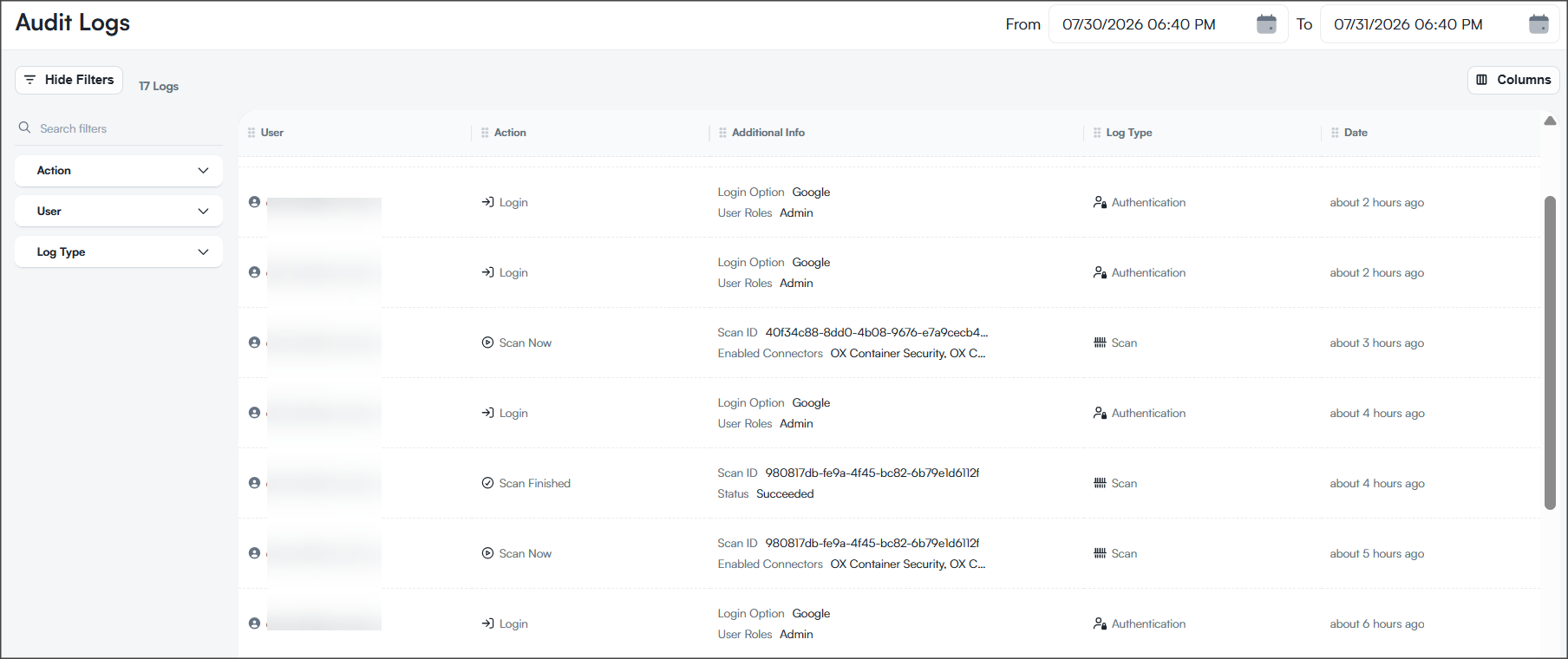
The Audit Logs page displays audit events in chronological order and provides filters to help you quickly locate specific events.
From the menu pane, go to **ADMIN > Audit Logs**.
Use this page to:
* monitor logins, scans, and user actions
* investigate unusual or unauthorized activity
* [export audit logs](/admin-settings/audit-logs/exporting-audit-logs.md)
## Prerequisites
You need read/write permissions to view audit logs.
## Audit log columns
The Audit Logs table includes the following columns.
| Column | Description |
| ------------------- | ------------------------------------------------------------------------------------------------------------------------------------------------------------------------------------------------------------------------------------------------------------ |
| **User** | User who performed the action. |
| **Action** | Action that was performed, such as **Login**, **Scan Now**, or **Scan Finished**. |
| **Additional Info** | Additional information about the event. The displayed information depends on the event type. For example, authentication events display the login method and assigned user roles, while scan events display the scan ID, enabled connectors, or scan status. |
| **Log Type** | Category of the audit event, such as **Authentication** or **Scan**. |
| **Date** | When the event occurred. |
## Filter audit logs
You can filter the displayed audit logs to show only the events that you want to review.
Filter
Description
Action
Displays only logs for the selected actions.
User
Displays only logs generated by the selected users.
Log Type
Use the tooltips to identify icons.
User: The name of the user.
Action: Login or Scan.
Additional Info: Shows additional details like the User Role or Scan ID.
Log Type
Date: The date of the action.
## View scan details
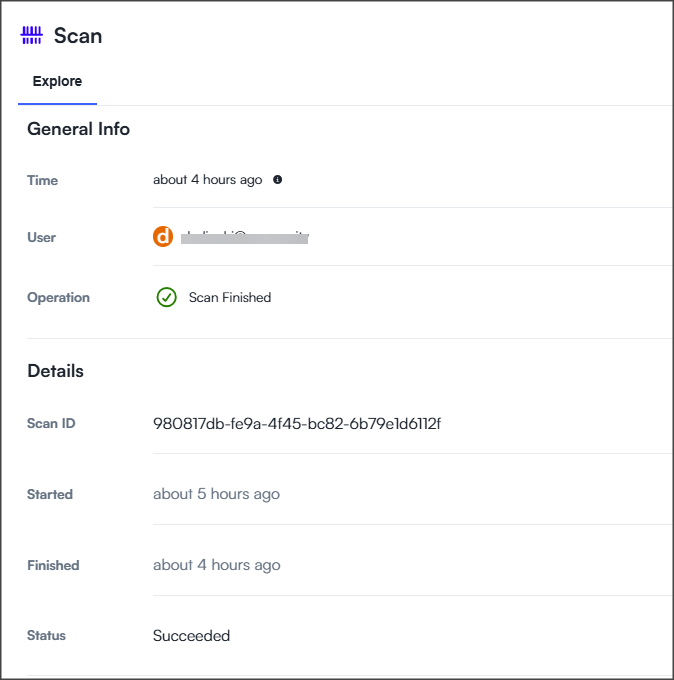
You can view additional information about scan events from the Audit Logs page.
**To view scan details:**
* On the **Audit Logs** page, select a **Scan** event.
### General info
The **General Info** section summarizes the audit event.
| Field | Description |
| ------------- | --------------------------------------------------------------------- |
| **Time** | Time when the audit event was recorded. |
| **User** | User who initiated the scan. |
| **Operation** | Operation associated with the audit event, such as **Scan Finished**. |
### Details
The **Details** section provides information about the scan.
| Field | Description |
| ------------ | ---------------------------------------------------------------------- |
| **Scan ID** | Unique identifier of the scan. |
| **Started** | Time when the scan started. |
| **Finished** | Time when the scan completed. |
| **Status** | Final scan status, such as **Succeeded**, **Failed**, or **Canceled**. |
> **Note:**\
> Detailed information is available only for scan events.
---
# Agent Instructions
This documentation is published with GitBook. GitBook is the documentation platform designed so that both humans and AI agents can read, navigate, and reason over technical content effectively. Learn more at gitbook.com.
## Querying This Documentation
If you need additional information that is not directly available in this page, you can query the documentation dynamically by asking a question.
Perform an HTTP GET request on the current page URL with the `ask` query parameter, and the optional `goal` query parameter:
```
GET https://docs.ox.security/admin-settings/audit-logs.md?ask=&goal=
```
`ask` is the immediate question: it should be specific, self-contained, and written in natural language.
`goal` is optional and describes the broader end goal you are ultimately trying to accomplish on behalf of the user. GitBook uses it to tailor the answer towards what is most useful for that goal.
The response will contain a direct answer to the question and relevant excerpts and sources from the documentation.
Use this mechanism when the answer is not explicitly present in the current page, you need clarification or additional context, or you want to retrieve related documentation sections.