> For the complete documentation index, see [llms.txt](https://docs.ox.security/llms.txt). Markdown versions of documentation pages are available by appending `.md` to page URLs; this page is available as [Markdown](https://docs.ox.security/admin-settings/scopes.md).
# Scopes
Scopes let you organize applications into logical groups. You can use these groups throughout OX to control access, filter data, and generate reports.
A scope represents a logical collection of applications. Currently, a scope contains applications only. Other asset types are associated with applications and are included automatically when viewing data for a scope.
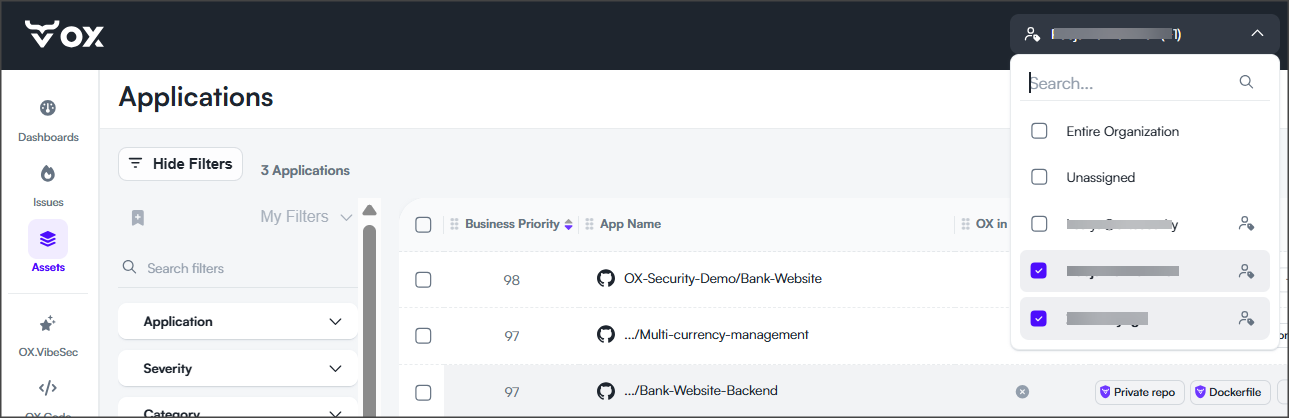
Selecting a scope filters dashboards, issue views, reports, and other supported pages to the applications included in that scope. Related assets, such as APIs, container images, and artifacts, are included automatically through their associated applications.
Scopes help you:
* Organize applications into logical groups.
* Limit user access to specific applications.
* Filter dashboards and issue views.
* Generate reports for a subset of applications.
* Limit API keys to specific applications.
* Simplify administration in large organizations.
### Define and select scopes
You can define scopes using application owners, tags, and business units.
While all three methods are supported, it is recommended to use application owners as the primary organizational structure and tags to further organize applications within each application owner group.
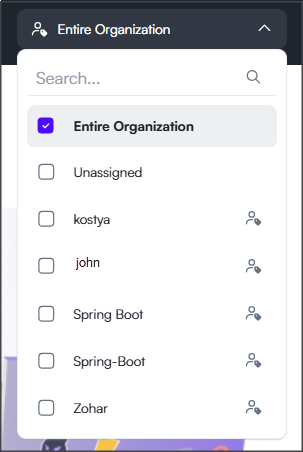
Selecting a scope filters the displayed data to the applications included in that scope.
| Scope | Description | Recommended use |
| --------------------------------------------------------------------------------------------------------- | -------------------------------------------------------------------------------------------------------------------------------------------------------------------------------------------- | ------------------------------------------------------------------------------------------------------------------------------ |
| Entire Organization | Includes all applications in the organization. This is the default scope. | View data across the entire organization. |
| [Application owners](/ox-code/ox-code-inventory/applications/managing-applications/application-owners.md) | Includes applications assigned to the selected application owner. Organize applications according to ownership, such as products, major teams, or areas of responsibility. | Create high-level organizational groups, such as products or major teams. |
| [Application tags](/ox-code/ox-code-inventory/applications/managing-applications/application-tags.md) | Includes applications that have the selected tag. Organize applications using custom classifications, such as services, components, environments, or technologies. | Organize applications within an application owner group by service, component, environment, or another logical classification. |
| [Business units](/generate-reports/built-in-reports/executive-reports.md#creating-business-units) | Includes applications that belong to the selected business unit. Organizes applications into a hierarchical structure, such as teams, departments, or product areas, using application tags. | Use when you want scopes to reflect your organization's hierarchy and reporting structure. |
| Unassigned | Includes applications that are not assigned to an application owner. This scope appears only when unassigned applications exist. | Identify applications that still need an application owner assigned. |
> **Note:** Only application owner scopes appear in the scope selector in the top navigation bar. Tag-based scopes are not available from the scope selector. Use tags to organize applications within an application owner scope.
### Best practices
To organize applications consistently across your organization:
* Use application owners to create the primary organizational groups (high-level buckets).
* Within each application owner group, use tags to organize applications by service, component, environment, or another logical subdivision.
* Use business units when applications need to be grouped according to your organization's business structure.
* Use scopes for access control, filtering, and reporting.
* Keep your scope definitions consistent across the organization.
* Avoid representing the same logical group using multiple scope definitions.
#### Example
The following organization model is recommended:
| Application owner | Tags |
| ----------------- | -------------------------------- |
| VibeSec | IDE Service, Hooks Service |
| Code | Scanner Service, Experience Team |
| Cloud | CSPM, Runtime, ADR |
| Pentester | Production, Staging |
In this example:
* Application owners create the primary organizational groups.
* Tags organize applications within each application owner group.
This approach provides a clear hierarchy that simplifies navigation, filtering, reporting, and access management.
> **Important:** Avoid defining the same logical group using multiple scope definitions. For example, don't create a Finance application owner, a Finance tag, and a Finance business unit to represent the same group of applications. Doing so can produce inconsistent filtering and reporting results and make it difficult for users to understand why different views display different application counts. :contentReference\[oaicite:3]{index=3}
### Related topics
* [Roles](/admin-settings/roles.md)
* [Applications](broken://pages/g9htknA2LyUsOVD8onnT)
* [Active Issues](broken://pages/RZBT6y0nd3RaSRNT1C27)
---
# Agent Instructions
This documentation is published with GitBook. GitBook is the documentation platform designed so that both humans and AI agents can read, navigate, and reason over technical content effectively. Learn more at gitbook.com.
## Querying This Documentation
If you need additional information that is not directly available in this page, you can query the documentation dynamically by asking a question.
Perform an HTTP GET request on the current page URL with the `ask` query parameter, and the optional `goal` query parameter:
```
GET https://docs.ox.security/admin-settings/scopes.md?ask=&goal=
```
`ask` is the immediate question: it should be specific, self-contained, and written in natural language.
`goal` is optional and describes the broader end goal you are ultimately trying to accomplish on behalf of the user. GitBook uses it to tailor the answer towards what is most useful for that goal.
The response will contain a direct answer to the question and relevant excerpts and sources from the documentation.
Use this mechanism when the answer is not explicitly present in the current page, you need clarification or additional context, or you want to retrieve related documentation sections.