> For the complete documentation index, see [llms.txt](https://docs.ox.security/llms.txt). Markdown versions of documentation pages are available by appending `.md` to page URLs; this page is available as [Markdown](https://docs.ox.security/generate-reports/built-in-reports/active-issues-report.md).
# Active Issues Reports
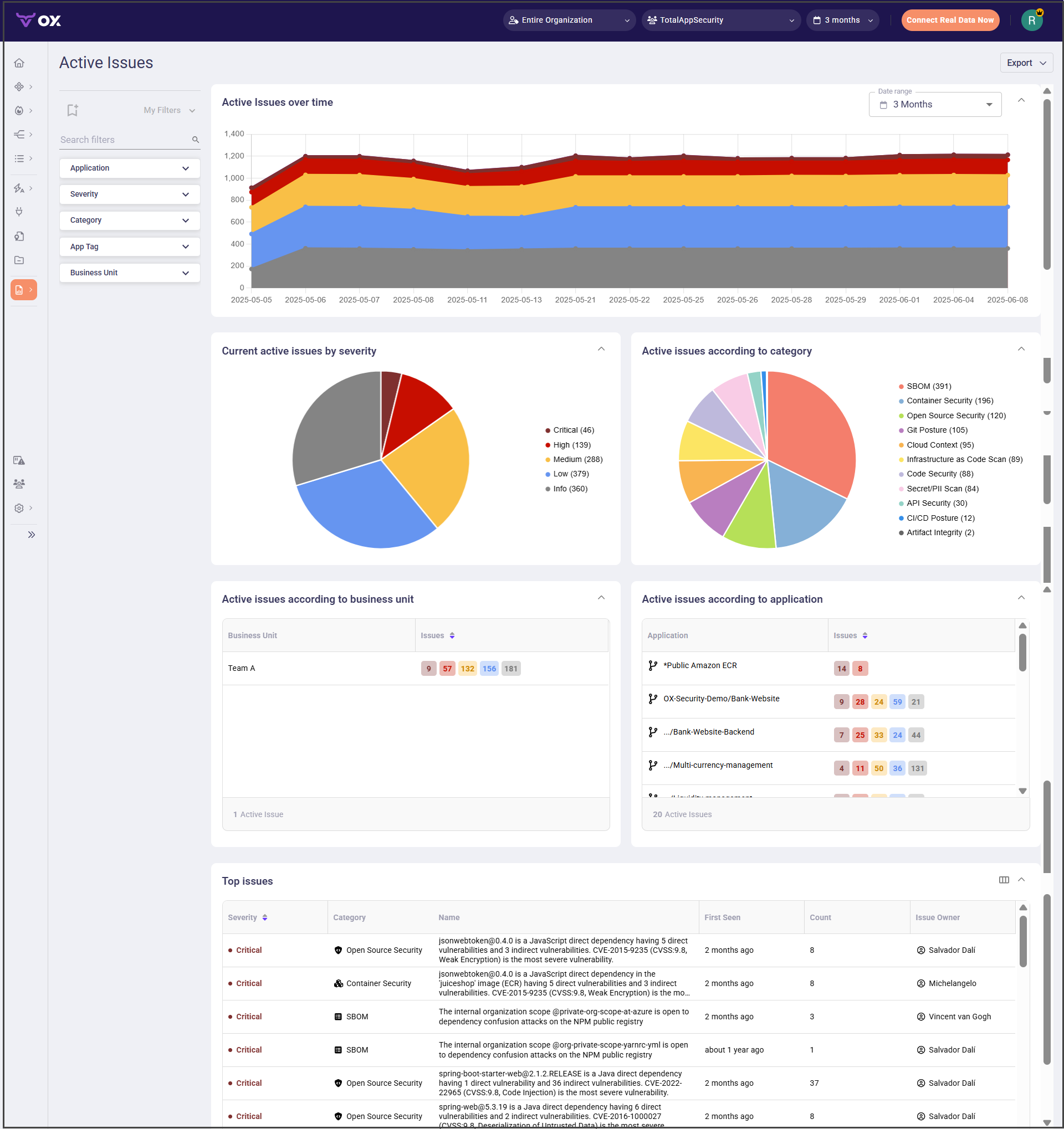
The Active Issues report provides a real-time view and an overtime view of all unresolved security issues in your organization.\
It helps teams track the volume, severity, and type of active issues, enabling data-driven prioritization and remediation.
You can filter and export the report data.
Use the Active Issues report to:
* Monitor the trend of unresolved security issues over time.
* Identify categories with the highest concentration of open issues.
* Focus on the most critical and high-impact vulnerabilities first.
* Track ownership and accountability for issue resolution.
### Report Sections
| Section | Description |
| --------------------------------------- | ------------------------------------------------------------------------------------------------------------------------------------------------- |
| **Active Issues Over Time** | Displays a stacked area chart showing how the number of active issues changes over the selected date range. |
| **Current Active Issues by Severity** | Shows a severity distribution chart for all currently active issues. |
| **Active Issues According to Category** | Shows a category-based distribution chart for all currently active issues. |
| **Top Issues** | Lists the most severe active issues with details such as category, vulnerability description, first seen date, occurrence count, and issue owner. |
### Filters
| Filter | Description |
| ----------------- | -------------------------------------------------------------------------------------------------------------------------------------------------------------------------- |
| **Category** | Displays issues according to security category, such as SBOM, Container Security, and Open Source Security. |
| **Application** | Select specific applications to include in the report. |
| **Severity** | Filter active issues by severity level. |
| **App Tag** | Filter results using application tags. |
| **Business Unit** | Narrow the results to specific business units. You can create new [business units in the Executive Reports page](/generate-reports/built-in-reports/executive-reports.md). |
## Exporting Active Issues report data
The following export options are available in the active issues report:
| Option | Description |
| ----------------- | ---------------------------------------------------------------- |
| **Export as PDF** | Generate a PDF file of the report, including charts and tables. |
| **Export as CSV** | Generate a CSV file containing issues data for further analysis. |
> **Note:** By default, the exported report includes all columns from the Top Issues table. If you hide any columns in your custom view, the export will reflect those changes.
---
# Agent Instructions
This documentation is published with GitBook. GitBook is the documentation platform designed so that both humans and AI agents can read, navigate, and reason over technical content effectively. Learn more at gitbook.com.
## Querying This Documentation
If you need additional information that is not directly available in this page, you can query the documentation by asking a question.
Perform an HTTP GET request on the following URL with the `ask` and `goal` query parameters:
```
GET https://docs.ox.security/generate-reports/built-in-reports/active-issues-report.md?ask=&goal=
```
`ask` is the immediate question: it should be specific, self-contained, and written in natural language.
`goal` is what the user is ultimately trying to achieve, the reason they need the answer. Sharing it helps GitBook give you a better, more relevant answer. A goal is most helpful when it describes the outcome the user wants rather than restating the question. For example, with `ask=how do I create an API token`, a goal like `automate deployments from our CI pipeline` lets GitBook tailor the answer to that use case.
The response will contain a direct answer to the question and relevant excerpts and sources from the documentation.
Use this mechanism when the answer is not explicitly present in the current page, you need clarification or additional context, or you want to retrieve related documentation sections.