> For the complete documentation index, see [llms.txt](https://docs.ox.security/llms.txt). Markdown versions of documentation pages are available by appending `.md` to page URLs; this page is available as [Markdown](https://docs.ox.security/get-started/common-page-elements.md).

# Common page elements

{% hint style="success" %}
**At a glance:** Find your way around the OX platform, starting with the elements that are visible on every page.
{% endhint %}

<figure><img src="https://884876233-files.gitbook.io/~/files/v0/b/gitbook-x-prod.appspot.com/o/spaces%2FdK3XMLdV8zRg847RmGmZ%2Fuploads%2Fgit-blob-0adcf0a36202b0f5460bba13dd523d22e31f8d51%2Fox_dashboard.png?alt=media" alt=""><figcaption></figcaption></figure>

## **Overview**

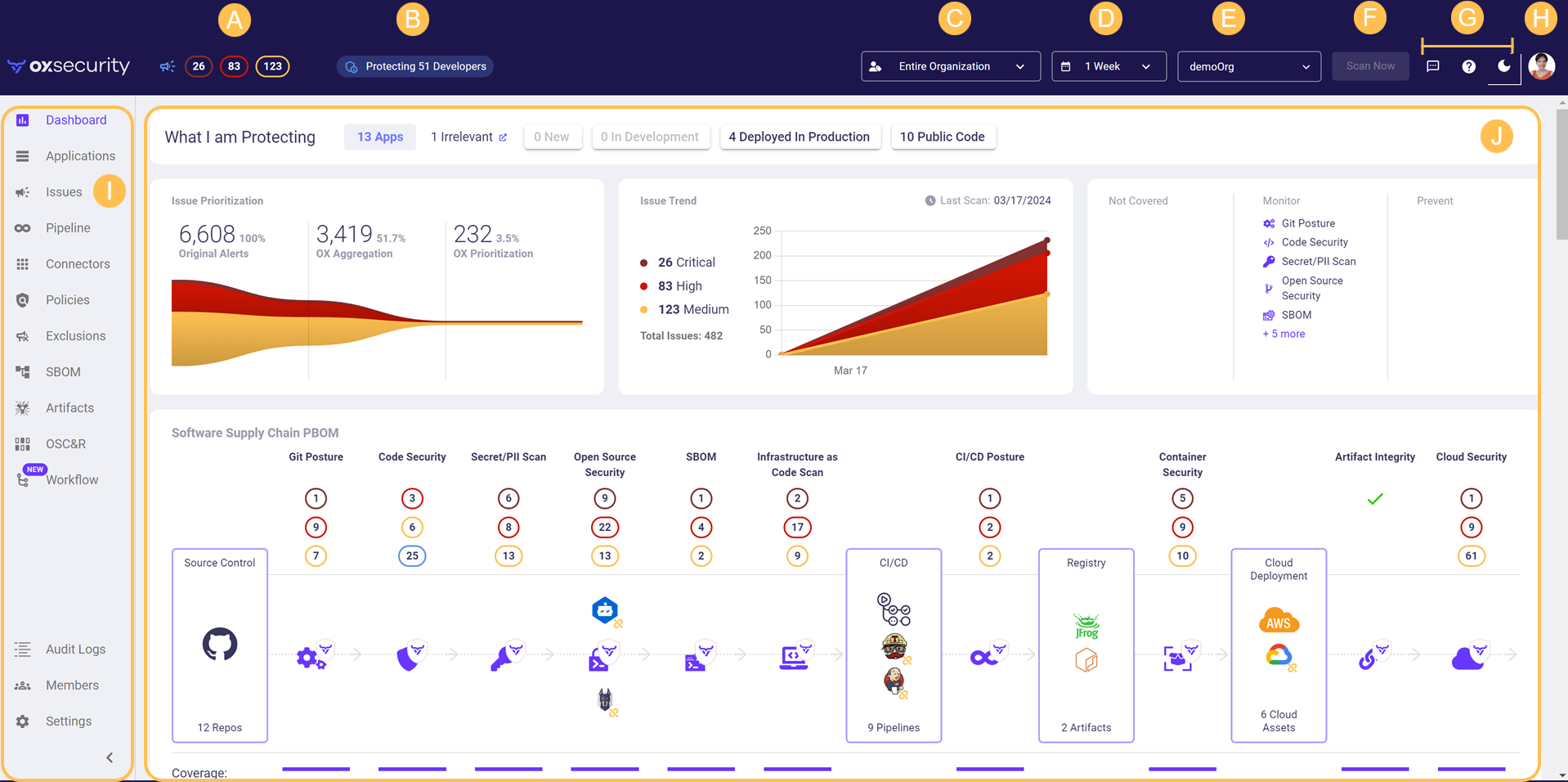
The OX platform is organized into pages, providing detailed security data from various vantage points and allowing you to streamline and automate your response. Other pages allow you to customize the system to work precisely according to your organization's requirements. Surrounding this primary [page content](#page-content), several elements are common to every page, allowing you to navigate the system, customize your view, and see a top-level summary.

## **Header bar**

<table><thead><tr><th width="80" align="center"></th><th></th></tr></thead><tbody><tr><td align="center"><img src="https://884876233-files.gitbook.io/~/files/v0/b/gitbook-x-prod.appspot.com/o/spaces%2FdK3XMLdV8zRg847RmGmZ%2Fuploads%2Fgit-blob-efa7b1bc84e78ccfe97c7a1fb7904dae10fa0b91%2FA.png?alt=media&amp;token=4b6eb684-581b-41dc-874d-1d14dad6dbf4" alt="" data-size="line"></td><td><p><strong>Issue count:</strong> The number of issues in each top severity category.</p><ul><li>Click on each number to go directly to the <strong>Issues</strong> page, filtered by the issues in that severity category.</li></ul></td></tr><tr><td align="center"><img src="https://884876233-files.gitbook.io/~/files/v0/b/gitbook-x-prod.appspot.com/o/spaces%2FdK3XMLdV8zRg847RmGmZ%2Fuploads%2Fgit-blob-07b5299eaddf61b3b4ea19f71cb2f552d14284a9%2FB.png?alt=media" alt="" data-size="line"></td><td><p><strong>What you're protecting:</strong> On the header bar itself, you'll see the number of developers contributing code to the repos you've connected to OX, but there's much more to this summary than initially meets the eye. Just hover over the number of developers to see:</p><ul><li>The number of repositories detected and scanned in the last scan</li><li><p>The number of discovered systems, including:</p><ul><li>Infrastructure systems (including source control systems like Git, CI/CD systems, cloud providers, etc.)</li><li>Security tools deployed by your organization (including SCA tools, static analysis scanners, PII and secret scanners, etc.)</li><li>OX's proprietary security tools (deployed automatically to complete your security coverage)</li></ul></li><li><p>Security policies, including:</p><ul><li>The number of policy rules currently active in your organization</li><li>The number of additional policy rules that could be activated, given the infrastructure systems and security tools that you've deployed</li></ul></li></ul><p><img src="https://884876233-files.gitbook.io/~/files/v0/b/gitbook-x-prod.appspot.com/o/spaces%2FdK3XMLdV8zRg847RmGmZ%2Fuploads%2Fgit-blob-3a7ba7229993724ae4fb2f24bc3a802c58171287%2Fprotecting%20(1).png?alt=media" alt=""><br></p></td></tr><tr><td align="center"><img src="https://884876233-files.gitbook.io/~/files/v0/b/gitbook-x-prod.appspot.com/o/spaces%2FdK3XMLdV8zRg847RmGmZ%2Fuploads%2Fgit-blob-0d07f58017690c1ac55e226f293d601ccd8cb2eb%2FC.png?alt=media&amp;token=0e07bda1-e85f-44b9-be17-7a0294d892ea" alt="" data-size="line"></td><td><strong>View selector:</strong> You can view issues related to all of the organization's applications or limit your view to issues only for applications with specific owners.</td></tr><tr><td align="center"><img src="https://884876233-files.gitbook.io/~/files/v0/b/gitbook-x-prod.appspot.com/o/spaces%2FdK3XMLdV8zRg847RmGmZ%2Fuploads%2Fgit-blob-00faf6595c357af93fd6522246707b464764d553%2FD.png?alt=media" alt="" data-size="line"></td><td><p><strong>Date selector:</strong> By default, the date filter displays a week's worth of data. You can shorten or lengthen this timeframe based on your needs.</p><ul><li>The date filter <strong>does not</strong> affect your view of your development chain's current status (including applications, artifacts, and issues – regardless of when they were first discovered).</li><li>The history filter <strong>does</strong> affect the length of time shown for any OX page or component that displays history (for example, the <strong>Issue trend</strong> chart on the <strong>Dashboard,</strong> or the <strong>Pipeline Summary</strong> and <strong>Pipeline Issues</strong> pages).</li></ul></td></tr><tr><td align="center"><img src="https://884876233-files.gitbook.io/~/files/v0/b/gitbook-x-prod.appspot.com/o/spaces%2FdK3XMLdV8zRg847RmGmZ%2Fuploads%2Fgit-blob-cf011be75a8af7fe193e112d78f0ce8402c7784a%2FE.png?alt=media" alt="" data-size="line"></td><td><p><strong>Organization selector:</strong> Select the organization you want to view.</p><ul><li><strong>Why don't I see this?</strong> No worries, most users won't. You'll only see this selector if your user is connected to multiple organizations.</li></ul></td></tr><tr><td align="center"><img src="https://884876233-files.gitbook.io/~/files/v0/b/gitbook-x-prod.appspot.com/o/spaces%2FdK3XMLdV8zRg847RmGmZ%2Fuploads%2Fgit-blob-9e1d287453be6d87b158416a4b5a7e8052183d6d%2FF.png?alt=media" alt="" data-size="line"></td><td><strong>Scan now:</strong> Use this button to start an immediate scan of your organization. In most cases, this isn't necessary, since OX automatically scans your organization daily.</td></tr><tr><td align="center"><img src="https://884876233-files.gitbook.io/~/files/v0/b/gitbook-x-prod.appspot.com/o/spaces%2FdK3XMLdV8zRg847RmGmZ%2Fuploads%2Fgit-blob-42c26bb3b171e04f06bbe96398038f909e920cb5%2FG.png?alt=media" alt="" data-size="line"></td><td><p><strong>Action buttons:</strong></p><p><img src="https://884876233-files.gitbook.io/~/files/v0/b/gitbook-x-prod.appspot.com/o/spaces%2FdK3XMLdV8zRg847RmGmZ%2Fuploads%2Fgit-blob-33b903ca76340a89ad43b20fe97bf368668e9288%2Fsend_feedback_icon.png?alt=media" alt="" data-size="line"> Send feedback, ask for help, request info, and more.</p><p><img src="https://884876233-files.gitbook.io/~/files/v0/b/gitbook-x-prod.appspot.com/o/spaces%2FdK3XMLdV8zRg847RmGmZ%2Fuploads%2Fgit-blob-6bd06c5bc4e0d1fce8613a8ef0a027913fad6ad1%2Fhelp_center_icon.png?alt=media" alt="" data-size="line"> Open our online Help Center <em>(where you are right now!)</em><br><img src="https://884876233-files.gitbook.io/~/files/v0/b/gitbook-x-prod.appspot.com/o/spaces%2FdK3XMLdV8zRg847RmGmZ%2Fuploads%2Fgit-blob-fc517f2e4a885cae6dd056c190b1688773478c6e%2Flight_dark_mode_icon.png?alt=media" alt="" data-size="line"> Switch between light and dark modes.</p></td></tr><tr><td align="center"><img src="https://884876233-files.gitbook.io/~/files/v0/b/gitbook-x-prod.appspot.com/o/spaces%2FdK3XMLdV8zRg847RmGmZ%2Fuploads%2Fgit-blob-92528544d63d0fa866d2575b39eaaf88fbee9d5d%2FH.png?alt=media" alt="" data-size="line"></td><td><strong>User icon:</strong> Click here to create a new organization, check out what's new in OX, or log out of the system.</td></tr></tbody></table>

## **Side navigation menu**

<table><thead><tr><th width="80" align="center"></th><th></th></tr></thead><tbody><tr><td align="center"><img src="https://884876233-files.gitbook.io/~/files/v0/b/gitbook-x-prod.appspot.com/o/spaces%2FdK3XMLdV8zRg847RmGmZ%2Fuploads%2Fgit-blob-ae775bf5563806d6b84ffdfbcc74423b68891b7f%2FI.png?alt=media" alt="" data-size="line"></td><td><strong>Side navigation menu:</strong> Use this menu to navigate the whole OX system. By default, the menu is collapsed (icons only). Use the <img src="https://884876233-files.gitbook.io/~/files/v0/b/gitbook-x-prod.appspot.com/o/spaces%2FdK3XMLdV8zRg847RmGmZ%2Fuploads%2Fgit-blob-d3bbc3e1a54c754b722c2305d1d0cb23a4964e11%2Fexpand_icon.png?alt=media" alt="" data-size="line"> button to expand it to include the page names.</td></tr></tbody></table>

## **Page content**

<table><thead><tr><th width="80" align="center"></th><th></th></tr></thead><tbody><tr><td align="center"><img src="https://884876233-files.gitbook.io/~/files/v0/b/gitbook-x-prod.appspot.com/o/spaces%2FdK3XMLdV8zRg847RmGmZ%2Fuploads%2Fgit-blob-754745854b67bc32248dd4327bf389bdc0fed4f0%2FJ.png?alt=media" alt="" data-size="line"></td><td><p><strong>Available pages include:</strong></p><ul><li><a href="broken://pages/xhL81PmLKt3YjEeyu7lh">Dashboard</a></li><li><a href="broken://pages/ttzpvAi1mvYbDMySi6Eu">Applications</a></li><li><a href="/analyze-with-ox/analyzing-scan-results/issues.md">Issues</a></li><li>Pipeline</li><li><a href="/ox-integrations/connectors.md">Connectors</a></li><li><a href="/ox-policies/policies.md">Policies</a></li><li><a href="/exclusions-and-sla/scope-policy-and-sla-compliance/exclusions.md">Exclusions</a></li><li>SBOM</li><li><a href="/ox-code/ox-code-inventory/api-bom.md">API BOM</a></li><li><a href="/ox-code/ox-code-inventory/saas-bom.md">SaaS BOM</a></li><li>Artifacts</li><li>OSC&#x26;R</li><li>Workflow</li><li>Audit logs</li><li><a href="/admin-settings/users.md">Users</a></li><li><a href="/admin-settings/settings.md">Settings</a></li></ul></td></tr></tbody></table>


---

# Agent Instructions
This documentation is published with GitBook. GitBook is the documentation platform designed so that both humans and AI agents can read, navigate, and reason over technical content effectively. Learn more at gitbook.com.

## Querying This Documentation
If you need additional information that is not directly available in this page, you can query the documentation dynamically by asking a question.

Perform an HTTP GET request on the current page URL with the `ask` query parameter, and the optional `goal` query parameter:

```
GET https://docs.ox.security/get-started/common-page-elements.md?ask=<question>&goal=<endgoal>
```

`ask` is the immediate question: it should be specific, self-contained, and written in natural language.
`goal` is optional and describes the broader end goal you are ultimately trying to accomplish on behalf of the user. GitBook uses it to tailor the answer towards what is most useful for that goal.

The response will contain a direct answer to the question and relevant excerpts and sources from the documentation.

Use this mechanism when the answer is not explicitly present in the current page, you need clarification or additional context, or you want to retrieve related documentation sections.