> For the complete documentation index, see [llms.txt](https://docs.ox.security/llms.txt). Markdown versions of documentation pages are available by appending `.md` to page URLs; this page is available as [Markdown](https://docs.ox.security/get-started/onboarding-to-ox/review-scan-results/bom.md).
# BOM Overview
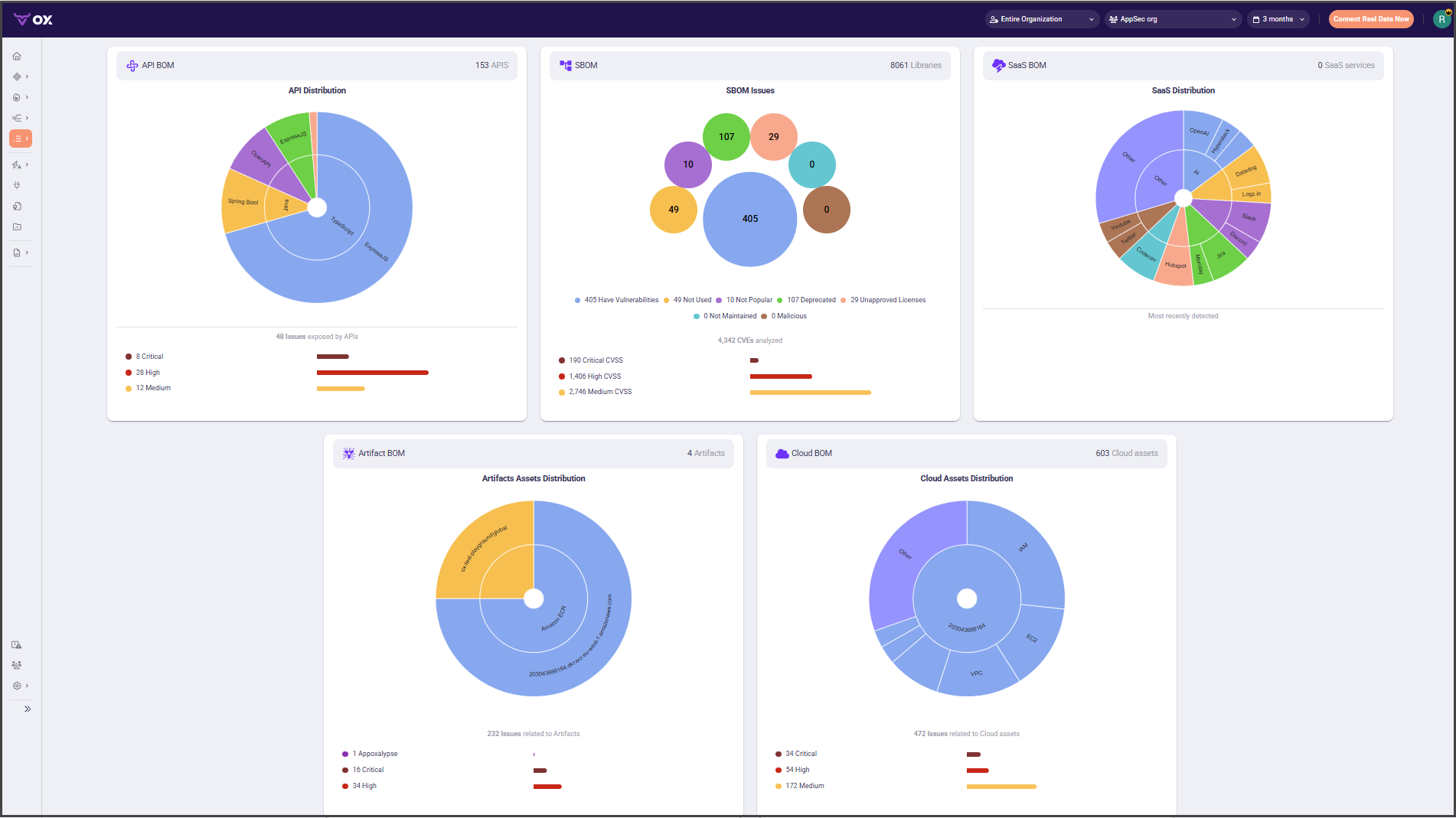
A Bill of Materials (BOM) is a complete, always-current inventory of what your software and environments contain. In OX, BOMs provide you a single view across code, build artifacts, and cloud so you can trace any risk from runtime back to its source and owner.
OX builds these BOMs by ingesting data from source control, CI/CD, registries, and cloud providers, then correlates it with vulnerabilities, policies, ownership, and SLAs. The result powers search, impact analysis, compliance reports, and attestation workflows.
| BOM option | What it inventories and why use it |
| ---------------------------------------------------------- | --------------------------------------------------------------------------------------------------------------------------------------------------------------- |
| [API BOM](/ox-code/ox-code-inventory/api-bom.md) | Catalogs your APIs by framework and type, shows issues exposed by endpoints. Use it to see API coverage, hot spots, and drill into risky services. |
| [SBOM](/ox-code/ox-code-inventory/sbom.md) | Lists libraries, packages, and versions inside apps and images. Use it for vulnerability and license governance, and to answer “where is this component used?”. |
| [SaaS BOM](/ox-code/ox-code-inventory/saas-bom.md) | Detects SaaS applications in use across the organization. Use it to track adoption, reduce shadow IT, and review data-exposure risk. |
| [Artifact BOM](/ox-code/ox-code-inventory/artifact-bom.md) | Tracks build outputs such as container images, packages, and charts with provenance. Use it for release readiness, signatures, and supply-chain traceability. |
| [Cloud BOM](/ox-cloud/cloud-inventory/cloud-bom.md) | Maps cloud assets and running workloads. Use it to see runtime exposure, drift, and how deployed resources relate to images, repos, and owners. |
---
# Agent Instructions
This documentation is published with GitBook. GitBook is the documentation platform designed so that both humans and AI agents can read, navigate, and reason over technical content effectively. Learn more at gitbook.com.
## Querying This Documentation
If you need additional information that is not directly available in this page, you can query the documentation by asking a question.
Perform an HTTP GET request on the following URL with the `ask` and `goal` query parameters:
```
GET https://docs.ox.security/get-started/onboarding-to-ox/review-scan-results/bom.md?ask=&goal=
```
`ask` is the immediate question: it should be specific, self-contained, and written in natural language.
`goal` is what the user is ultimately trying to achieve, the reason they need the answer. Sharing it helps GitBook give you a better, more relevant answer. A goal is most helpful when it describes the outcome the user wants rather than restating the question. For example, with `ask=how do I create an API token`, a goal like `automate deployments from our CI pipeline` lets GitBook tailor the answer to that use case.
The response will contain a direct answer to the question and relevant excerpts and sources from the documentation.
Use this mechanism when the answer is not explicitly present in the current page, you need clarification or additional context, or you want to retrieve related documentation sections.