> For the complete documentation index, see [llms.txt](https://docs.ox.security/llms.txt). Markdown versions of documentation pages are available by appending `.md` to page URLs; this page is available as [Markdown](https://docs.ox.security/get-started/onboarding-to-ox/source-control/azure.md).
# Azure Repos
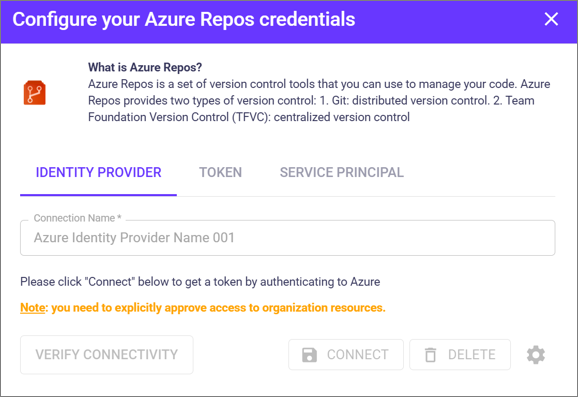
Azure Repos is a set of version control tools that you can use to manage your code. Azure Repos provides two types of version control:
1. Git: distributed version control.
2. Team Foundation Version Control (TFVC): centralized version control.
Azure Pipelines is a cloud-based solution that automatically builds and tests code projects.
Connecting your Azure account allows OX to map and scan your apps for security issues.
### Connection methods
#### Identity Provider
1. In OX, go to Connectors > Source Control > Azure Repos.
2. Open the IDENTITY PROVIDER tab, select **CONNECT,** and follow the instructions on the screen.
#### Token
1. To create the token, see the Microsoft documentation. [Create an access token in Azure DevOps](https://docs.microsoft.com/en-us/azure/devops/organizations/accounts/use-personal-access-tokens-to-authenticate?view=azure-devops\&tabs=Windows).
2. Add the permissions listed in the section [Token scopes required](#token-scopes-required).
3. In OX, go to Connectors > Source Control > Azure Repos.
4. Open the TOKEN tab and copy the token into the token field.
5. Select **CONNECT**.
#### Service Principal
1. To create a managed identity or application service principal, see the Microsoft documentation [Use service principals and managed identities in Azure DevOps](https://learn.microsoft.com/en-us/azure/devops/integrate/get-started/authentication/service-principal-managed-identity).
2. In OX, go to Connectors > Source Control > Azure Repos.
3. Open the SERVICE PRINCIPAL tab and enter the service principal ID (in the Client ID field), the client secret, and the tenant ID to connect.
4. Ensure your host URL follows this format: `https://dev.azure.com/{organizationName}/`
#### Connect multiple organizations
To connect multiple organizations, use a dedicated Personal Access Token (PAT) for each connection.
### Token scopes required
* Auditing - Read Audit Log
* Build - Read
* Code - Full
* Code - Status
* Graph - Read and Manage
* Identity - Read and Manage
* Member Entitlement Management - Read and Write
* Project and Team - Read, Write and Manage
* Release - Read
* Security - Manage
* User profile - Read
* Wiki - Read
* Work items - Read and Write
Once you have verified Azure repos connectivity, you can see all the repositories and can select them for scanning.
### Setting repositories' scope
You can use the **Gear** icon to choose the repositories' scope OX will cover. Only repositories chosen here will be covered and scanned.
Here you can also decide what will happen by default with newly discovered repositories.
---
# Agent Instructions
This documentation is published with GitBook. GitBook is the documentation platform designed so that both humans and AI agents can read, navigate, and reason over technical content effectively. Learn more at gitbook.com.
## Querying This Documentation
If you need additional information that is not directly available in this page, you can query the documentation dynamically by asking a question.
Perform an HTTP GET request on the current page URL with the `ask` query parameter, and the optional `goal` query parameter:
```
GET https://docs.ox.security/get-started/onboarding-to-ox/source-control/azure.md?ask=&goal=
```
`ask` is the immediate question: it should be specific, self-contained, and written in natural language.
`goal` is optional and describes the broader end goal you are ultimately trying to accomplish on behalf of the user. GitBook uses it to tailor the answer towards what is most useful for that goal.
The response will contain a direct answer to the question and relevant excerpts and sources from the documentation.
Use this mechanism when the answer is not explicitly present in the current page, you need clarification or additional context, or you want to retrieve related documentation sections.
.png?alt=media)
.png?alt=media)
.png?alt=media)
.png?alt=media)