> For the complete documentation index, see [llms.txt](https://docs.ox.security/llms.txt). Markdown versions of documentation pages are available by appending `.md` to page URLs; this page is available as [Markdown](https://docs.ox.security/get-started/onboarding-to-ox/source-control/github/github-app.md).
# GitHub App
The GitHub App method offers a streamlined way to connect an OX platform account to GitHub. This method uses an application created by OX Security, which simplifies the connection process.
When using this method, you install the OX GitHub app into your GitHub organization. The app is granted permissions to access your GitHub data, allowing the OX platform to interact with your repositories. For details about the permissions requested by the app and how they are used, see [OX GitHub App Permissions](/get-started/onboarding-to-ox/source-control/github/github-app/ox-security-github-app-permissions.md).
The following process describes the OX-generated GitHub App configuration. In addition to the OX-generated option, which is the recommended option, you can define a [self-hosted GitHub App configuration](/get-started/onboarding-to-ox/source-control/github/github-app/creating-a-self-hosted-ox-github-app.md).
**To connect with GitHub App:**
1. In the **OX** platform, go to **Connectors** and select **GitHub > GITHUB APP**.
2. Select **CONNECT**. You are automatically redirected to the source control system’s authentication dialog.
3. Login to GitHub. The **Install OX Security** dialog appears with the list of organizations that you have defined on GitHub.
4. Select the organization with which you want to set up the GitHub-OX integration.
5. In the **Install & Authorize OX Security** dialog, select as follows:
* **All repositories:** Grants OX GITHUB APP permissions to all the GitHub repositories within the selected GitHub organization.
* **Only select repositories:** Select GitHub repositories to which you want to grants OX GITHUB APP permissions within the selected GitHub organization.
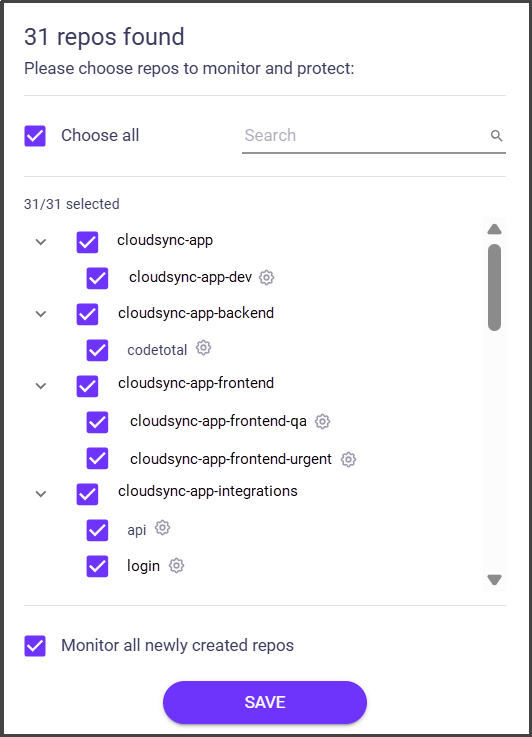
6. Select **Install & Authorize**. The connection is established and you are redirected back to OX Security, where the list of all the repositories that participate in the integration appears.
7. Select the repos you want to scan and click **SAVE**.
8. (optional) [Select branches you want to scan within the selected repos.](/ox-code/scanning/multi-branch-support.md)
9. (optional) To connect more GitHub accounts to the same organization in the OX platform, select **Add another GitHub App +**, add the app and select **CONNECT**.
### What's Next?
After connecting GitHub to OX using app, you can integrate OX with your CI/CD pipelines to automate scanning and report results to pull requests.
OX supports multiple pipeline integration methods, including [GitHub App](/ox-code/scanning/scanning-ci-cd-pipelines/integrating-source-control-platforms/app-pipeline-integration/github-app.md) integration, [webhook-based](/ox-code/scanning/scanning-ci-cd-pipelines/integrating-source-control-platforms/webhooks-pipeline-integration.md) integrations, and direct CI/CD integrations.
---
# Agent Instructions
This documentation is published with GitBook. GitBook is the documentation platform designed so that both humans and AI agents can read, navigate, and reason over technical content effectively. Learn more at gitbook.com.
## Querying This Documentation
If you need additional information that is not directly available in this page, you can query the documentation dynamically by asking a question.
Perform an HTTP GET request on the current page URL with the `ask` query parameter, and the optional `goal` query parameter:
```
GET https://docs.ox.security/get-started/onboarding-to-ox/source-control/github/github-app.md?ask=&goal=
```
`ask` is the immediate question: it should be specific, self-contained, and written in natural language.
`goal` is optional and describes the broader end goal you are ultimately trying to accomplish on behalf of the user. GitBook uses it to tailor the answer towards what is most useful for that goal.
The response will contain a direct answer to the question and relevant excerpts and sources from the documentation.
Use this mechanism when the answer is not explicitly present in the current page, you need clarification or additional context, or you want to retrieve related documentation sections.
.png?alt=media)
.png?alt=media)
.png?alt=media)