> For the complete documentation index, see [llms.txt](https://docs.ox.security/llms.txt). Markdown versions of documentation pages are available by appending `.md` to page URLs; this page is available as [Markdown](https://docs.ox.security/get-started/onboarding-to-ox/source-control/github/github-token.md).

# GitHub Token

The Token method provides the most flexibility for connecting GitHub to OX Security. In this method, users generate an API token in GitHub, which serves as a security credential to allow OX Security access to specific repositories and actions.

**To connect with Token:**

1. [Get a GitHub token.](/get-started/onboarding-to-ox/source-control/github/github-token/getting-github-tokens.md)
2. In the **OX** platform, go to **Connectors** and select **GitHub > TOKEN**.

<figure><img src="/files/ZzaPNLs3M2t2OduzchHi" alt="" width="495"><figcaption></figcaption></figure>

3. In the **Configure your GitHub credentials** dialog, set the following parameters:

   <table><thead><tr><th width="264.166748046875">Parameter</th><th>Description</th></tr></thead><tbody><tr><td><strong>GitHub Host URL</strong></td><td>Add your GitHub organization account URL.</td></tr><tr><td><strong>Token</strong></td><td>Paste the GitHub token you have created.</td></tr><tr><td><strong>Connection Name</strong></td><td>The token name is automatically generated by OX app.<br>You can change/edit the connection name at any time.</td></tr><tr><td><strong>OX Broker</strong></td><td>Enable this option to connect GitHub through an OX Broker instead of a direct connection. When enabled, OX routes communication through the broker, allowing access to GitHub instances that are not directly reachable from the internet. After enabling the toggle, provide the broker connection details as described in the <a href="/pages/o6H5cyziWfJu3de54MC1">OX Broker documentation</a>.</td></tr></tbody></table>
4. To select specific repositories for scanning by OX platform, select the gear icon next to **DELETE**.

<figure><img src="/files/g3QonGhbOsVL6Pzv4Qtv" alt="" width="321"><figcaption></figcaption></figure>

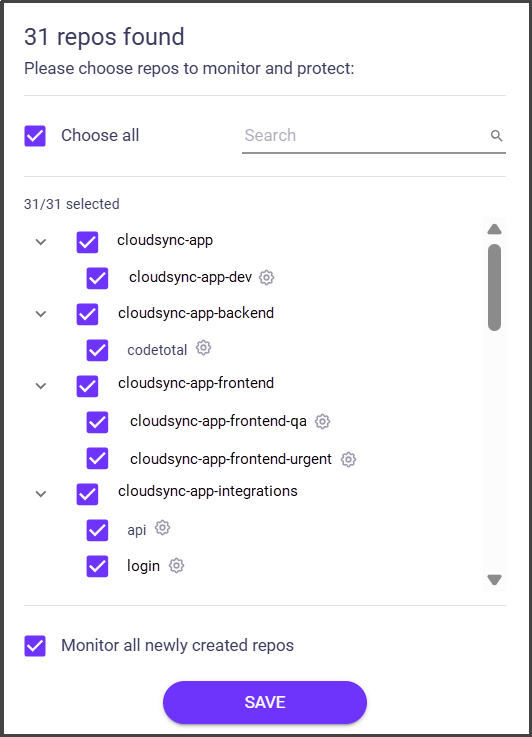
5. Select the repos you want to protect.

<figure><img src="/files/wGo4qPSZZcoKukdJ68JR" alt="" width="266"><figcaption></figcaption></figure>

6. Select **SAVE**.
7. (optional) [Select branches you want to scan within the selected repos.](/scan-and-analyze-with-ox/scanning/multi-branch-support.md)
8. To connect more GitHub accounts to the same organization in the OX platform, select **Add another Token +**, set the required parameters and select **CONNECT**.


---

# Agent Instructions
This documentation is published with GitBook. GitBook is the documentation platform designed so that both humans and AI agents can read, navigate, and reason over technical content effectively. Learn more at gitbook.com.

## Querying This Documentation
If you need additional information that is not directly available in this page, you can query the documentation dynamically by asking a question.

Perform an HTTP GET request on the current page URL with the `ask` query parameter, and the optional `goal` query parameter:

```
GET https://docs.ox.security/get-started/onboarding-to-ox/source-control/github/github-token.md?ask=<question>&goal=<endgoal>
```

`ask` is the immediate question: it should be specific, self-contained, and written in natural language.
`goal` is optional and describes the broader end goal you are ultimately trying to accomplish on behalf of the user. GitBook uses it to tailor the answer towards what is most useful for that goal.

The response will contain a direct answer to the question and relevant excerpts and sources from the documentation.

Use this mechanism when the answer is not explicitly present in the current page, you need clarification or additional context, or you want to retrieve related documentation sections.