> For the complete documentation index, see [llms.txt](https://docs.ox.security/llms.txt). Markdown versions of documentation pages are available by appending `.md` to page URLs; this page is available as [Markdown](https://docs.ox.security/issue-prioritization.md).
# Issue Prioritization
OX prioritizes issues by combining the original severity of a finding with additional context discovered during analysis. This approach helps surface the issues that present the highest risk in your environment instead of relying solely on the severity reported by the detection engine.
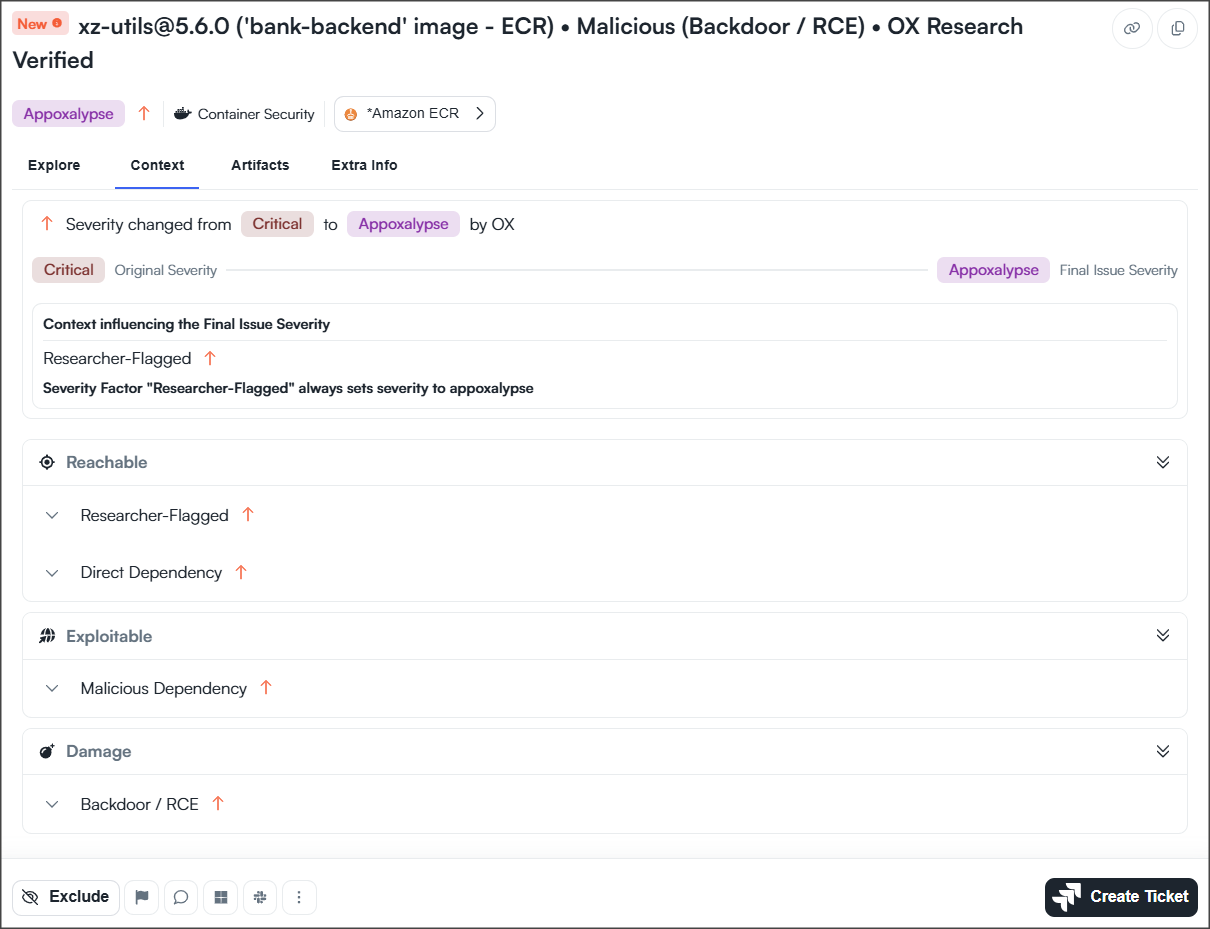
OX uses Severity Factors to capture the context that influences the final issue severity. This context enables OX to prioritize issues based on the actual risk in your environment rather than relying only on the original severity.
OX evaluates thousands of Severity Factors across different security domains to determine the final severity of an issue.
### How issue prioritization works
When OX identifies an issue, it starts with the severity reported by the detection engine, either an OX native engine or a third-party engine. OX then evaluates additional context about the affected asset, dependency, or workload and applies the relevant Severity Factors.
Depending on the applicable Severity Factors, the issue severity can remain unchanged or be adjusted to better reflect the actual risk.
For each issue, OX displays:
* Original Severity
* Final Issue Severity
* The Severity Factors that influenced the final severity
On the **Context** tab, you can review the Severity Factors that influenced the final severity and understand why OX assigned the issue its current priority.
### Severity Factor categories
Severity Factors are grouped into three categories that represent different aspects of an issue's risk.
| Category | Description |
| ----------- | ---------------------------------------------------------------------------------------------------------------------------------------------------------------------------------------------------------------- |
| Reachable | Indicates whether the affected asset, dependency, workload, or resource can be reached, increasing the likelihood that the issue can be exploited. |
| Exploitable | Indicates whether the issue can realistically be exploited based on the available evidence and environment. |
| Damage | Indicates the potential impact of a successful exploit, based on factors such as remote code execution, malicious dependencies, sensitive data exposure, and the affected application's Business Priority score. |
A single issue can have multiple Severity Factors from one or more categories. Together, these factors provide the context OX uses to prioritize issues.
### Security framework mappings
In addition to prioritizing issues, OX maps issues to well-known security frameworks and classifications, such as OWASP Top 10 Web Application Security Risks, OWASP Top 10 CI/CD Security Risks, OWASP API Security Top 10, CVSS, EPSS, CWE, CISA KEV, and PCI DSS.
These mappings provide additional context for findings and can be used to filter issues.
**To filter issues by a security framework or classification:**
1. Open the **Active Issues** page.
2. Open the filter menu.
3. Select **Severity Factor**.
4. Search for the framework or classification that you want to use.
5. Select one or more Severity Factors to display matching issues.
> **Note:** OX automatically maps issues to supported security frameworks and classifications during analysis.
---
# Agent Instructions
This documentation is published with GitBook. GitBook is the documentation platform designed so that both humans and AI agents can read, navigate, and reason over technical content effectively. Learn more at gitbook.com.
## Querying This Documentation
If you need additional information that is not directly available in this page, you can query the documentation dynamically by asking a question.
Perform an HTTP GET request on the following URL with the `ask` and `goal` query parameters:
```
GET https://docs.ox.security/issue-prioritization.md?ask=&goal=
```
`ask` is the immediate question: it should be specific, self-contained, and written in natural language.
`goal` is what the user is ultimately trying to achieve, the reason they need the answer. Sharing it helps GitBook give you a better, more relevant answer. A goal is most helpful when it describes the outcome the user wants rather than restating the question. For example, with `ask=how do I create an API token`, a goal like `build a script that syncs our docs to a CMS` lets GitBook tailor the answer to that use case.
The response will contain a direct answer to the question and relevant excerpts and sources from the documentation.
Use this mechanism when the answer is not explicitly present in the current page, you need clarification or additional context, or you want to retrieve related documentation sections.