> For the complete documentation index, see [llms.txt](https://docs.ox.security/llms.txt). Markdown versions of documentation pages are available by appending `.md` to page URLs; this page is available as [Markdown](https://docs.ox.security/ox-cloud/cloud-security/attack-surface-dashboard.md).

# Attack Surface Dashboard

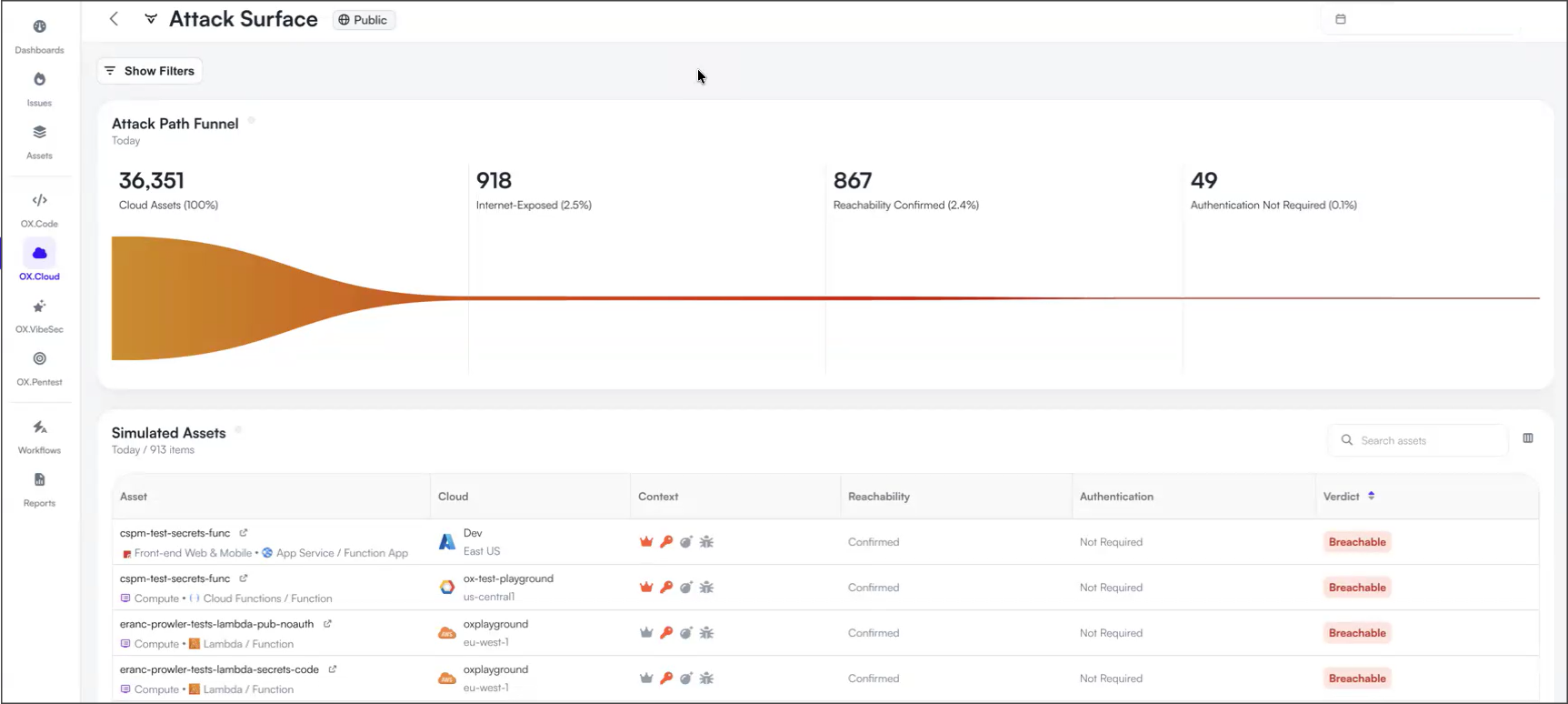
The Attack Surface dashboard provides an external view of your cloud assets and helps you identify assets that are exposed to the internet, can be reached from outside your organization, and can be accessed without authentication.

Unlike other cloud security views that focus on the internal configuration of your cloud environment, the Attack Surface dashboard evaluates your cloud assets from an external perspective. OX validates whether internet-exposed assets can be reached from outside your organization and whether they require authentication, helping you prioritize assets that present the highest external risk.

<figure><img src="/files/v9z6MznZm1cMeBbPpqun" alt=""><figcaption></figcaption></figure>

### Before you begin

Before using the Attack Surface dashboard, you need to enable this capability.

**To enable reachability validation:**

1. Go to **Settings** **>** **Cloud**.
2. Enable **Internet Reachability Check**.

> **Note**
>
> Enabling **Internet Reachability Check** allows OX to actively test your internet-exposed assets by attempting to connect to them from outside your organization. This may generate network activity against your environment. Enable this setting only if you want OX to validate the external reachability of your cloud assets.

## Attack Path Funnel

The Attack Path Funnel summarizes how OX prioritizes the assets that present the highest external risk. The funnel helps reduce the overall cloud inventory to the relatively small number of assets that require immediate investigation.

| Stage                           | Description                                                                                                             |
| ------------------------------- | ----------------------------------------------------------------------------------------------------------------------- |
| **Cloud Assets**                | Total number of cloud assets discovered across connected cloud environments.                                            |
| **Internet Exposed**            | Assets that are accessible from the internet.                                                                           |
| **Reachability Confirmed**      | Internet-exposed assets that OX verified can be reached from outside your organization.                                 |
| **Authentication Not Required** | Reachable assets that do not require authentication to access. These assets present the highest external exposure risk. |

## Simulated Assets

The Simulated Assets table lists the cloud assets evaluated by OX.

You can select an asset to open the [Asset details](/ox-cloud/cloud-security/attack-surface-dashboard/attack-surface-asset-details.md) page, where you can review its configuration, validation evidence, relationships, and associated cloud security findings.

<table><thead><tr><th width="205.66668701171875">Column</th><th>Description</th></tr></thead><tbody><tr><td><strong>Asset</strong></td><td>Asset name and resource type.</td></tr><tr><td><strong>Cloud</strong></td><td>Cloud provider, account, project, subscription, or region.</td></tr><tr><td><strong>Context</strong></td><td>Security context collected by OX, including cloud and runtime information.</td></tr><tr><td><strong>Reachability</strong></td><td>Indicates whether OX verified that the asset can be reached from outside the organization.<br><br><strong>Confirmed</strong>: OX verified that the asset can be reached from outside the organization.</td></tr><tr><td><strong>Authentication</strong></td><td>Indicates whether OX verified whether authentication is required to access the asset.<br><br><strong>Not Required</strong>: OX verified that the asset can be accessed without authentication.</td></tr><tr><td><strong>Verdict</strong></td><td>Indicates the overall assessment of the asset's external exposure based on the reachability and authentication validation performed by OX.<br><br><strong>Breachable</strong>: OX classified the asset as breachable because it is reachable from outside the organization and does not require authentication.</td></tr></tbody></table>


---

# Agent Instructions
This documentation is published with GitBook. GitBook is the documentation platform designed so that both humans and AI agents can read, navigate, and reason over technical content effectively. Learn more at gitbook.com.

## Querying This Documentation
If you need additional information that is not directly available in this page, you can query the documentation dynamically by asking a question.

Perform an HTTP GET request on the current page URL with the `ask` query parameter, and the optional `goal` query parameter:

```
GET https://docs.ox.security/ox-cloud/cloud-security/attack-surface-dashboard.md?ask=<question>&goal=<endgoal>
```

`ask` is the immediate question: it should be specific, self-contained, and written in natural language.
`goal` is optional and describes the broader end goal you are ultimately trying to accomplish on behalf of the user. GitBook uses it to tailor the answer towards what is most useful for that goal.

The response will contain a direct answer to the question and relevant excerpts and sources from the documentation.

Use this mechanism when the answer is not explicitly present in the current page, you need clarification or additional context, or you want to retrieve related documentation sections.
