> For the complete documentation index, see [llms.txt](https://docs.ox.security/llms.txt). Markdown versions of documentation pages are available by appending `.md` to page URLs; this page is available as [Markdown](https://docs.ox.security/ox-cloud/cloud-security/attack-surface-dashboard/attack-surface-asset-details.md).
# Attack Surface Asset Details
The Asset details page provides detailed information about a cloud asset, including its configuration, external reachability validation, relationships to other cloud resources, and associated security findings.
To open the page, select an asset in the Simulated Assets table.
The page contains the following tabs:
* [Explore](#explore)
* [Reachability](#reachability)
* [Graph View](#graph-view)
* [Issue Statistics](#issue-statistics)
## Explore
The Explore tab provides an overview of the selected asset, including its cloud configuration, exposure status, and associated cloud security findings.
### Summary
| Section | Description |
| --------------------- | -------------------------------------------------------------------------------------------------------------------------------------------- |
| **Policies** | Displays the cloud security issues associated with the asset. Select **View *****n***** Issues** to open the related issues. |
| **Cloud Information** | Displays information about the cloud provider, account, region, resource type, category, internet exposure, and authentication requirements. |
### General Details
The General Details section displays metadata for the selected resource.
Depending on the resource type, the information may include:
| Property | Description |
| -------------------------------- | ---------------------------------------------------------------------------- |
| **Resource ID** | Unique identifier of the cloud resource. |
| **ARN** | Amazon Resource Name for AWS resources. |
| **Detected Environment** | Environment associated with the resource, such as Development or Production. |
| **Resource-specific properties** | Additional metadata specific to the selected cloud resource. |
## Reachability
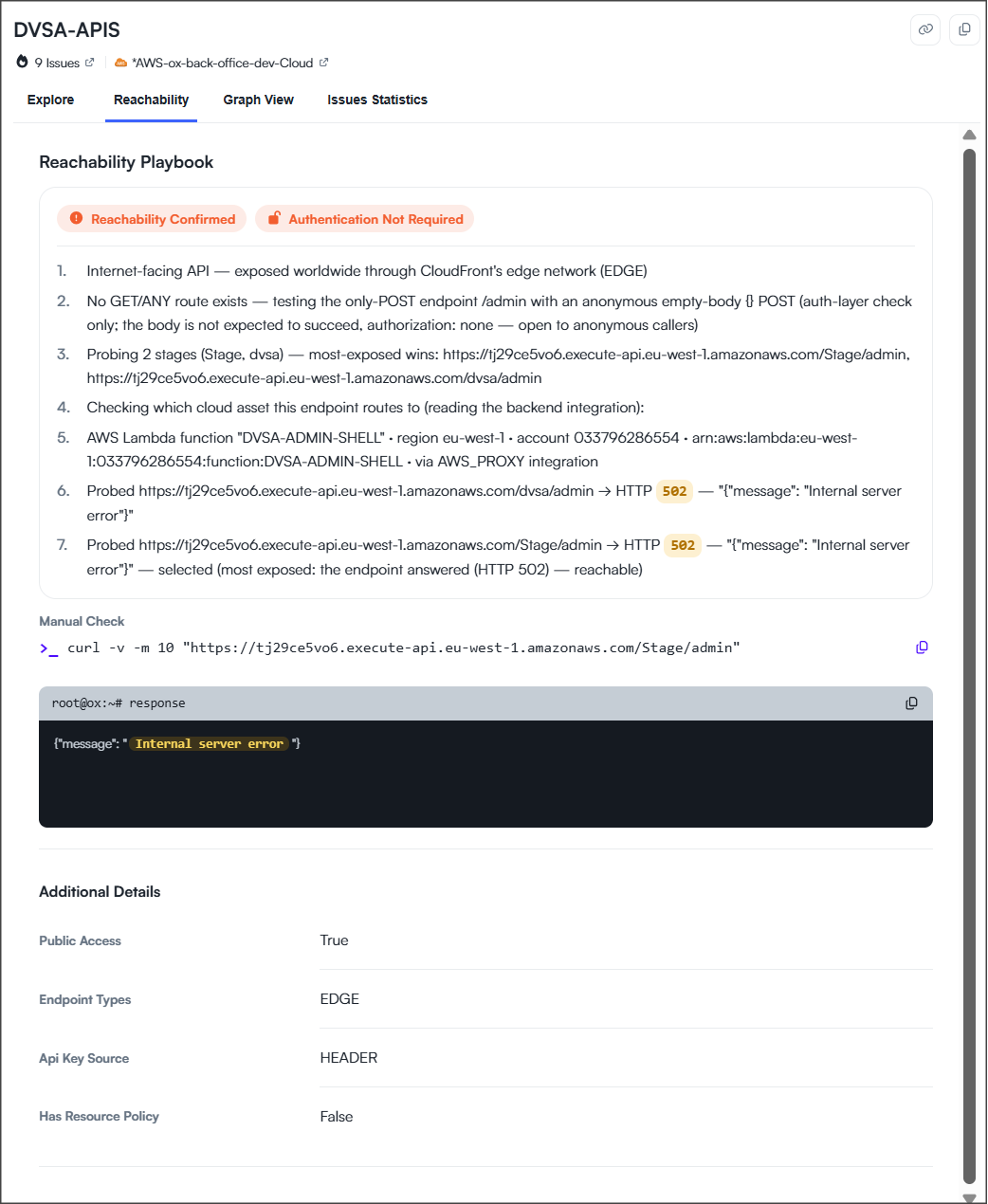
The Reachability tab explains how OX validated the external reachability of the selected asset.
### Reachability Playbook
The Reachability Playbook provides transparency into the validation performed by OX.
| Section | Description |
| ---------------------- | ------------------------------------------------------------------------------------------------------------------------- |
| **Validation Summary** | Displays the validation result and whether authentication is required. |
| **Playbook** | Describes the validation steps performed by OX, including the endpoints evaluated, requests sent, and responses received. |
### Manual Check
The Manual Check section provides commands that you can copy and run to validate the findings independently.
| Item | Description |
| ------------ | ----------------------------------------------- |
| **Command** | Command used to validate the selected asset. |
| **Response** | Response returned when the command is executed. |
### Additional Details
The Additional Details section displays metadata collected during the validation.
| Property | Description |
| ----------------------- | --------------------------------------------------------------- |
| **Public Access** | Indicates whether the asset is publicly accessible. |
| **Endpoint Type** | Type of public endpoint associated with the asset. |
| **API Key Source** | Location from which an API key is expected, if applicable. |
| **Has Resource Policy** | Indicates whether the resource has an associated access policy. |
## Graph View
The Graph View tab visualizes the selected asset and its relationships to connected cloud resources.
Use this view to understand how the asset fits into your cloud environment and identify resources that may be affected by configuration changes or remediation activities.
| Element | Description |
| ----------------------- | ------------------------------------------------------------- |
| **Selected Asset** | The cloud asset being analyzed. |
| **Connected Resources** | Cloud resources connected to the selected asset. |
| **Relationships** | Connections between the selected asset and related resources. |
## Issue Statistics
The Issue Statistics tab summarizes the cloud security findings associated with the selected asset.
Use this tab to understand the overall security posture of the selected asset before investigating individual findings.
| Widget | Description |
| --------------- | -------------------------------------------------------------------------- |
| **Category** | Distribution of findings by category. |
| **Severity** | Distribution of findings by severity. |
| **Issue Owner** | Distribution of findings by assigned owner. |
| **Source Tool** | Distribution of findings by the OX capability that generated the findings. |
---
# Agent Instructions
This documentation is published with GitBook. GitBook is the documentation platform designed so that both humans and AI agents can read, navigate, and reason over technical content effectively. Learn more at gitbook.com.
## Querying This Documentation
If you need additional information that is not directly available in this page, you can query the documentation by asking a question.
Perform an HTTP GET request on the following URL with the `ask` and `goal` query parameters:
```
GET https://docs.ox.security/ox-cloud/cloud-security/attack-surface-dashboard/attack-surface-asset-details.md?ask=&goal=
```
`ask` is the immediate question: it should be specific, self-contained, and written in natural language.
`goal` is what the user is ultimately trying to achieve, the reason they need the answer. Sharing it helps GitBook give you a better, more relevant answer. A goal is most helpful when it describes the outcome the user wants rather than restating the question. For example, with `ask=how do I create an API token`, a goal like `automate deployments from our CI pipeline` lets GitBook tailor the answer to that use case.
The response will contain a direct answer to the question and relevant excerpts and sources from the documentation.
Use this mechanism when the answer is not explicitly present in the current page, you need clarification or additional context, or you want to retrieve related documentation sections.
.png?alt=media)