> For the complete documentation index, see [llms.txt](https://docs.ox.security/llms.txt). Markdown versions of documentation pages are available by appending `.md` to page URLs; this page is available as [Markdown](https://docs.ox.security/ox-cloud/cloud-security/reachability.md).
# Reachability
Reachability validation helps determine whether supported cloud assets are accessible from the internet.
A misconfiguration finding on its own does not tell you how urgent the issue is. An S3 bucket flagged as "publicly accessible" might be reachable from the open internet, or it might sit behind a private network with no inbound path. The remediation priority is very different in each case.
Reachability resolves that ambiguity. For every affected asset, OX performs an active check and reports whether the asset is reachable, whether authentication is required, and exactly how the test was run.
disabled by default
### How reachability validation works
When enabled, OX performs validation checks for supported cloud resources to determine:
* Whether the asset is reachable from the internet
* Whether authentication is required
* Whether exposure has been confirmed
This additional context helps distinguish between theoretical risks and assets that are actively exposed.
### Reachability results
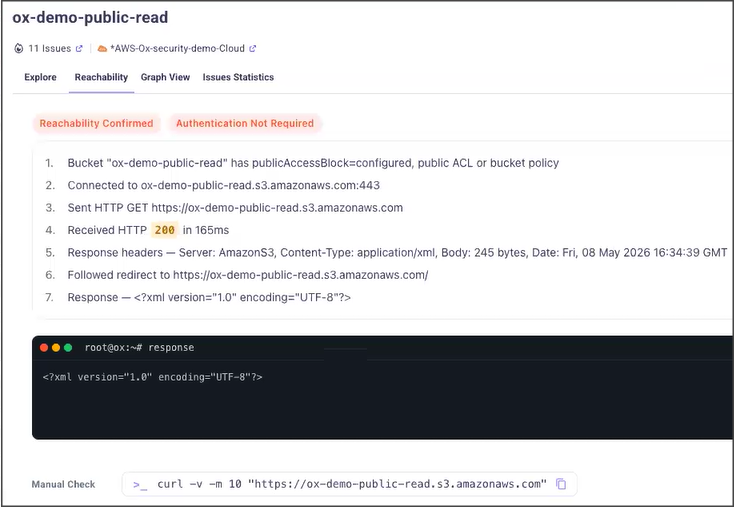
For supported findings, the issue details include a dedicated **Reachability** tab.
For each scanned asset, OX reports:
* **Reachability:** Whether the asset is reachable from the internet.
* **Authentication:** Whether authentication is required to reach it.
An asset that is reachable and does not require authentication is the highest-priority case and warrants immediate attention.
OX also documents the exact method used to test each asset. The test link is shown in the asset view and can be copied, so your team can validate the result in its own terminal.
The tab provides:
* Reachability status
* Authentication requirements
* Validation results
* Evidence collected during testing
* Manual verification guidance
For example, OX may confirm that a cloud storage bucket is reachable from the internet and does not require authentication, indicating that the resource may require immediate attention.
### Validation evidence
To support investigation and remediation, OX provides details about the validation process, including:
* Requests sent during testing
* Response details
* Validation results
* Commands that can be used to reproduce the validation manually
This evidence allows security teams to verify findings independently and better understand the exposure risk.
### Enabling reachability validation
Reachability Validation is disabled by default.
To enable it:
1. Go to **Settings** > **Scan Settings**.
2. Locate **Exposure Validation**.
3. Enable **Internet Reachability Check**.
After the capability is enabled, OX begins validating supported cloud assets during cloud security scans.
### Related topics
* [Cloud Security Dashboard](/ox-cloud/cloud-security/cloud-security-dashboard.md)
* [Kubernetes Security](/ox-cloud/cloud-security/kubernetes-security.md)
* [Cloud Security](/api-documentation/api-reference/api--cloud-security.md)
### Reachability results
### Viewing reachability for an asset
1. Go to the **Issues** page.
2. Select a CSPM issue (for example, an S3 publicly accessible finding).
3. Open the affected asset.
4. Select the **Reachability** tab.
The tab shows the reachability result, the authentication requirement, and the test method OX used.
### Enabling Reachability
Reachability is off by default. OX runs an active check against your assets, so the capability must be enabled before any testing happens.
1. Go to **Settings > Scan**.
2. Scroll to **Exposure Validation**.
3. Turn on **Internet Reachability Check**.
> **Important:** When enabled, OX actively tests whether assets are exposed and whether authentication is required. This can trigger notifications from security tools in your environment. Make sure your team is aware that these checks occur before turning it on.
---
# Agent Instructions
This documentation is published with GitBook. GitBook is the documentation platform designed so that both humans and AI agents can read, navigate, and reason over technical content effectively. Learn more at gitbook.com.
## Querying This Documentation
If you need additional information that is not directly available in this page, you can query the documentation dynamically by asking a question.
Perform an HTTP GET request on the current page URL with the `ask` query parameter, and the optional `goal` query parameter:
```
GET https://docs.ox.security/ox-cloud/cloud-security/reachability.md?ask=&goal=
```
`ask` is the immediate question: it should be specific, self-contained, and written in natural language.
`goal` is optional and describes the broader end goal you are ultimately trying to accomplish on behalf of the user. GitBook uses it to tailor the answer towards what is most useful for that goal.
The response will contain a direct answer to the question and relevant excerpts and sources from the documentation.
Use this mechanism when the answer is not explicitly present in the current page, you need clarification or additional context, or you want to retrieve related documentation sections.