> For the complete documentation index, see [llms.txt](https://docs.ox.security/llms.txt). Markdown versions of documentation pages are available by appending `.md` to page URLs; this page is available as [Markdown](https://docs.ox.security/ox-integrations/3rd-party-integrations/cloud-context/qualys.md).
# Qualys
Qualys is a cloud-based vulnerability management platform that identifies vulnerabilities across networked assets, including servers, workstations, network devices, and other IP-addressable systems.
Connecting Qualys to OX imports Qualys vulnerability findings into the OX platform, where they are correlated with additional security context and unified with findings from other security tools.
OX enriches imported Qualys findings with information from across the platform, helping security teams understand asset ownership, prioritize remediation, and investigate vulnerabilities within the context of their broader security posture.
> The Qualys Host URL is the API Server URL for your Qualys platform, for example, `https://qualysapi.qg3.apps.qualys.com` for US3. To find the correct URL for your platform, see the Qualys [Platform Identification](https://www.qualys.com/platform-identification/) page and use the **API Server URL**. Do not use the **Platform URL** or **API Gateway URL**.
## Qualys account requirements
Before connecting Qualys to OX, make sure the Qualys account used for the integration meets the following requirements:
| Requirement | Description |
| -------------------- | -------------------------------------------------------------------------------------------------------------------------------------------------------------------------------------------------------- |
| Authentication | OX authenticates to Qualys using a username and password with HTTP Basic authentication over HTTPS. The account must have a local Qualys password. SSO-only accounts cannot be used for the integration. |
| Qualys modules | VMDR is required. WAS is supported but optional. |
| Access | OX requires read-only access to Qualys. OX does not create, modify, or delete data in Qualys. |
| Account permissions | API access must be enabled for the Qualys account. The account must also have read access to the asset groups that you want OX to scan. |
| Data collected | OX retrieves host vulnerability detections, host asset metadata, and KnowledgeBase vulnerability definitions from Qualys. |
| Collection frequency | OX retrieves Qualys data as part of the daily OX scan. |
## Connect OX to Qualys
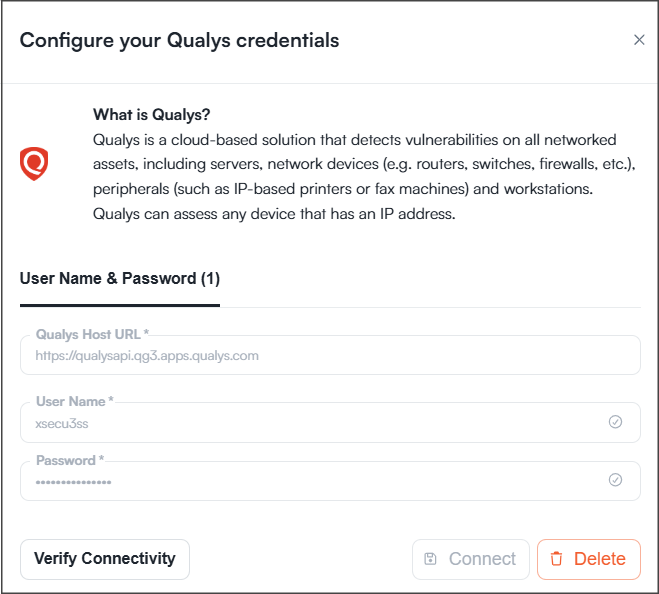
1. Go to **Settings > Connectors**.
2. Select **Qualys**.
Enter the following information:
| Parameter | Description |
| --------------- | -------------------------------------------------------------------------------------------------------------------------------------------------------- |
| Qualys Host URL | Enter the API Server URL for your Qualys platform, for example, `https://qualysapi.qg3.apps.qualys.com`. Do not use the Platform URL or API Gateway URL. |
| User Name | Your Qualys username. |
| Password | Your Qualys password. |
3. Select **Verify Connectivity**.
4. Select **Connect**.
---
# Agent Instructions
This documentation is published with GitBook. GitBook is the documentation platform designed so that both humans and AI agents can read, navigate, and reason over technical content effectively. Learn more at gitbook.com.
## Querying This Documentation
If you need additional information that is not directly available in this page, you can query the documentation dynamically by asking a question.
Perform an HTTP GET request on the current page URL with the `ask` query parameter, and the optional `goal` query parameter:
```
GET https://docs.ox.security/ox-integrations/3rd-party-integrations/cloud-context/qualys.md?ask=&goal=
```
`ask` is the immediate question: it should be specific, self-contained, and written in natural language.
`goal` is optional and describes the broader end goal you are ultimately trying to accomplish on behalf of the user. GitBook uses it to tailor the answer towards what is most useful for that goal.
The response will contain a direct answer to the question and relevant excerpts and sources from the documentation.
Use this mechanism when the answer is not explicitly present in the current page, you need clarification or additional context, or you want to retrieve related documentation sections.