> For the complete documentation index, see [llms.txt](https://docs.ox.security/llms.txt). Markdown versions of documentation pages are available by appending `.md` to page URLs; this page is available as [Markdown](https://docs.ox.security/ox-integrations/3rd-party-integrations/cloud-context/tenable-cloud.md).
# Tenable Cloud
Tenable Cloud Security (formerly Ermetic) is a cloud security platform for discovering assets, assessing misconfigurations and identity risks, and continuously monitoring public cloud environments.
By integrating Tenable Cloud Security with OX, you centralize Tenable findings alongside code, container, pipeline, and runtime signals already in OX.
OX ingests Tenable Cloud data on a schedule and on demand, enriches it with OX context (application mapping, workflows, compliance), and presents a unified queue for investigation and reporting.
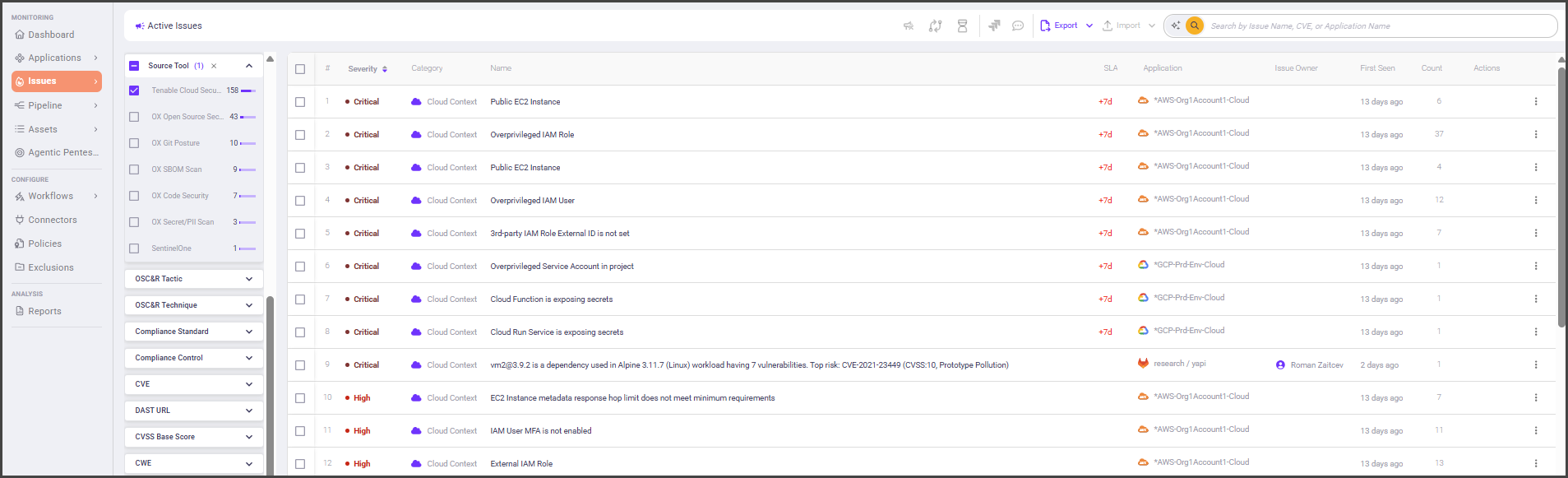
After connecting, you will see Tenable Cloud results in the Active issues page (filter **Source tool > Tenable Cloud Security**).
### What OX adds
* **Context and correlation:** OX maps Tenable data to applications, repositories, and services to show impact and ownership.
* **Prioritization with severity factors:** OX may **reprioritize** vendor severities when exploitability and environment context reduce risk, for example, Critical → High. Severity factors explain why the priority changed.
* **Evidence at a glance:** When available, OX displays vendor evidence and links alongside OX analytics to speed triage.
### Terminology mapping
Tenable and OX use different labels for similar concepts. Use this quick map while you work:
| Tenable term | What it includes (examples) | OX equivalent |
| --------------------------- | -------------------------------------------------------------------- | ------------------------------------------------------------------------------------------- |
| **Cloud Findings** | CSPM findings, workload protection findings, access/permission risks | **Issues** (CSPM/runtime categories) |
| **Vulnerabilities** | OS/package CVEs on workloads and images | **Runtime Open Source vulnerability** (the name of the policy that identifies these issues) |
| **Risk / Prioritized list** | Tenable’s vendor-side prioritization | **Issues with severity factors** (OX prioritization) |
### Prerequisites
* Tenable Cloud Security account with access to **Settings > API**
* Permission to **Add Token** and assign a **Role**
### Step 1: Generate an API token \[Tenable Cloud Security]
1. Log in to your **Tenable Cloud Security Console**.
2. Go to **Settings > API**.
3. In the **Organization** tree (left), choose the **account scope** for the token (by default, the entire Organization).
4. Select **+ Add Token** (top right).
5. Enter a **meaningful name** for the token.
6. Select the required **permission Role**.
7. Select **Add Token**.
8. When the token is created, **copy and store the secret value** in a secure location — it **cannot be viewed again**.
> **Best practice**\
> Store the token in a secrets manager and set a reminder to rotate it according to your policy.
### Step 2: Determine your Host URL (API endpoint)
Tenable Cloud Security uses regional API endpoints. The simplest way to confirm your tenant’s endpoint is to check the browser URL while signed in to the console. Use the matching endpoint below as your **Host URL**:
| Tenable Region | API Endpoint |
| ----------------------- | ----------------------------------------- |
| Australia | `https://au.app.ermetic.com/api/graph` |
| Brazil | `https://br.app.ermetic.com/api/graph` |
| Canada | `https://ca.app.ermetic.com/api/graph` |
| Europe | `https://eu.app.ermetic.com/api/graph` |
| India | `https://in.app.ermetic.com/api/graph` |
| Japan | `https://jp.app.ermetic.com/api/graph` |
| Singapore | `https://sg.app.ermetic.com/api/graph` |
| South Korea | `https://kr.app.ermetic.com/api/graph` |
| United Arab Emirates | `https://ae.app.ermetic.com/api/graph` |
| United Kingdom | `https://uk.app.ermetic.com/api/graph` |
| United States | `https://us.app.ermetic.com/api/graph` |
| United States Gov Cloud | `https://usgov.app.ermetic.com/api/graph` |
### Step 3: Connect Tenable Cloud Security to OX \[OX]
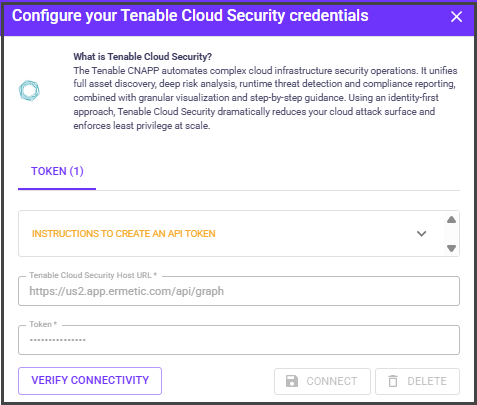
1. In OX, go to **Connectors**.
2. Search for **Tenable Cloud Security**.
| Field | What to use |
| ------------- | --------------------------------------- |
| **Host URL** | Your regional endpoint from **Step 2**. |
| **API token** | The token you created in **Step 1**. |
3. Select **Connect**. OX validates the credentials.
---
# Agent Instructions
This documentation is published with GitBook. GitBook is the documentation platform designed so that both humans and AI agents can read, navigate, and reason over technical content effectively. Learn more at gitbook.com.
## Querying This Documentation
If you need additional information that is not directly available in this page, you can query the documentation dynamically by asking a question.
Perform an HTTP GET request on the current page URL with the `ask` query parameter, and the optional `goal` query parameter:
```
GET https://docs.ox.security/ox-integrations/3rd-party-integrations/cloud-context/tenable-cloud.md?ask=&goal=
```
`ask` is the immediate question: it should be specific, self-contained, and written in natural language.
`goal` is optional and describes the broader end goal you are ultimately trying to accomplish on behalf of the user. GitBook uses it to tailor the answer towards what is most useful for that goal.
The response will contain a direct answer to the question and relevant excerpts and sources from the documentation.
Use this mechanism when the answer is not explicitly present in the current page, you need clarification or additional context, or you want to retrieve related documentation sections.
.png?alt=media)