> For the complete documentation index, see [llms.txt](https://docs.ox.security/llms.txt). Markdown versions of documentation pages are available by appending `.md` to page URLs; this page is available as [Markdown](https://docs.ox.security/ox-integrations/3rd-party-integrations/cloud-security/gcp-and-gke-1/gcp-and-gke.md).
# GKE
Google Kubernetes Engine (GKE) is a managed Kubernetes service that simplifies the deployment, scaling, and management of containerized applications in Google Cloud. It abstracts infrastructure management while providing flexibility and control over Kubernetes clusters.
Integrating OX Security with GKE gives your security team real-time visibility into what’s running in your clusters and improves workload protection, as follows:
* **Workload-Level Scanning:** OX identifies which container images are actively running in Kubernetes workloads, such as deployments and pods, and scans those confirmed to be in use. This improves precision and reduces unnecessary overhead.
* **Runtime Context**\
OX enriches security findings across your environment with runtime metadata. When a vulnerability is found in code or an image that is deployed and running, the issue is flagged with additional severity context to support informed triage and decision-making.
* **Risk Prioritization Support**\
You can prioritize issues based on runtime status, filter findings by whether they are actively running, or create custom policies that adjust severity accordingly.
For a description of the supported Kubernetes connection models, including direct cloud integration and Inspector-based access, see [Kubernetes Reachability](/ox-integrations/3rd-party-integrations/cloud-security/kubernetes-reachability.md).
To support GKE integration, OX also connects to [Google Cloud Platform (GCP)](/ox-integrations/3rd-party-integrations/cloud-security/gcp-and-gke-1.md). The GCP connector is required to enable GKE connectivity and provides cloud-level context for Kubernetes workloads.
## Prerequisites
* A Google Cloud project with IAM permissions to:
* Create service accounts
* Manage service account keys
* Enable required APIs (e.g., Compute Engine API, IAM API, Kubernetes Engine API).
* Optional: `gcloud` CLI installed and configured.
* A running GKE cluster in the selected GCP project, with Kubernetes API enabled.
* Authorized OX static IP address to access your GKE: 108.128.213.11, 34.247.61.212.
## Connect to GKE
After you configure the GCP connector, you can connect your GKE clusters. The GKE connector does not require separate credentials. Instead, it automatically uses the credentials you created for GCP, because both connectors rely on the same authentication format and access scope within your Google Cloud project.
Configuring GKE is a short process. Once the GCP connector is active and the required services are enabled in your Google Cloud project, you only need to select your cluster and complete the connection.
When you connect GKE, OX retrieves metadata from your Kubernetes clusters and enriches your environment with workload-level and runtime insights.
**To connect to GKE:**
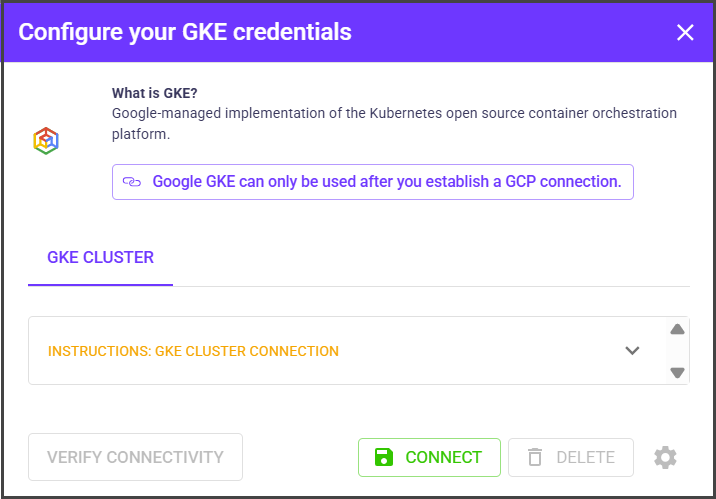
1. In the **OX Security** platform, go to **Connectors** and search for **GKE**.
2. Select **GKE**.
3. Select **Connect**.
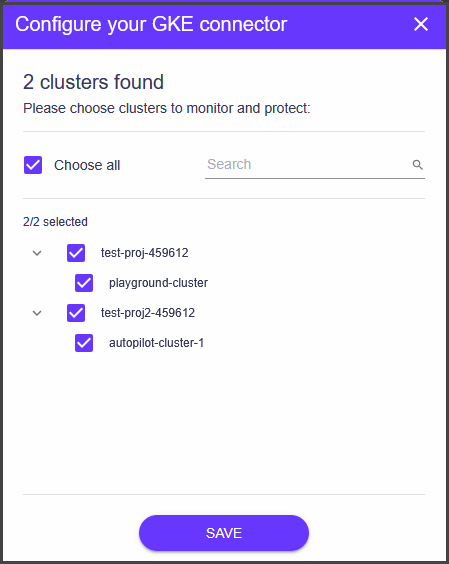
4. To select specific clusters for scanning by OX platform, select the gear icon next to **DELETE**.
5. Select the clusters you want to protect.
6. Select **SAVE**.
After connecting your cluster, OX begins collecting Kubernetes metadata, such as deployed workloads, image versions, and runtime status. This information enriches your Applications, Issues, Attack Path, and Artifact BOM pages with cloud-native context.
---
# Agent Instructions
This documentation is published with GitBook. GitBook is the documentation platform designed so that both humans and AI agents can read, navigate, and reason over technical content effectively. Learn more at gitbook.com.
## Querying This Documentation
If you need additional information that is not directly available in this page, you can query the documentation by asking a question.
Perform an HTTP GET request on the following URL with the `ask` and `goal` query parameters:
```
GET https://docs.ox.security/ox-integrations/3rd-party-integrations/cloud-security/gcp-and-gke-1/gcp-and-gke.md?ask=&goal=
```
`ask` is the immediate question: it should be specific, self-contained, and written in natural language.
`goal` is what the user is ultimately trying to achieve, the reason they need the answer. Sharing it helps GitBook give you a better, more relevant answer. A goal is most helpful when it describes the outcome the user wants rather than restating the question. For example, with `ask=how do I create an API token`, a goal like `automate deployments from our CI pipeline` lets GitBook tailor the answer to that use case.
The response will contain a direct answer to the question and relevant excerpts and sources from the documentation.
Use this mechanism when the answer is not explicitly present in the current page, you need clarification or additional context, or you want to retrieve related documentation sections.