> For the complete documentation index, see [llms.txt](https://docs.ox.security/llms.txt). Markdown versions of documentation pages are available by appending `.md` to page URLs; this page is available as [Markdown](https://docs.ox.security/ox-integrations/3rd-party-integrations/dynamic-app-security/bright.md).
# Bright Security
> Note: This capability may be in Early Access (EA) in your environment. Coordinate availability with your OX technical contact.
You can connect OX to your Bright Security instance to import Dynamic Application Security Testing (DAST) results. This lets you view DAST issues alongside other security findings in the OX platform.
## Prerequisites
Bright Security Admin account.
## Step 1: Get a Bright API key \[Bright Security]
Bright Security (Bright DAST) utilizes API keys for authentication and integration purposes, as follows:
* **User Keys (Personal API Keys):** These keys are created and managed within a user's personal settings in the Bright DAST platform. They are used for individual user-specific operations and integrations.
* **Project Keys:** These keys are associated with specific projects within Bright DAST and are used for project-level integrations and operations.
* **Organization Keys:** These keys provide access at the organizational level, often used for broader integrations and management across multiple projects.
For integration with OX, you need to create a Personal API Key.
Use a read-only key. If your organization prefers stricter scoping, create a dedicated service account and generate the key from that account.
**To generate a Bright Security API key:**
1. Sign in to Bright Security.
2. Access your personal settings by clicking on your profile in the upper-right corner of the screen and selecting **User Settings**.
3. Locate the **MANAGE YOUR USER API KEYS** section, and select **+ Create API key**.
4. Define the token **Name**.
5. Select the **scope(s)** and **action types** (such as read or write), as follows:
| Scope | Purpose | Notes |
| --------------- | ------------------------------------------ | ------------------------------- |
| `projects:read` | View available projects and project issues | Recommended minimum (read-only) |
| `issues:read` | View detected scan issues | Recommended minimum (read-only) |
| `scans:read` | View existing scans | (Optional) For richer evidence |
5. (Optional) Set an **Expiration Date**.
6. Select **Create**. Copy the key and store it securely, you won’t be able to view it again after leaving the popup. Created keys (without full values) appear under **Manage your organization API keys**.
## Step 2: Connect Bright to OX \[OX]
1. In the OX platform, go to the **Connectors** page.
2. Select **Add Connector** and search for **Bright**.
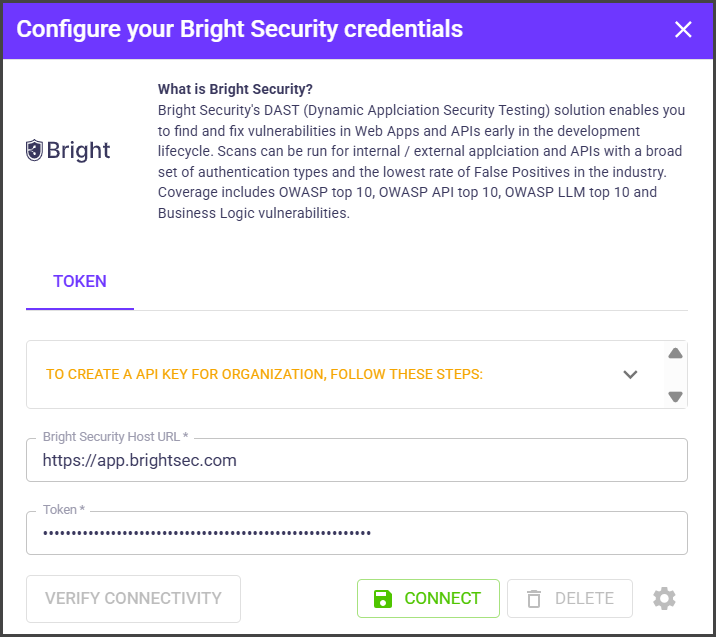
3. In the **Configure your Bright Security credentials** box, provide the following details:
| Field | Description |
| ------------------- | --------------------------------------------------------------------------------- |
| **Bright Host URL** | The base server URL Bright provides. |
| **Token** | The unrestricted API key (no products selected) you generated in Bright Security. |
4. Select **CONNECT**.
5. To select specific Bright projects to import, click the gear icon next to the **DELETE** button.
6. Select the Bright projects and select **SAVE**.
When connected, OX starts pulling DAST data from Bright.
---
# Agent Instructions
This documentation is published with GitBook. GitBook is the documentation platform designed so that both humans and AI agents can read, navigate, and reason over technical content effectively. Learn more at gitbook.com.
## Querying This Documentation
If you need additional information that is not directly available in this page, you can query the documentation dynamically by asking a question.
Perform an HTTP GET request on the current page URL with the `ask` query parameter, and the optional `goal` query parameter:
```
GET https://docs.ox.security/ox-integrations/3rd-party-integrations/dynamic-app-security/bright.md?ask=&goal=
```
`ask` is the immediate question: it should be specific, self-contained, and written in natural language.
`goal` is optional and describes the broader end goal you are ultimately trying to accomplish on behalf of the user. GitBook uses it to tailor the answer towards what is most useful for that goal.
The response will contain a direct answer to the question and relevant excerpts and sources from the documentation.
Use this mechanism when the answer is not explicitly present in the current page, you need clarification or additional context, or you want to retrieve related documentation sections.