> For the complete documentation index, see [llms.txt](https://docs.ox.security/llms.txt). Markdown versions of documentation pages are available by appending `.md` to page URLs; this page is available as [Markdown](https://docs.ox.security/ox-integrations/3rd-party-integrations/dynamic-app-security/cycognito.md).
# CyCognito
> Note: This capability may be in Early Access (EA) in your environment. Coordinate availability with your OX technical contact.
You can connect OX to your CyCognito instance to import Dynamic Application Security Testing (DAST) results. This lets you view DAST issues alongside other security findings in OX.
## Prerequisites
* A CyCognito account with Admin role or IT User role, and access to the projects you plan to import.
* Projects or applications in CyCognito that already have at least one completed scan so findings exist.
## Step 1: Generate a Cycognito API token \[CyCognito]
Use a read-only token. If your organization prefers stricter scoping, create a dedicated service account and generate the token from that account.
1. In CyCognito, go to **Settings > API Key Management**.
* Some tenants label this path **Workflow & Integration > API Key Management**.
**Note:** If your tenant separates *personal* and *organization* tokens, choose the option your security policy requires.
2. Select **Add API Key**.
3. In the dialog, configure the key:
| Field | What to enter |
| ------------------ | ---------------------------------------------------------------------------------------------------- |
| **Key name** | A unique name that explains the purpose, for example, `OX ingestion`. |
| **Access** | Choose **Read only** for ingestion. Select **Read and write** only if your use case requires writes. |
| **Set expiration** | (Recommended) Set a validity period to enforce rotation. |
4. Select **Generate** and copy the key value. The API key value is shown only once, store it in a secure location.
## Step 2: Connecting to Cycognito
1. In the OX platform, go to the **Connectors** page.
2. Select **Add Connector** and search for **CyCognito**.
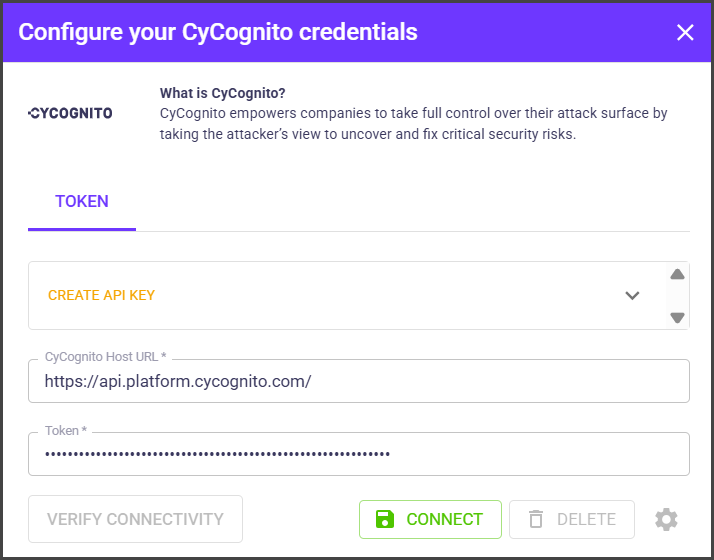
3. In the **Configure your CyCognito credentials** box, provide the following details:
| Field | Description |
| ---------------------- | --------------------------------------- |
| **CyCognito Host URL** | The base server URL CyCognito provides. |
| **Token** | The API key you generated in CyCognito. |
4. Select **CONNECT**.
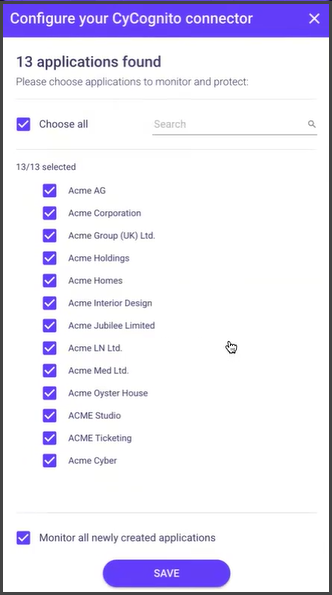
5. To select specific CyCognito projects to import, click the gear icon next to the **DELETE** button.
6. Select the CyCognito projects and select **SAVE**.
When connected, OX starts pulling DAST data from CyCognito.
---
# Agent Instructions
This documentation is published with GitBook. GitBook is the documentation platform designed so that both humans and AI agents can read, navigate, and reason over technical content effectively. Learn more at gitbook.com.
## Querying This Documentation
If you need additional information that is not directly available in this page, you can query the documentation dynamically by asking a question.
Perform an HTTP GET request on the current page URL with the `ask` query parameter, and the optional `goal` query parameter:
```
GET https://docs.ox.security/ox-integrations/3rd-party-integrations/dynamic-app-security/cycognito.md?ask=&goal=
```
`ask` is the immediate question: it should be specific, self-contained, and written in natural language.
`goal` is optional and describes the broader end goal you are ultimately trying to accomplish on behalf of the user. GitBook uses it to tailor the answer towards what is most useful for that goal.
The response will contain a direct answer to the question and relevant excerpts and sources from the documentation.
Use this mechanism when the answer is not explicitly present in the current page, you need clarification or additional context, or you want to retrieve related documentation sections.