> For the complete documentation index, see [llms.txt](https://docs.ox.security/llms.txt). Markdown versions of documentation pages are available by appending `.md` to page URLs; this page is available as [Markdown](https://docs.ox.security/ox-integrations/3rd-party-integrations/registry/docker-registry-distribution.md).
# Docker Registry / Distribution
Docker Registry / Distribution is a self-hosted Docker Registry V2-compatible registry that organizations run in their own environments. Connecting Docker Registry / Distribution to OX enables OX to discover and scan container images stored in your private registry and surface container security findings alongside the rest of your application security results.
Unlike the [Docker Hub](/ox-integrations/3rd-party-integrations/registry/docker-hub.md) connector, which connects to the Docker SaaS platform, the Docker Registry / Distribution connector supports registries hosted and managed within your own environment.
## Prerequisites
Before connecting Docker Registry / Distribution to OX, ensure that:
* You have permission to configure integrations in OX.
* Your Docker Registry / Distribution instance is accessible from OX.
* You have a Docker Registry account with permissions to access the repositories that you want OX to scan.
* You know the following connection details:
* Docker Registry host URL
* Username
* Password
> **Note**
>
> If your registry is hosted in a private network or behind a firewall, allow connectivity from OX to the registry or configure an [OX Broker](/get-started/onboarding-to-ox/prerequisites-and-access/ox-deployment/ox-broker.md).
### Connect OX to Docker Registry / Distribution
1. In OX, go to **Settings** > **Connectors**.
2. Select **Add Connection**.
3. Select **Docker Registry / Distribution**.
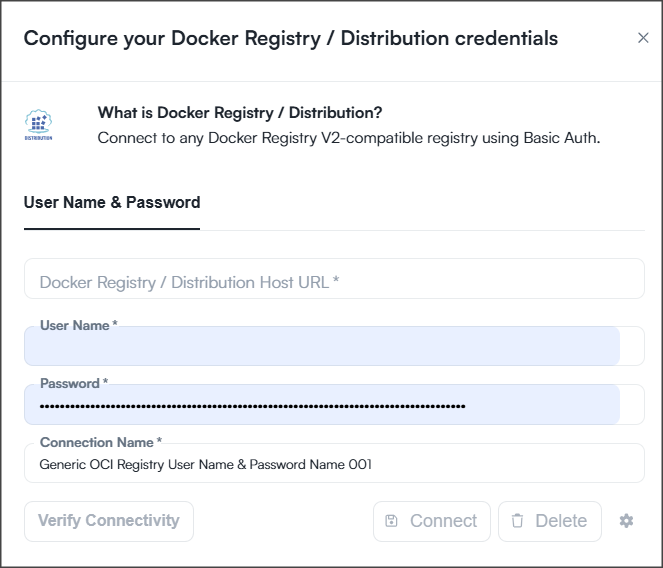
Enter the connection details.
| Parameter | Description |
| --------------------------------------- | -------------------------------------------------------------------------------------- |
| Docker Registry / Distribution Host URL | The URL of your Docker Registry instance. For example: `https://registry.example.com`. |
| User Name | The username used to authenticate to the registry. |
| Password | The password associated with the registry account. |
| Connection Name | A descriptive name for the connection in OX. |
4. Select **Verify Connectivity**.
5. Select **Connect**.
6. Open the connection configuration.
7. Select the repositories that you want OX to monitor and scan.
8. Select **Save**.
After the connection is established, OX scans the selected repositories and continuously monitors them for container security findings. Findings are available throughout the OX platform, including Active Issues, Applications, dashboards, reports, and workflows.
---
# Agent Instructions
This documentation is published with GitBook. GitBook is the documentation platform designed so that both humans and AI agents can read, navigate, and reason over technical content effectively. Learn more at gitbook.com.
## Querying This Documentation
If you need additional information that is not directly available in this page, you can query the documentation dynamically by asking a question.
Perform an HTTP GET request on the current page URL with the `ask` query parameter, and the optional `goal` query parameter:
```
GET https://docs.ox.security/ox-integrations/3rd-party-integrations/registry/docker-registry-distribution.md?ask=&goal=
```
`ask` is the immediate question: it should be specific, self-contained, and written in natural language.
`goal` is optional and describes the broader end goal you are ultimately trying to accomplish on behalf of the user. GitBook uses it to tailor the answer towards what is most useful for that goal.
The response will contain a direct answer to the question and relevant excerpts and sources from the documentation.
Use this mechanism when the answer is not explicitly present in the current page, you need clarification or additional context, or you want to retrieve related documentation sections.