> For the complete documentation index, see [llms.txt](https://docs.ox.security/llms.txt). Markdown versions of documentation pages are available by appending `.md` to page URLs; this page is available as [Markdown](https://docs.ox.security/vibesec/agent-activity-log.md).
# Agent Activity Log
## Agent Activity Log
The Agent Activity Log page provides visibility into the agent-side activity that OX reviewed across your organization. This includes prompts developers send to their AI coding agents, tool use performed by agents, such as MCP server calls, bash commands, and external SaaS calls, and skills scanned by VibeSec.
The log covers both activities that OX reviewed and allowed, and activities where OX took action, such as providing inline guidance or blocking an activity.
Reviewing this page helps you understand what VibeSec does for each agent activity, including reviews that happen in the background and never surface in the agent chat.
Activity appears in real time, so new rows stream in without a browser refresh. Only activity from the last 7 days is shown. Older events are not retained.
## Activity table
The activity table lists each agent activity with a summary of how VibeSec reviewed it. An Activities counter at the top of the page shows how many rows match the current filters.
| Column | Description |
| -------------- | ------------------------------------------------------------------------------------------------------------------------ |
| Activity | Type of agent activity, such as a user prompt, bash command, or skill scan. |
| Details | Additional information about the activity. For example, the skill name for a skill scan. Prompt content may be redacted. |
| Risk Mitigated | Risk identified and mitigated by VibeSec, when applicable. |
| OX Action | Outcome of VibeSec's review or the action VibeSec took. See OX Action values. |
| When | When the activity occurred, shown as a relative time. |
| User | User associated with the activity. |
| Tool | AI coding agent used for the activity. |
### OX Action values
The OX Action column indicates how VibeSec handled the activity.
| Value | Description |
| ---------------------------- | ---------------------------------------------------------------------------------------------- |
| No Guideline Needed | VibeSec reviewed the prompt and determined that a security guideline was not required. |
| Security Guideline Applied | VibeSec returned a security guideline for the prompt. |
| Tool Validated | VibeSec reviewed the tool invocation and allowed it to proceed. |
| Tool Blocked by Policy | A policy was triggered and the tool invocation was blocked. |
| Skill Scanned | VibeSec scanned an AI agent skill. |
| Secret Blocked | VibeSec detected a secret in the prompt and blocked the prompt before it reached the AI agent. |
| Malicious Dependency Blocked | VibeSec detected an attempt to use a malicious dependency and blocked the activity. |
## Filtering activity
Each filter section has a search box, a checkbox for each value, and a count of matching activities next to each value. Counts update as you apply other filters.
| Filter | Description |
| ------------- | ----------------------------------------------------------------------------- |
| Activity Type | Filter by the type of activity, such as user prompt, tool use, or skill scan. |
| OX Action | Filter by the outcome or action shown in the OX Action column. |
| Source | Filter by the AI coding agent associated with the activity. |
| User | Filter by the user associated with the activity. |
## Activity details
Select an activity to review additional information about the event and how VibeSec handled it.
The information displayed depends on the activity type and the action taken by VibeSec. Activity details can include information about user prompts, tool use, skill scans, blocked secrets, and blocked malicious dependencies.
### User Prompt details
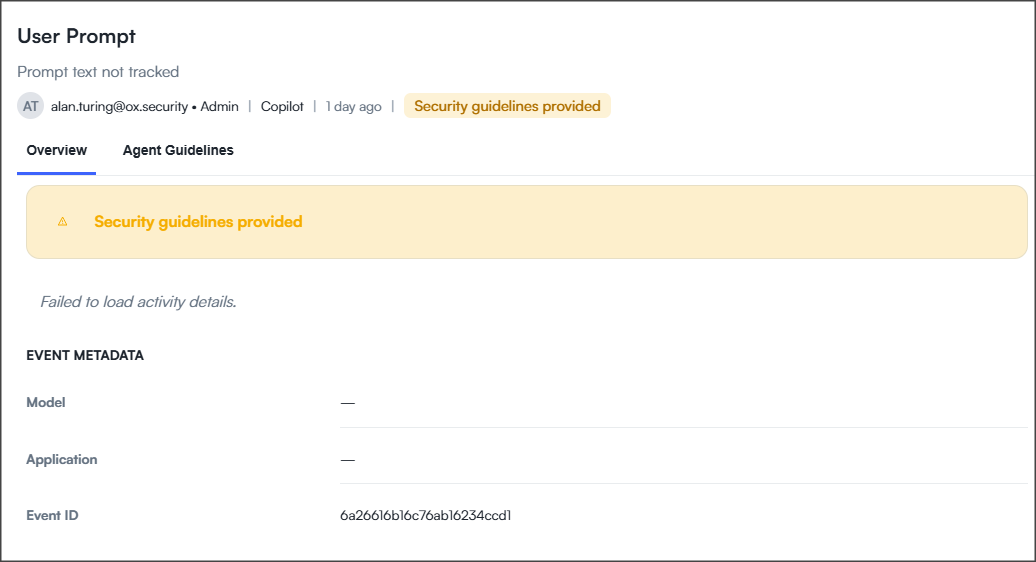
Select a User Prompt activity to review how VibeSec evaluated the prompt and whether security guidance was provided to the agent.
| Section | Description |
| -------------- | -------------------------------------------------------------------------------------------------------------------------------------------------- |
| Status card | Shows the outcome of VibeSec's review. For example, **Security Guideline Applied** indicates that VibeSec returned security guidance to the agent. |
| Event Metadata | Displays technical details about the prompt event, including the AI model, application, when available, and event ID. |
### Tool Use details
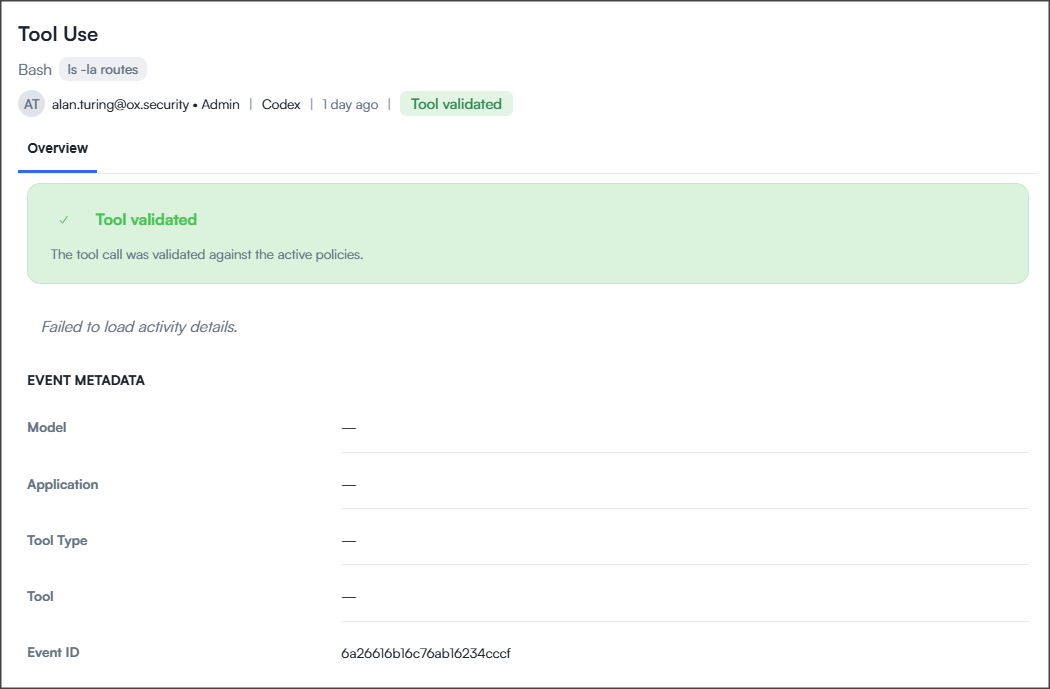
Select a Tool Use activity to review how VibeSec evaluated the tool invocation.
| Section | Description |
| -------------- | ---------------------------------------------------------------------------------------------------------------------------------------------- |
| Status card | Shows the outcome of VibeSec's review. For example, **Tool Validated** indicates that the tool invocation was reviewed and allowed to proceed. |
| Event Metadata | Displays technical details about the tool use event, including the AI model, application, tool type, tool, and event ID. |
### Other activity details
For activity related to specific VibeSec security capabilities, see the corresponding topic for information about the activity and the details available in the Agent Activity Log:
* [Secret protection](/vibesec/secret-protection.md): Secret detection and blocked prompt details.
* [Malicious dependency governance](/vibesec/malicious-dependency-governance.md): Malicious dependency detection and blocking details.
---
# Agent Instructions
This documentation is published with GitBook. GitBook is the documentation platform designed so that both humans and AI agents can read, navigate, and reason over technical content effectively. Learn more at gitbook.com.
## Querying This Documentation
If you need additional information that is not directly available in this page, you can query the documentation dynamically by asking a question.
Perform an HTTP GET request on the current page URL with the `ask` query parameter, and the optional `goal` query parameter:
```
GET https://docs.ox.security/vibesec/agent-activity-log.md?ask=&goal=
```
`ask` is the immediate question: it should be specific, self-contained, and written in natural language.
`goal` is optional and describes the broader end goal you are ultimately trying to accomplish on behalf of the user. GitBook uses it to tailor the answer towards what is most useful for that goal.
The response will contain a direct answer to the question and relevant excerpts and sources from the documentation.
Use this mechanism when the answer is not explicitly present in the current page, you need clarification or additional context, or you want to retrieve related documentation sections.
.png?alt=media)