> For the complete documentation index, see [llms.txt](https://docs.ox.security/llms.txt). Markdown versions of documentation pages are available by appending `.md` to page URLs; this page is available as [Markdown](https://docs.ox.security/vibesec/installing-vibesec/deploying-vibesec-across-the-organization.md).
# Deploying VibeSec Across the Organization
Use this method to deploy VibeSec across multiple machines using an MDM tool.
This approach allows your IT team to install, update, and enforce VibeSec across all developer machines without requiring [manual setup](/vibesec/installing-vibesec/installing-vibesec.md).
VibeSec is platform-agnostic. You can apply the same principles and scripts using any MDM tool, such as Jamf, Microsoft Intune, or Kandji.
VibeSec installation can run repeatedly. When executed, it updates existing installations, reuses authentication when available, and restores configuration if it was changed or removed.
Running the installation script frequently ensures:
* All machines run the latest version
* The installation is restored if it is disabled or removed
> **Note**\
> Run the script every hour to keep VibeSec installed and up to date. Use a shorter interval for stricter enforcement.
## Authentication methods
VibeSec supports two authentication methods for MDM deployment. The method you choose determines how developers are authenticated after installation and whether user setup is required in advance.
* **OAuth:** Developers are prompted to authenticate in their browser when they first use VibeSec. This requires either organizational SSO to be configured in OX (so users are created automatically on first sign-in), or pre-existing OX users for each developer.
* **API token:** Developers are authenticated automatically during installation. No additional sign-in is required, and there is no need to create OX users in advance.
OX provides [a separate installation script for each authentication method](#deployment-scripts).
For MDM and fleet deployments, **API token authentication is recommended** because it provides a simpler centralized deployment experience. Developers are authenticated automatically during installation and do not need to complete an individual sign-in flow.
OAuth is supported for MDM deployments, but is better suited to manual installations because each developer must authenticate through their browser when they first use VibeSec.
| Authentication method | User experience | Requirements | Recommendation |
| --------------------- | --------------------------------------------------------------------------------------------------------------------- | ---------------------------------------------------------------------------------------------------------------------------------------------------------------- | ------------------------------------------ |
| OAuth | Developers are prompted to authenticate in their browser the first time they use VibeSec. | Either organizational SSO must be configured in OX so users are created automatically during sign-in, or OX user accounts must already exist for all developers. | Recommended for manual installations. |
| API token | Developers are authenticated automatically during installation. No sign-in is required when they start using VibeSec. | No pre-created OX users or SSO configuration are required. | Recommended for MDM and fleet deployments. |
OX provides a separate installation script for each authentication method.
## Prerequisites
| Prerequisite | Details |
| ------------------------------------------------------------ | -------------------------------------------------------------------------------------------------------------------------------------------------------------------------------------------------------------------------------------------------------------------------------------------------------------------------------------------------------------------------------------------------------------- |
| **Network access** |
If your organization restricts outbound network traffic (for example, using a proxy or firewall), add the following domains to your allowlist:
|
| **API token authentication (recommended)** | If you are using the API token authentication method, create a [new VibeSec token](/vibesec/installing-vibesec/creating-new-vibesec-tokens.md) before you begin. |
| **OAuth authentication, auto-provisioning for new OX users** |
If you authenticate using OAuth and your developers do not already have OX user accounts, ensure that auto-provisioning is enabled in your OX settings.
This allows OX to automatically create a user for each developer upon first login.
To enable auto-provisioning, see Sign in to OX for instructions.
|
## Install VibeSec using MDM
Use your MDM tool to distribute and enforce VibeSec across machines.
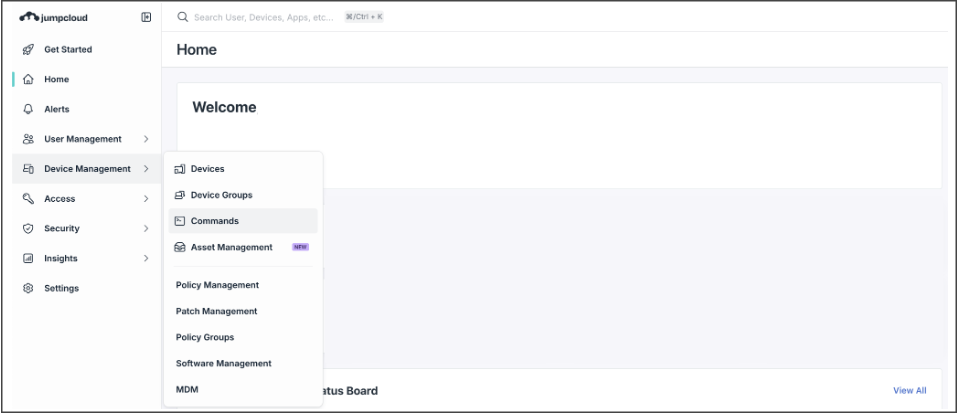
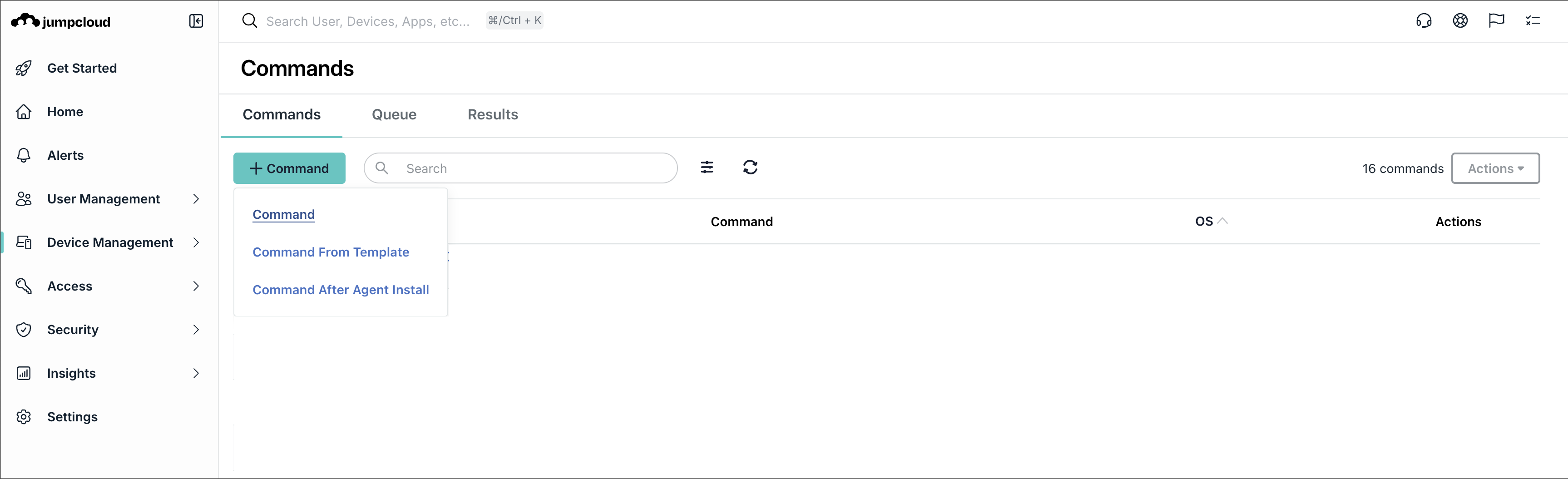
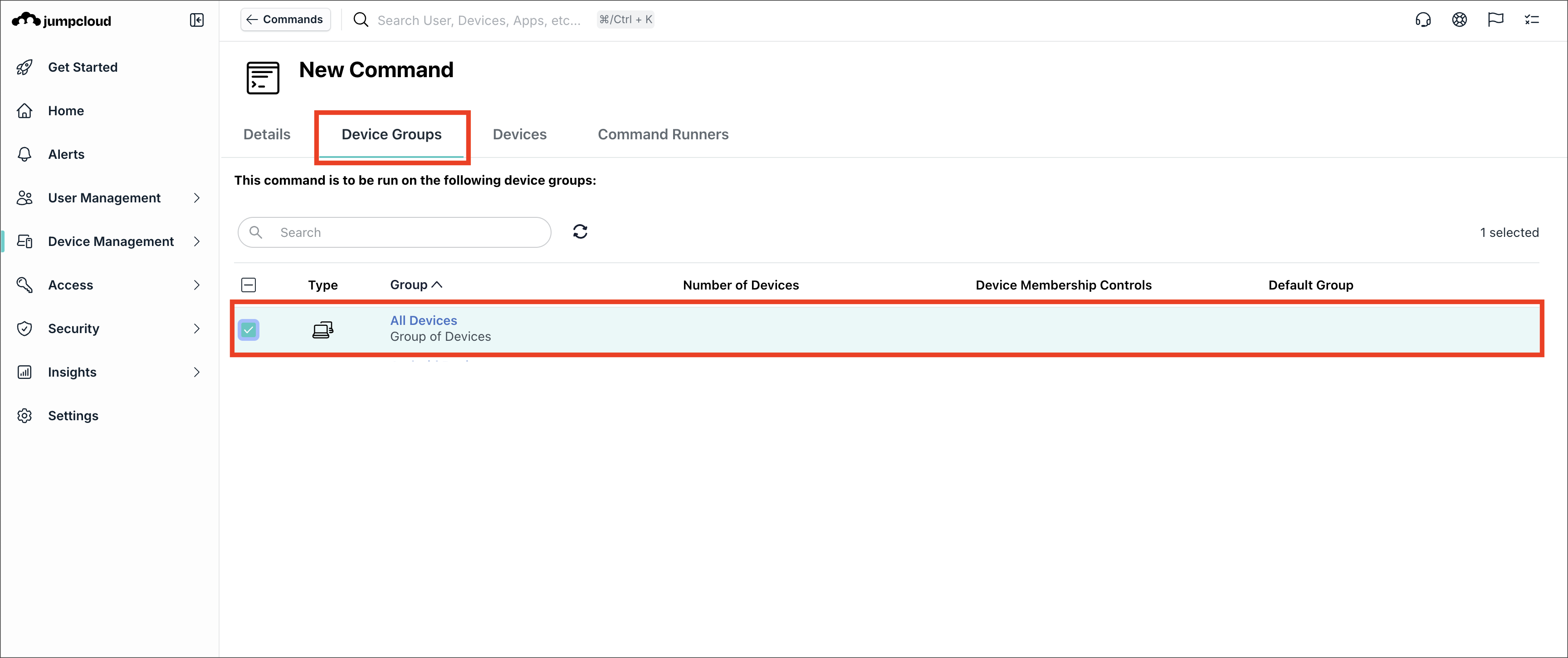
The following example uses JumpCloud to demonstrate how to deploy VibeSec. The same principles apply to other MDM tools. Adjust the steps based on your environment.
### Step 1: Create the command
1. Go to your MDM tool.
2. Create a new command.
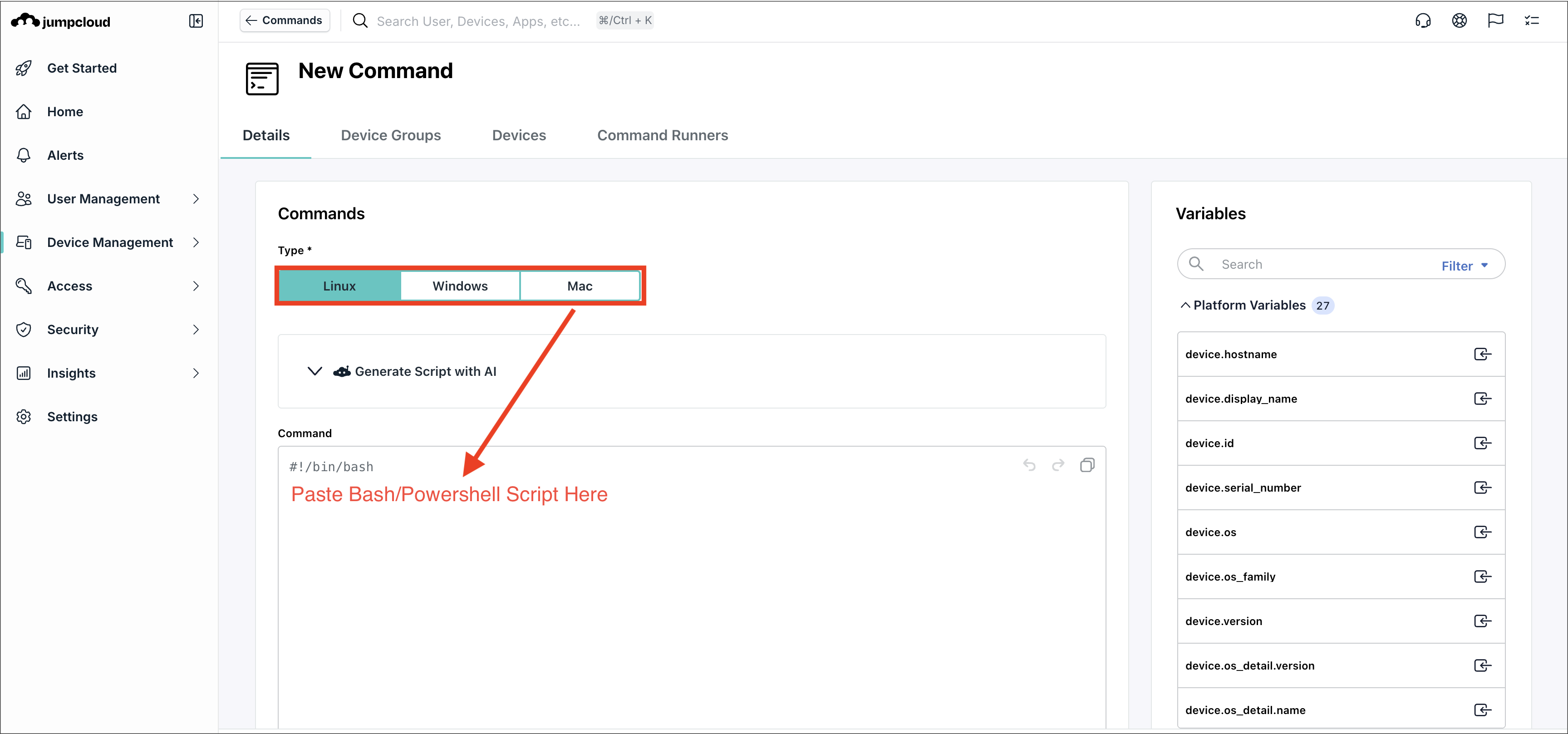
3. Paste the relevant [script for each operating system](#deployment-scripts).
### Step 2: Configure execution and assign the command
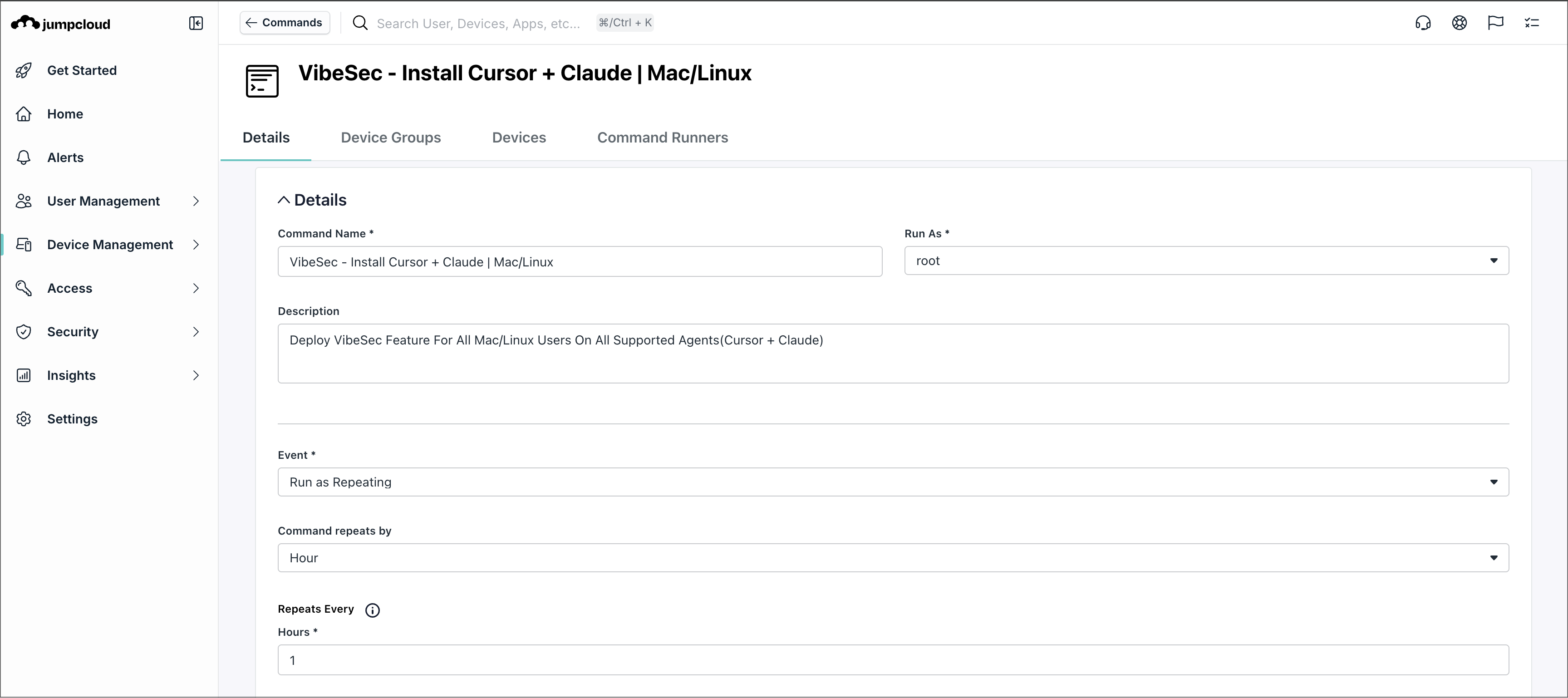
1. Set the command to run on a schedule.
2. Set the execution interval:
* (recommended option) Run every hour to keep VibeSec installed and up to date,
**Or**
* Run every 5 minutes to enforce configuration and restore changes more quickly
3. To assign the command, select the relevant device groups or devices.
### Step 3: Verify deployment
1. Go to a target machine.
2. Confirm that VibeSec is installed.
3. Verify that the script runs periodically.
4. Check logs if installation fails.
## Deployment scripts
Use the script that matches your operating system and [authentication method](#authentication-methods).
> Re-running the installation script does not affect the user if the installation is unchanged. If VibeSec was removed or modified, the script restores it automatically.
{% tabs %}
{% tab title="Mac & Linux: OAuth" %}
```
#!/bin/bash
rm -f /tmp/ox-vibesec-install.*
loggedInUser=$(stat -f %Su /dev/console)
loggedInUserHome=$(dscl . -read /Users/"$loggedInUser" NFSHomeDirectory | awk '{print $2}')
# Write the install script to a temp file to avoid nested quoting issues
TMPSCRIPT=$(mktemp /tmp/ox-vibesec-install.XXXXXX)
cat > "$TMPSCRIPT" << 'EOFSCRIPT'
#!/bin/bash
echo "User: $(whoami)"
curl -fsSL https://ox-vibesec.s3.eu-west-1.amazonaws.com/vibesec-installation/install.sh | bash -s -- --ox-flag
EOFSCRIPT
chmod 755 "$TMPSCRIPT"
chown "$loggedInUser" "$TMPSCRIPT"
su - "$loggedInUser" -c "bash $TMPSCRIPT"
rm -f "$TMPSCRIPT"
```
{% endtab %}
{% tab title="Mac & Linux: Token" %}
```
#!/bin/bash
# ── Replace with your API token ──
OX_TOKEN=""
# ──────────────────────────────────
rm -f /tmp/ox-vibesec-install.*
loggedInUser=$(stat -f %Su /dev/console)
loggedInUserHome=$(dscl . -read /Users/"$loggedInUser" NFSHomeDirectory | awk '{print $2}')
# Write the install script to a temp file to avoid nested quoting issues
TMPSCRIPT=$(mktemp /tmp/ox-vibesec-install.XXXXXX)
cat > "$TMPSCRIPT" << EOFSCRIPT
#!/bin/bash
echo "User: \$(whoami)"
curl -fsSL https://ox-vibesec.s3.eu-west-1.amazonaws.com/vibesec-installation/install.sh | bash -s -- --ox-flag --token "${OX_TOKEN}"
EOFSCRIPT
chmod 755 "$TMPSCRIPT"
chown "$loggedInUser" "$TMPSCRIPT"
su - "$loggedInUser" -c "bash $TMPSCRIPT"
rm -f "$TMPSCRIPT"
```
{% endtab %}
{% tab title="Windows: OAuth" %}
```
# Clean up any previous temp files
Remove-Item -Path "$env:TEMP\ox-vibesec-install.*" -Force -ErrorAction SilentlyContinue
# Get the logged-in user
$loggedInUser = (Get-CimInstance -ClassName Win32_ComputerSystem).UserName
if (-not $loggedInUser) {
$explorerProcess = Get-Process -Name explorer -ErrorAction SilentlyContinue | Select-Object -First 1
if ($explorerProcess) {
$loggedInUser = (Get-CimInstance Win32_Process -Filter "ProcessId=$($explorerProcess.Id)").GetOwner().User
}
}
$userOnly = $loggedInUser -replace '^.*\\'
$loggedInUserProfile = (Get-CimInstance Win32_UserProfile | Where-Object {
$_.LocalPath -match "\\$userOnly$"
}).LocalPath
if (-not $loggedInUserProfile) {
$loggedInUserProfile = "C:\Users\$userOnly"
}
Write-Host "Logged-in user: $loggedInUser"
Write-Host "User profile: $loggedInUserProfile"
# Build the inner script as a plain string — no temp file needed
$logFile = [System.IO.Path]::Combine($env:TEMP, "ox-vibesec-install.$([guid]::NewGuid().ToString('N').Substring(0,8)).log")
$innerScript = @'
$ErrorActionPreference = 'Continue'
try {
Write-Output "User: $env:USERNAME"
$script = irm https://ox-vibesec.s3.eu-west-1.amazonaws.com/vibesec-installation/install.ps1
& ([scriptblock]::Create($script)) -OxFlag
Write-Output "Exit code: $LASTEXITCODE"
} catch {
Write-Output "EXCEPTION: $($_.Exception.Message)"
Write-Output "AT: $($_.ScriptStackTrace)"
exit 1
}
'@
# Encode as base64 for -EncodedCommand (requires UTF-16LE)
$bytes = [System.Text.Encoding]::Unicode.GetBytes($innerScript)
$encodedCommand = [Convert]::ToBase64String($bytes)
# Run as the logged-in user via scheduled task
$taskName = "OxVibeSecInstall_$([guid]::NewGuid().ToString('N').Substring(0,8))"
$action = New-ScheduledTaskAction -Execute "powershell.exe" -Argument "-NoProfile -ExecutionPolicy Bypass -EncodedCommand $encodedCommand" -WorkingDirectory $loggedInUserProfile
$principal = New-ScheduledTaskPrincipal -UserId $loggedInUser -LogonType Interactive -RunLevel Limited
# Redirect all output streams to log file via task settings
$settings = New-ScheduledTaskSettingsSet -AllowStartIfOnBatteries -DontStopIfGoingOnBatteries
$trigger = New-ScheduledTaskTrigger -Once -At (Get-Date).AddSeconds(1)
# Use cmd wrapper to capture output since EncodedCommand doesn't support redirection
$action = New-ScheduledTaskAction -Execute "cmd.exe" -Argument "/c powershell.exe -NoProfile -ExecutionPolicy Bypass -EncodedCommand $encodedCommand > `"$logFile`" 2>&1"
Register-ScheduledTask -TaskName $taskName -Action $action -Principal $principal -Settings $settings -Force | Out-Null
Start-ScheduledTask -TaskName $taskName
# Wait for completion
$timeout = 120
$elapsed = 0
do {
Start-Sleep -Seconds 2
$elapsed += 2
$taskInfo = Get-ScheduledTask -TaskName $taskName -ErrorAction SilentlyContinue
} while ($taskInfo.State -eq 'Running' -and $elapsed -lt $timeout)
# Check result
$taskResult = (Get-ScheduledTaskInfo -TaskName $taskName).LastTaskResult
# Dump log to MDM stdout, then clean up
if (Test-Path $logFile) {
Write-Host "=== Task Output ==="
Get-Content $logFile | Write-Host
Remove-Item $logFile -Force -ErrorAction SilentlyContinue
}
# Cleanup
Unregister-ScheduledTask -TaskName $taskName -Confirm:$false -ErrorAction SilentlyContinue
if ($elapsed -ge $timeout) {
Write-Host "ERROR: Install task timed out after ${timeout}s"
exit 1
}
if ($taskResult -ne 0) {
Write-Host "ERROR: Install failed with exit code $taskResult"
exit 1
}
Write-Host "Installation complete."
```
{% endtab %}
{% tab title="Windows: Token" %}
```
# Clean up any previous temp files
Remove-Item -Path "$env:TEMP\ox-vibesec-install.*" -Force -ErrorAction SilentlyContinue
# Get the logged-in user
$loggedInUser = (Get-CimInstance -ClassName Win32_ComputerSystem).UserName
if (-not $loggedInUser) {
$explorerProcess = Get-Process -Name explorer -ErrorAction SilentlyContinue | Select-Object -First 1
if ($explorerProcess) {
$loggedInUser = (Get-CimInstance Win32_Process -Filter "ProcessId=$($explorerProcess.Id)").GetOwner().User
}
}
$userOnly = $loggedInUser -replace '^.*\\'
$loggedInUserProfile = (Get-CimInstance Win32_UserProfile | Where-Object {
$_.LocalPath -match "\\$userOnly$"
}).LocalPath
if (-not $loggedInUserProfile) {
$loggedInUserProfile = "C:\Users\$userOnly"
}
Write-Host "Logged-in user: $loggedInUser"
Write-Host "User profile: $loggedInUserProfile"
# Build the inner script as a plain string — no temp file needed
$logFile = [System.IO.Path]::Combine($env:TEMP, "ox-vibesec-install.$([guid]::NewGuid().ToString('N').Substring(0,8)).log")
$innerScript = @'
$ErrorActionPreference = 'Continue'
try {
Write-Output "User: $env:USERNAME"
$script = irm https://ox-vibesec.s3.eu-west-1.amazonaws.com/vibesec-installation/install.ps1
& ([scriptblock]::Create($script)) -OxFlag -Token "YOUR_TOKEN_HERE"
Write-Output "Exit code: $LASTEXITCODE"
} catch {
Write-Output "EXCEPTION: $($_.Exception.Message)"
Write-Output "AT: $($_.ScriptStackTrace)"
exit 1
}
'@
# Encode as base64 for -EncodedCommand (requires UTF-16LE)
$bytes = [System.Text.Encoding]::Unicode.GetBytes($innerScript)
$encodedCommand = [Convert]::ToBase64String($bytes)
# Run as the logged-in user via scheduled task
$taskName = "OxVibeSecInstall_$([guid]::NewGuid().ToString('N').Substring(0,8))"
$action = New-ScheduledTaskAction -Execute "powershell.exe" -Argument "-NoProfile -ExecutionPolicy Bypass -EncodedCommand $encodedCommand" -WorkingDirectory $loggedInUserProfile
$principal = New-ScheduledTaskPrincipal -UserId $loggedInUser -LogonType Interactive -RunLevel Limited
# Redirect all output streams to log file via task settings
$settings = New-ScheduledTaskSettingsSet -AllowStartIfOnBatteries -DontStopIfGoingOnBatteries
$trigger = New-ScheduledTaskTrigger -Once -At (Get-Date).AddSeconds(1)
# Use cmd wrapper to capture output since EncodedCommand doesn't support redirection
$action = New-ScheduledTaskAction -Execute "cmd.exe" -Argument "/c powershell.exe -NoProfile -ExecutionPolicy Bypass -EncodedCommand $encodedCommand > `"$logFile`" 2>&1"
Register-ScheduledTask -TaskName $taskName -Action $action -Principal $principal -Settings $settings -Force | Out-Null
Start-ScheduledTask -TaskName $taskName
# Wait for completion
$timeout = 120
$elapsed = 0
do {
Start-Sleep -Seconds 2
$elapsed += 2
$taskInfo = Get-ScheduledTask -TaskName $taskName -ErrorAction SilentlyContinue
} while ($taskInfo.State -eq 'Running' -and $elapsed -lt $timeout)
# Check result
$taskResult = (Get-ScheduledTaskInfo -TaskName $taskName).LastTaskResult
# Dump log to MDM stdout, then clean up
if (Test-Path $logFile) {
Write-Host "=== Task Output ==="
Get-Content $logFile | Write-Host
Remove-Item $logFile -Force -ErrorAction SilentlyContinue
}
# Cleanup
Unregister-ScheduledTask -TaskName $taskName -Confirm:$false -ErrorAction SilentlyContinue
if ($elapsed -ge $timeout) {
Write-Host "ERROR: Install task timed out after ${timeout}s"
exit 1
}
if ($taskResult -ne 0) {
Write-Host "ERROR: Install failed with exit code $taskResult"
exit 1
}
Write-Host "Installation complete."
```
{% endtab %}
{% endtabs %}
---
# Agent Instructions
This documentation is published with GitBook. GitBook is the documentation platform designed so that both humans and AI agents can read, navigate, and reason over technical content effectively. Learn more at gitbook.com.
## Querying This Documentation
If you need additional information that is not directly available in this page, you can query the documentation dynamically by asking a question.
Perform an HTTP GET request on the current page URL with the `ask` query parameter, and the optional `goal` query parameter:
```
GET https://docs.ox.security/vibesec/installing-vibesec/deploying-vibesec-across-the-organization.md?ask=&goal=
```
`ask` is the immediate question: it should be specific, self-contained, and written in natural language.
`goal` is optional and describes the broader end goal you are ultimately trying to accomplish on behalf of the user. GitBook uses it to tailor the answer towards what is most useful for that goal.
The response will contain a direct answer to the question and relevant excerpts and sources from the documentation.
Use this mechanism when the answer is not explicitly present in the current page, you need clarification or additional context, or you want to retrieve related documentation sections.