> For the complete documentation index, see [llms.txt](https://docs.ox.security/llms.txt). Markdown versions of documentation pages are available by appending `.md` to page URLs; this page is available as [Markdown](https://docs.ox.security/vibesec/malicious-dependency-governance.md).
# Malicious Dependency Blocking
> **Note:**
>
> * This capability is currently in Early Access (EA) and is not generally available. To request access, please contact OX technical support.
Malicious Dependency Blocking helps prevent AI coding agents from installing known malicious dependencies. When an AI agent attempts to install a dependency, VibeSec validates the requested package and version before the installation completes.
If the dependency is identified as malicious, VibeSec blocks the installation and records the event in OX, where you can review both blocked and successful dependency validation activity.
### Enable Malicious Dependency Blocking
**To enable Malicious Dependency Blocking:**
1. Go to **Settings > VibeSec**.
2. Switch on **Dependency Governance**.
3. Under **Dependency Governance**, switch on **Block malicious dependencies**.
When **Block malicious dependencies** is turned off, VibeSec continues to detect and record malicious dependency installation attempts but does not block them.
> **Note:** **Dependency Governance** must be enabled for Malicious Dependency Blocking to take effect.
### How Malicious Dependency Blocking works
When the Dependencies capability is enabled, VibeSec automatically validates dependency installation requests made by AI coding agents. The installation waits for VibeSec to complete the validation before proceeding.
* If the requested dependency version passes validation, the installation proceeds normally.
* If the requested dependency version is identified as malicious, VibeSec blocks the installation before the dependency is added to the project.
The AI coding tool displays a message explaining why the installation was blocked and, when available, recommends a safe alternative version.
VibeSec validates dependencies when an AI agent attempts to:
* Install a specific package and version, such as `npm install package@x.y.z`.
* Run another supported package installation command.
* Edit or update a dependency manifest file.
If a single installation includes multiple dependencies, VibeSec evaluates each dependency individually. If one dependency is identified as malicious and the dependencies are part of the same installation command or manifest update, VibeSec blocks the entire operation. No dependencies from that operation are installed.
> **Note:** Malicious Dependency Blocking currently supports the `npm` package manager for Node.js packages and the `pip` package manager for Python packages.
### Review dependency activity
After a dependency installation attempt, you can review both blocked and successful dependency validation events in OX.
To review dependency activity:
1. Go to **Agent Activity Log**.
2. Filter the activity by **Dependency installation**.
| Column | Description |
| ------------------ | ---------------------------------------------------------------------------------------------------------------------------------------------------------------------------------------------------------------------------------------------------------------------------- |
| **Activity** | The activity type. Dependency validation events appear as **Dependency installation**. |
| **Details** | Displays the dependency that the agent attempted to install or the number of dependencies included in the installation. |
| **Risk Mitigated** | Displays the risk identified by VibeSec. For blocked installations, the value is **Restricted dependency blocked**. |
| **OX Action** |
The action taken by VibeSec.
- Dependency Blocked – The installation was blocked because a malicious dependency was detected. - Dependency Validated – The dependency passed validation and the installation was allowed.
|
| **When** | When the activity occurred. |
| **User** | The user associated with the activity. |
| **Tool** | The AI coding tool where the activity occurred. |
> **Note:** The Agent Activity Log displays activity from the last seven days. Older events are not retained.
### Review dependency installation details
Select a dependency installation event to review why VibeSec allowed or blocked the operation and which dependencies were involved.
| Section | Description |
| --------------------- | ------------------------------------------------------------------------------------------------------------------------------------------------------------------------------------------------------------------------------------------------------------------------------------------------------------------------------------------------------------- |
| **Event summary** | Displays the dependency installation summary, including the user, user role, AI coding tool, event time, and the action taken by VibeSec. |
| **Blocked by Policy** | Explains why the installation was blocked. If multiple dependencies were included in the same installation and one violated the policy, VibeSec blocks the entire installation and no dependencies are installed. This section appears only for blocked events. |
| **Dependencies** |
Lists each dependency included in the installation, including the package name, requested version, package ecosystem, and validation status.
Status values: • Malicious: The dependency or requested version was identified as malicious. • Cleared: The dependency passed validation.
|
| **Event Metadata** | Displays technical information about the event, including the tool that attempted the installation and the event ID. |
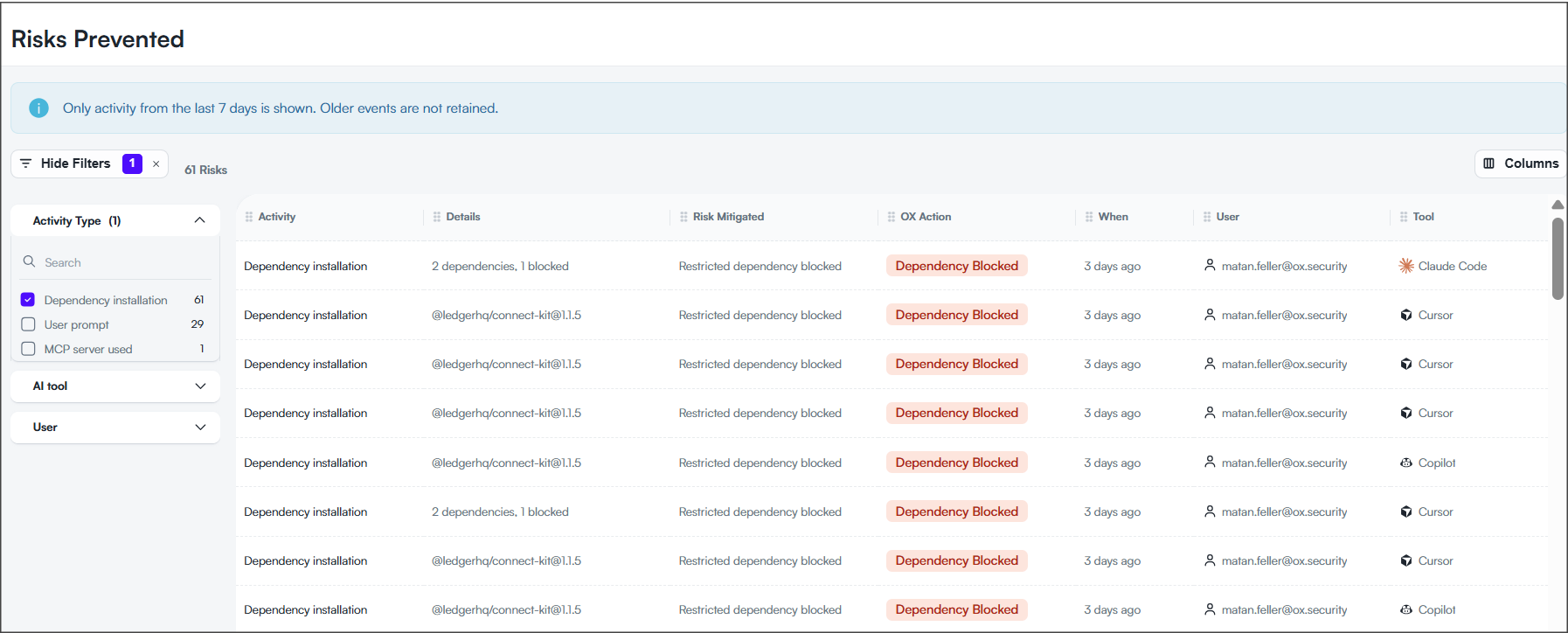
### Review blocked dependencies in Risks Prevented page
The Risks Prevented page provides a focused view of agent activity for which OX blocked a risk.
Dependency installation events appear on this page only when the dependency was blocked. Validated dependency installations are available in the Agent Activity Log, but do not appear in Risks Prevented.
> **Note:** The Risks Prevented page displays activity from the last seven days. Older events are not retained.
---
# Agent Instructions
This documentation is published with GitBook. GitBook is the documentation platform designed so that both humans and AI agents can read, navigate, and reason over technical content effectively. Learn more at gitbook.com.
## Querying This Documentation
If you need additional information that is not directly available in this page, you can query the documentation dynamically by asking a question.
Perform an HTTP GET request on the current page URL with the `ask` query parameter, and the optional `goal` query parameter:
```
GET https://docs.ox.security/vibesec/malicious-dependency-governance.md?ask=&goal=
```
`ask` is the immediate question: it should be specific, self-contained, and written in natural language.
`goal` is optional and describes the broader end goal you are ultimately trying to accomplish on behalf of the user. GitBook uses it to tailor the answer towards what is most useful for that goal.
The response will contain a direct answer to the question and relevant excerpts and sources from the documentation.
Use this mechanism when the answer is not explicitly present in the current page, you need clarification or additional context, or you want to retrieve related documentation sections.

.png?alt=media)
.png?alt=media)