> For the complete documentation index, see [llms.txt](https://docs.ox.security/llms.txt). Markdown versions of documentation pages are available by appending `.md` to page URLs; this page is available as [Markdown](https://docs.ox.security/vibesec/secret-protection.md).
# Secret Protection
## About secret protection
VibeSec helps prevent secrets from being exposed to AI coding agents by detecting secrets in prompts before they leave the developer's machine.
When a secret is detected, VibeSec can block the prompt before it reaches the agent or allow it to continue and record the detection in the Agent Activity Log.
## How secret protection works
When a developer submits a prompt to an AI coding agent, VibeSec scans the prompt for secrets before it leaves the developer's machine.
If a secret is detected, VibeSec identifies its type and applies the configured action:
* **Block:** The prompt is stopped before it reaches the AI agent.
* **Allow:** The prompt continues to the AI agent and the detection is recorded in the Agent Activity Log.
Secret values are protected in the activity data. When a secret is shown in the Agent Activity Log, only a masked representation of its value is displayed.
## Reviewing secret activity
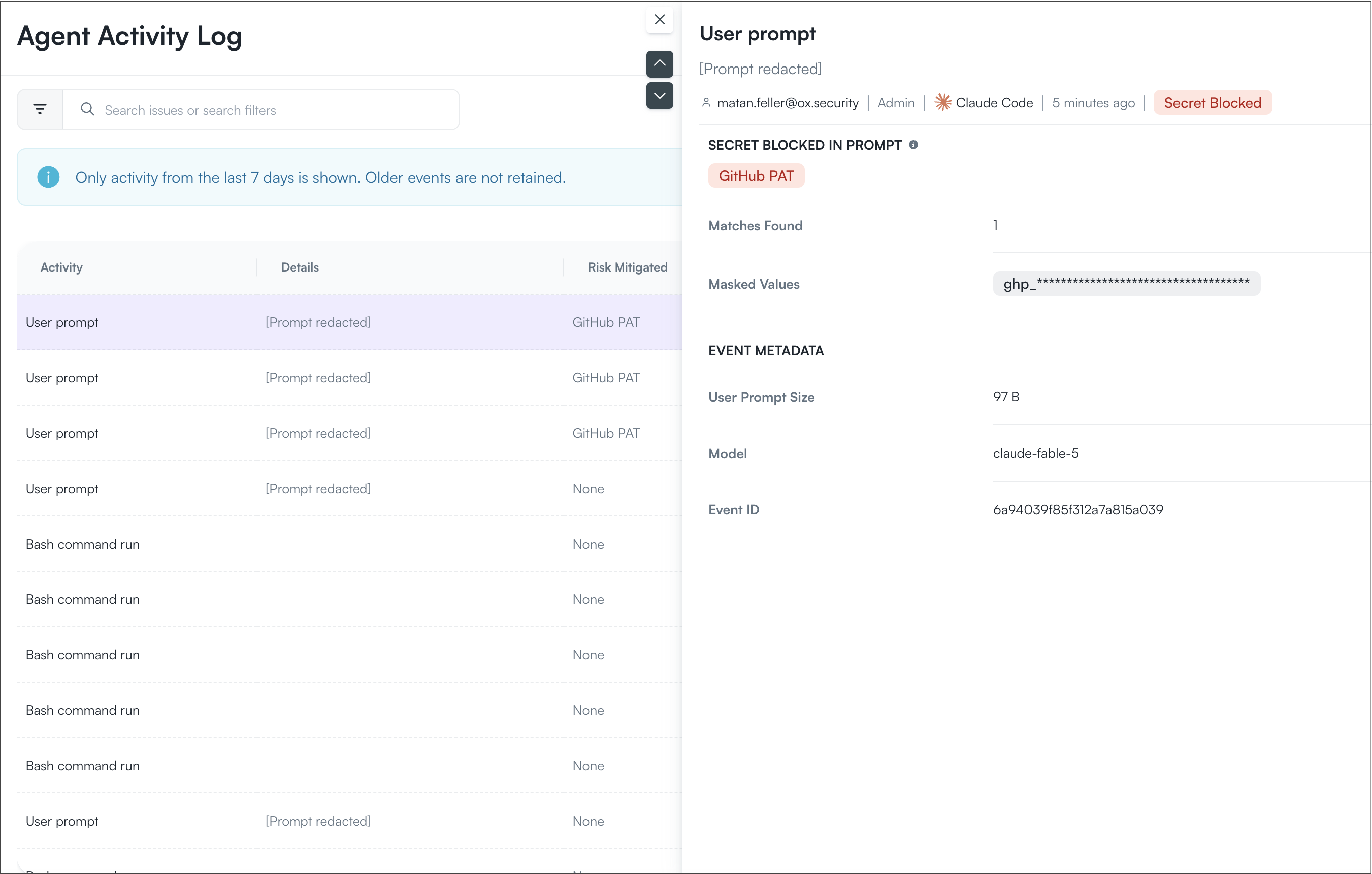
Secret detections are recorded in the Agent Activity Log. The log provides information about the activity without exposing the complete secret value.
Select an activity to open the Activity Details dialog.
For a blocked prompt, the prompt content is redacted, and the activity is marked **Secret Blocked**. The dialog identifies the type of secret detected and provides additional information about the detection.
| Field | Description |
| ---------------- | ----------------------------------------------------------------------------------------- |
| User | User who submitted the prompt containing the secret. |
| Role | User's role in OX. |
| Agent | AI coding agent used for the activity, such as Claude Code. |
| Time | Time when the activity occurred. |
| Status | Indicates how VibeSec handled the detected secret, such as **Secret Blocked**. |
| Secret type | Type of secret detected in the prompt, such as a GitHub personal access token (PAT). |
| Matches Found | Number of secrets detected in the prompt. |
| Masked Values | Masked representation of the detected secret. The complete secret value is not displayed. |
| User Prompt Size | Size of the user prompt. |
| Model | AI model the prompt was intended for. |
| Event ID | Unique identifier for the activity event. |
### Enabling secret protection
To enable secret protection:
1. Go to **Settings > VibeSec**.
2. Enable **Secret Protection**.
3. Select how VibeSec handles prompts containing secrets:
* **Block:** Prevents the prompt from reaching the AI agent.
* **Allow:** Allows the prompt to continue and records the detection in the Agent Activity Log.
---
# Agent Instructions
This documentation is published with GitBook. GitBook is the documentation platform designed so that both humans and AI agents can read, navigate, and reason over technical content effectively. Learn more at gitbook.com.
## Querying This Documentation
If you need additional information that is not directly available in this page, you can query the documentation dynamically by asking a question.
Perform an HTTP GET request on the current page URL with the `ask` query parameter, and the optional `goal` query parameter:
```
GET https://docs.ox.security/vibesec/secret-protection.md?ask=&goal=
```
`ask` is the immediate question: it should be specific, self-contained, and written in natural language.
`goal` is optional and describes the broader end goal you are ultimately trying to accomplish on behalf of the user. GitBook uses it to tailor the answer towards what is most useful for that goal.
The response will contain a direct answer to the question and relevant excerpts and sources from the documentation.
Use this mechanism when the answer is not explicitly present in the current page, you need clarification or additional context, or you want to retrieve related documentation sections.