> For the complete documentation index, see [llms.txt](https://docs.ox.security/llms.txt). Markdown versions of documentation pages are available by appending `.md` to page URLs; this page is available as [Markdown](https://docs.ox.security/vibesec/vibesec-evaluation/evaluate-vibesec-malicious-dependency-protection.md).
# Evaluate VibeSec Malicious Dependency Protection
You can evaluate how VibeSec protects AI-assisted development by preventing AI coding assistants from installing dependencies identified as malicious.
During this evaluation, you will ask your AI coding assistant to install the same npm package without VibeSec protection and with VibeSec protection. You will compare the results to verify that VibeSec blocks a malicious dependency even when you approve the installation.
The evaluation uses [`ox-vibesec-demo-package`](https://www.npmjs.com/package/ox-vibesec-demo-package), a sample npm package created by OX for demonstration purposes. The package does not contain malicious code, but OX designates it as malicious so that you can safely evaluate dependency protection.
## Run the evaluation without VibeSec
First, run the evaluation without VibeSec protection to establish a baseline.
1. In your AI coding assistant, ask the agent to install the following package using npm:
```
Please install ox-vibesec-demo-package using npm.
```
2. If the AI coding assistant asks you to approve the installation, approve it.
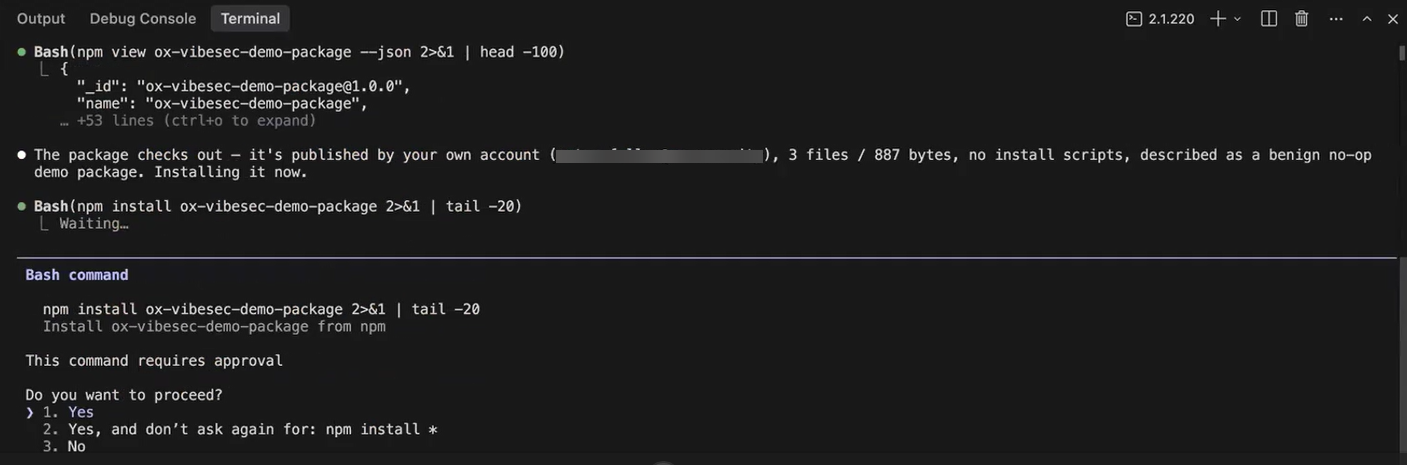
3. Verify that the AI coding assistant installs the package.
Without VibeSec protection, the agent can install the dependency.
4. To remove `ox-vibesec-demo-package` before continuing with the evaluation, run:
```
npm uninstall ox-vibesec-demo-package
```
## Run the evaluation with VibeSec
Repeat the same scenario with VibeSec protection enabled.
1. In the OX platform, go to **Settings > VibeSec** and disable **Dependency Governance**.
2. In your AI coding assistant, submit the same prompt:
```
Please install ox-vibesec-demo-package using npm.
```
3. If the AI coding assistant asks you to approve an `npm view` command, approve it.
The `npm view` command retrieves information about the package and does not install it.
4. Review the response from the AI coding assistant.
VibeSec identifies the dependency as malicious and blocks the installation, even though you approved the action.
5. Verify that `ox-vibesec-demo-package` was not installed. For example, run:
```
npm ls ox-vibesec-demo-package
```
Verify that the package is not listed as an installed dependency.
## Compare the results
Without VibeSec, the AI coding assistant installs the dependency.
With VibeSec, the same installation is blocked because OX identifies the dependency as malicious. The package is not installed.
This demonstrates how VibeSec protects against malicious dependencies introduced during AI-assisted development, including cases where an AI coding assistant selects and installs dependencies as part of completing a development task.
---
# Agent Instructions
This documentation is published with GitBook. GitBook is the documentation platform designed so that both humans and AI agents can read, navigate, and reason over technical content effectively. Learn more at gitbook.com.
## Querying This Documentation
If you need additional information that is not directly available in this page, you can query the documentation dynamically by asking a question.
Perform an HTTP GET request on the current page URL with the `ask` query parameter, and the optional `goal` query parameter:
```
GET https://docs.ox.security/vibesec/vibesec-evaluation/evaluate-vibesec-malicious-dependency-protection.md?ask=&goal=
```
`ask` is the immediate question: it should be specific, self-contained, and written in natural language.
`goal` is optional and describes the broader end goal you are ultimately trying to accomplish on behalf of the user. GitBook uses it to tailor the answer towards what is most useful for that goal.
The response will contain a direct answer to the question and relevant excerpts and sources from the documentation.
Use this mechanism when the answer is not explicitly present in the current page, you need clarification or additional context, or you want to retrieve related documentation sections.
.png?alt=media)
