> For the complete documentation index, see [llms.txt](https://docs.ox.security/llms.txt). Markdown versions of documentation pages are available by appending `.md` to page URLs; this page is available as [Markdown](https://docs.ox.security/vibesec/vibesec-prevented-risks-new.md).
# Prevented Risks
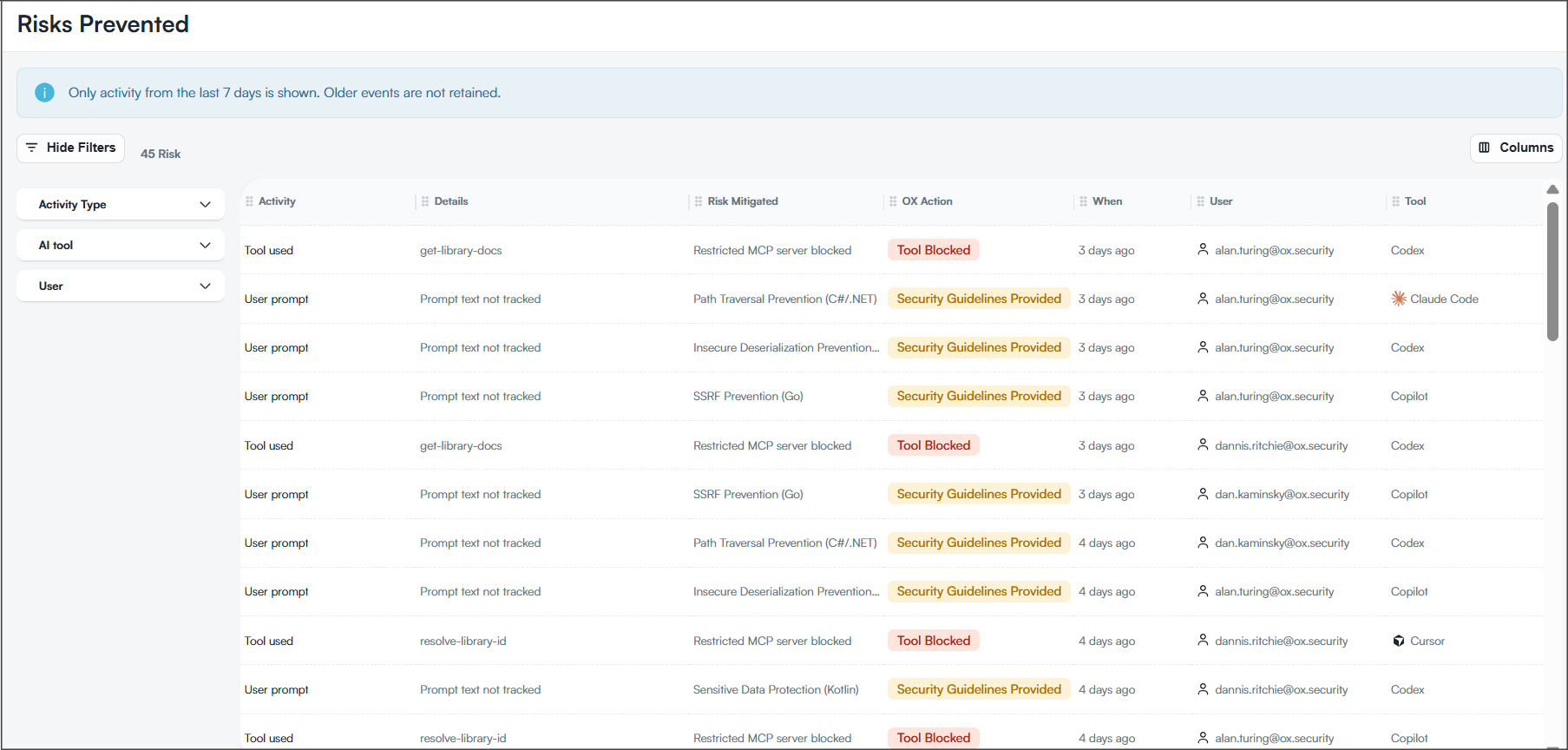
The Risks Prevented page shows security risks that OX VibeSec prevented before they reached production. It includes blocked tool usage, security guidance provided to AI agents, the affected users, and the actions OX took to mitigate the risk.
Reviewing this page helps you understand how developers interact with AI coding assistants, measure the effectiveness of your security controls, and identify the risks most frequently prevented across the organization.
### Risks prevented table
The table displays individual prevention events recorded during the last seven days.
| Column | Description |
| ------------------------ | -------------------------------------------------------------------------------------------------------------------------------------------------- |
| Activity | The type of activity that triggered the prevention event, such as a user prompt or tool usage. |
| Details | Additional information about the activity. For user prompts, prompt content is not retained. For tool activity, the tool name is shown. |
| Risk Mitigated | The risk that OX prevented, such as path traversal, SSRF, insecure deserialization, sensitive data exposure, or access to a restricted MCP server. |
| [OX Action](#ox-actions) | The action OX took to mitigate the risk. |
| When | When the event occurred. |
| User | The developer associated with the activity. |
| Tool | The AI coding assistant involved in the activity. |
#### OX actions
The OX Action column shows how OX responded to the activity.
| Action | Description |
| ---------------------------- | --------------------------------------------------------------------------------------- |
| Tool Blocked | OX prevented access to a restricted tool or MCP server. |
| Security Guidelines Provided | OX returned security guidance to the AI agent to help prevent insecure code generation. |
### Filtering activity
Use the filters pane to focus on specific prevention events.
| Filter | Description |
| ------------- | -------------------------------------- |
| Activity Type | Filters events by activity category. |
| AI Tool | Filters events by AI coding assistant. |
| User | Filters events by developer. |
The page displays activity from the last seven days only. Older events are not retained.
### Event details
Select an event in the table to open its details panel.
The details panel provides additional information about the prevented activity, including the mitigation applied, associated security guidance, and technical metadata captured during the event.
#### User prompt events
User prompt events are generated when a developer prompt triggers a security guideline.
Prompt content is not retained. Instead, the details panel shows the security guidance returned to the AI agent and metadata about the interaction.
| Section | Description |
| ---------------------------- | ----------------------------------------------------------------------------------------- |
| Guidelines Returned to Agent | The security guideline returned to the AI agent. |
| User Information | Information about the developer, AI coding assistant, event time, and mitigation applied. |
| Event Metadata | Technical details captured during the interaction. |
#### Guidelines Returned to Agent
This section shows the security guideline that OX returned to the AI agent.
| Field | Description |
| -------------- | ------------------------------------------------- |
| Guideline Name | The name of the guideline that was applied. |
| Category | The guideline category. |
| Size | The guideline size. |
| Owner | The user or organization that owns the guideline. |
#### Event metadata
The Event Metadata section provides additional context about the interaction.
| Field | Description |
| ---------------- | ------------------------------------------------------------------------ |
| User Prompt Size | The size of the submitted prompt. Prompt content itself is not retained. |
| Model | The AI model used to process the request. |
| Event ID | The unique identifier of the event. |
#### Tool usage events
Tool usage events are generated when a developer attempts to use a restricted tool or MCP server.
The details panel provides information about the blocked activity and the mitigation applied by OX.
| Section | Description |
| ---------------- | ----------------------------------------------------------------------------------------- |
| Tool Information | Information about the tool or MCP server involved in the activity. |
| User Information | Information about the developer, AI coding assistant, event time, and mitigation applied. |
| Event Metadata | Technical details captured during the event. |
{% hint style="info" %}
The exact fields displayed in the details panel can vary depending on the activity type and the mitigation applied.
{% endhint %}
### Related topics
* [About VibeSec](https://claude.ai/vibesec/vibesec.md)
* [VibeSec Usage Reports](https://claude.ai/generate-reports/built-in-reports/vibesec-usage-reports.md)
* [Installing VibeSec on a single device using hooks and OAuth](https://claude.ai/vibesec/vibesec/installing-vibesec.md)
* [Deploying VibeSec Across the Organization](https://claude.ai/vibesec/vibesec/deploying-vibesec-across-the-organization.md)
---
# Agent Instructions
This documentation is published with GitBook. GitBook is the documentation platform designed so that both humans and AI agents can read, navigate, and reason over technical content effectively. Learn more at gitbook.com.
## Querying This Documentation
If you need additional information that is not directly available in this page, you can query the documentation dynamically by asking a question.
Perform an HTTP GET request on the current page URL with the `ask` query parameter, and the optional `goal` query parameter:
```
GET https://docs.ox.security/vibesec/vibesec-prevented-risks-new.md?ask=&goal=
```
`ask` is the immediate question: it should be specific, self-contained, and written in natural language.
`goal` is optional and describes the broader end goal you are ultimately trying to accomplish on behalf of the user. GitBook uses it to tailor the answer towards what is most useful for that goal.
The response will contain a direct answer to the question and relevant excerpts and sources from the documentation.
Use this mechanism when the answer is not explicitly present in the current page, you need clarification or additional context, or you want to retrieve related documentation sections.