
Cloud Context Policies

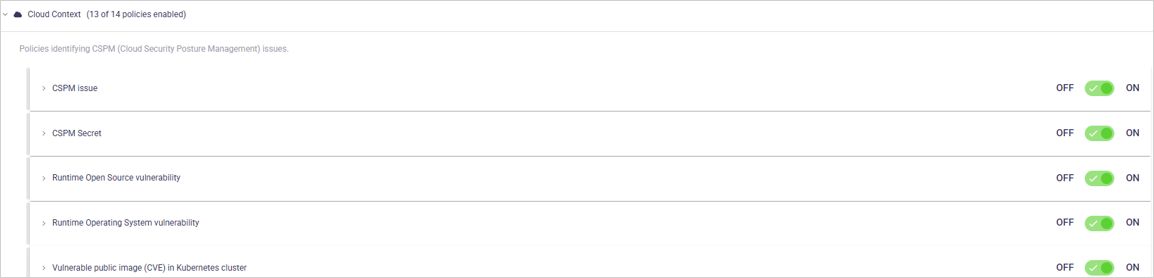
Cloud Context policies identify security risks, hardcoded secrets and PII, and misconfigurations in your cloud environments. OX evaluates cloud assets using cloud provider metadata and configuration data to identify risk and exposures.

The article describes the policies in this category, configuration options, and the impact of policy violations. For an overview of policies and policy management, see the Policies article.

View and manage Cloud Context policies

Open each policy to view the business impact and optional settings.

CSPM issue

Purpose: Detects cloud environment misconfigurations.

Business impact: Misconfigured cloud environments increase the risk of unauthorized access, data exposure, and compliance violations. CSPM evaluates cloud configurations against security benchmarks to identify risky settings early. Addressing these findings reduces the likelihood of security incidents and regulatory issues.

Setting
Description
Default

ON/OFF (toggle)

Enable/disable the policy.

ON

Show issues of severity (dropdown)

Limits which severities appear as issues.

All (including Info)

Ignore Application Business Priority for severity calculation (checkbox)

When enabled, severity is not adjusted based on application priority.

OFF

CSPM secret

Purpose: Detects hardcoded secrets stored in cloud environments.

Business impact: Storing secrets insecurely in cloud environments increases the risk of unauthorized access, data breaches, and broader infrastructure compromise. Secrets such as API keys, tokens, and credentials that are exposed or misconfigured in cloud services can be exploited by attackers. Identifying and securing these secrets early helps protect cloud environments and reduce the impact of security incidents.

Setting
Description
Default

ON/OFF (toggle)

Enable/disable the policy.

ON

Show issues of severity (dropdown)

Limits which severities appear as issues.

All (including Info)

Ignore Application Business Priority for severity calculation (checkbox)

When enabled, severity is not adjusted based on application priority.

OFF

PII in Runtime

Purpose:Detects exposure of personally identifiable information in applications, workloads, and cloud storage during runtime execution.

Business impact: Exposed personally identifiable information (PII) during runtime increases the risk of privacy violations and regulatory impact. Runtime PII, such as email addresses or credit card numbers, may be processed by applications and can be exploited if exposed. Protecting PII during runtime helps maintain user trust and supports compliance with data protection regulations.

Setting
Description
Default

ON/OFF (toggle)

Enable/disable the policy.

ON

Show issues of severity (dropdown)

Limits which severities appear as issues.

All (including Info)

Report PII On (dropdown)

Resource locations that OX scans to detect exposed secrets.

Use the checkboxes to change the selection.

Current selection

Ignore Application Business Priority for severity calculation (checkbox)

When enabled, severity is not adjusted based on application priority.

OFF

Runtime open source vulnerability

Purpose: Detects known open-source vulnerabilities (CVEs) in components used at runtime.

Business impact: Failing to scan applications for vulnerabilities at runtime can leave security flaws undetected and increase the risk of breaches. Runtime vulnerability scanning identifies exploitable weaknesses while applications are running. Addressing these findings early reduces the likelihood of unauthorized access, data exposure, and system compromise.

This policy is only available via third-party integrations like Prisma Cloud, Wiz, Orca, Oligo, and Microsoft Defender for Cloud.

Setting
Description
Defau

ON/OFF (toggle)

Enable/disable the policy.

ON

Show issues of severity (dropdown)

Limits which severities appear as issues.

All (including Info)

Ignore Application Business Priority for severity calculation (checkbox)

When enabled, severity is not adjusted based on application priority.

OFF

Runtime operating system vulnerability

Purpose: Detects known operating system vulnerabilities (CVEs) in runtime environments.

Business impact: Failing to scan operating systems for vulnerabilities at runtime allows security gaps to persist and increases the risk of system compromise. Runtime scanning identifies exploitable flaws in operating systems while they are in use. Addressing these findings early reduces the likelihood of breaches, unauthorized access, and exposure of sensitive data.

This policy is only available via third-party integrations like Prisma Cloud, Wiz, Orca, Oligo, and Microsoft Defender for Cloud.

Setting
Description
Default

ON/OFF (toggle)

Enable/disable the policy.

ON

Show issues of severity (dropdown)

Limits which severities appear as issues.

All (including Info)

Ignore Application Business Priority for severity calculation (checkbox)

When enabled, severity is not adjusted based on application priority.

OFF

SAST in cloud functions

Purpose: Analyzes cloud function source code to detect security vulnerabilities using static analysis.

Business impact: Failing to analyze cloud function source code, such as AWS Lambdas, for security flaws allows insecure coding patterns to reach production. SAST identifies vulnerabilities in function code before runtime, reducing the risk of unauthorized access, data exposure, and logic-based attacks. Addressing these issues early improves the security of serverless workloads.

This policy is only available via third-party integrations like Prisma Cloud, Wiz, Orca, Oligo, and Microsoft Defender for Cloud.

Setting
Description
Default

ON/OFF (toggle)

Enable/disable the policy.

ON

Show issues of severity (dropdown)

Limits which severities appear as issues.

All (including Info)

Ignore Application Business Priority for severity calculation (checkbox)

When enabled, severity is not adjusted based on application priority.

OFF

SAST in runtime

Purpose: Analyzes application code to detect security vulnerabilities using static analysis before runtime.

Business impact: Failing to analyze application code for security flaws allows insecure coding patterns to persist and increases the risk of breaches and system compromise. SAST identifies vulnerabilities in code before runtime, reducing the likelihood of unauthorized access, data exposure, and logic-based attacks. Addressing these issues early improves application security as systems evolve.

This policy is only available via third-party integrations like Prisma Cloud, Wiz, Orca, Oligo, and Microsoft Defender for Cloud.

Setting
Description
Default

ON/OFF (toggle)

Enable/disable the policy.

ON

Show issues of severity (dropdown)

Limits which severities appear as issues.

All (including Info)

Ignore Application Business Priority for severity calculation (checkbox)

When enabled, severity is not adjusted based on application priority.

OFF

Secrets in cloud functions

Purpose: Detects exposed secrets in cloud function code or configuration.

Business impact: Failing to detect exposed secrets in cloud functions, such as AWS Lambdas, increases the risk of unauthorized access and system compromise. Hardcoded or misconfigured secrets, including API keys and credentials, can be exploited to access cloud resources or sensitive data. Identifying and securing these secrets early reduces the risk of breaches and limits the impact of security incidents in serverless environments.

This policy is only available via third-party integrations like Prisma Cloud, Wiz, Orca, Oligo, and Microsoft Defender for Cloud.

Setting
Description
Default

ON/OFF (toggle)

Enable/disable the policy.

ON

Show issues of severity (dropdown)

Limits which severities appear as issues.

All (including Info)

Ignore Application Business Priority for severity calculation (checkbox)

When enabled, severity is not adjusted based on application priority.

OFF

Secrets in runtime

Purpose: Detects exposed secrets in applications, workloads and cloud storage during runtime execution.

Business impact: Exposed secrets during runtime increase the risk of unauthorized access and data breaches. Runtime secrets such as API keys, tokens, and credentials are required for application operation, but if mishandled or exposed, they can be exploited by attackers. Detecting and securing runtime secrets early reduces the risk of compromise and limits the impact of security incidents.

Setting
Description
Default

ON/OFF (toggle)

Enable/disable the policy.

ON

Show issues of severity (dropdown)

Limits which severities appear as issues.

All (including Info)

Report Secrets On (dropdown)

Cloud resource locations that OX scans to detect exposed secrets.

Use the checkboxes to change the selection.

Current selection

Ignore Application Business Priority for severity calculation (checkbox)

When enabled, severity is not adjusted based on application priority.

OFF

Unscanned image in Kubernetes cluster

Purpose: Detects container images in Kubernetes clusters that have not been scanned for vulnerabilities.

Business impact: Running container images that have not been scanned at runtime introduces unknown security risks into Kubernetes environments. Unverified images may contain critical vulnerabilities or malicious code that attackers can exploit. Scanning images before or during runtime helps enforce security standards, reduce the attack surface, and prevent untrusted images from compromising the cluster.

Setting
Description
Default

ON/OFF (toggle)

Enable/disable the policy.

OFF

Show issues of severity (dropdown)

Limits which severities appear as issues.

All (including Info)

Vulnerable dependency (CVE) in cloud functions

Purpose: Detects known CVE vulnerabilities in third-party dependencies used by cloud functions.

Business impact: Using cloud functions that rely on third-party libraries with known CVEs exposes serverless workloads to security risks. Vulnerable dependencies can be exploited to gain unauthorized access, execute malicious code, or compromise data. Identifying and addressing these issues early reduces supply chain risk and prevents inherited vulnerabilities from reaching production.

This policy is only available via third-party integrations like Prisma Cloud, Wiz, Orca, Oligo, and Microsoft Defender for Cloud.

Setting
Description
Default

ON/OFF (toggle)

Enable/disable the policy.

ON

Show issues of severity (dropdown)

Limits which severities appear as issues.

All (including Info)

Ignore Application Business Priority for severity calculation (checkbox)

When enabled, severity is not adjusted based on application priority.

OFF

Vulnerable dependency (CVE) in VM

Purpose: Detects known CVE vulnerabilities in third-party dependencies installed on virtual machines.

Business impact: Using virtual machines that contain dependencies with known CVEs exposes systems to exploitation and compromise. Vulnerable third-party libraries installed on VMs can be abused to gain unauthorized access, escalate privileges, or disrupt workloads. Identifying and addressing these vulnerabilities early reduces supply chain risk and helps protect running virtual machine environments.

This policy is only available via third-party integrations like Prisma Cloud, Wiz, Orca, Oligo, and Microsoft Defender for Cloud.

Setting
Description
Default

ON/OFF (toggle)

Enable/disable the policy.

ON

Show issues of severity (dropdown)

Limits which severities appear as issues.

All (including Info)

Ignore Application Business Priority for severity calculation (checkbox)

When enabled, severity is not adjusted based on application priority.

OFF

Vulnerability management

Purpose: Detects security issues across the environment, including obsolete software, misconfigurations, and system vulnerabilities.

Business impact: Unmanaged vulnerabilities increase the risk of unauthorized access, data breaches, and operational disruption. The Vulnerability Management policy identifies security issues such as end-of-life software, insecure configurations, and system weaknesses across the environment. Addressing these findings reduces overall risk exposure and helps maintain a secure and compliant infrastructure.

This policy is only available via third-party integrations like Qualys.

Setting
Description
Default

ON/OFF (toggle)

Enable/disable the policy.

ON

Show issues of severity (dropdown)

Limits which severities appear as issues.

All (including Info)

Ignore Application Business Priority for severity calculation (checkbox)

When enabled, severity is not adjusted based on application priority.

OFF

Vulnerable public image (CVE) in Kubernetes cluster

Purpose: Detects Kubernetes workloads that use public container images with known CVEs.

Business impact: Using public container images without vulnerability scanning introduces security risks into Kubernetes clusters. Images from public registries may contain known vulnerabilities that attackers can exploit to gain unauthorized access or compromise data. Scanning public images before deployment helps block high-risk images and reduces the risk of cluster compromise.

Setting
Description
Default

ON/OFF (toggle)

Enable/disable the policy.

ON

Show issues of severity (dropdown)

Limits which severities appear as issues.

All (including Info)

  1. Open the Active Issues page.

  2. Use the Category filter and select the policy category to view related active issues.

  3. Use the Policy filter to narrow the list to a specific policy.

  4. Apply the Category and Policy filters separately or together, depending on how specific you want the results to be.

  5. Use the search box to refine results, such as filtering by file name, keyword, or rule identifier.

When you change a policy’s severity, ON/OFF toggle or any other setting, you must save the current profile or create a new one.

  • To save the current profile, click SAVE in the page header.

  • To create a new profile, click SAVE AS in the page header. For instructions, see the section Create or edit policy profiles in the Policies article.

Last updated











