> For the complete documentation index, see [llms.txt](https://docs.ox.security/llms.txt). Markdown versions of documentation pages are available by appending `.md` to page URLs; this page is available as [Markdown](https://docs.ox.security/api-documentation/api-reference/model-context-protocol.md).
# Model Context Protocol
> **Note:** This capability is currently in Early Access (EA) and is not generally available. To request access, please contact OX technical support.
OX Security supports integration with AI agents through the Model Context Protocol (MCP), allowing structured, secure interaction between agents and OX Security data.
With this setup, organizations can build or connect smart assistants that interact with their security data conversationally, without logging into the OX UI or navigating dashboards.
Any AI system or tool that supports MCP integration can work with OX.
By exposing selected data and actions through an MCP server, OX Security enables AI-powered tools, such as Cursor, Claude, VS Code extensions, and internal company agents to query and act on live security information from OX.
For the actual integration instructions, refer to [MCP Integration Guide](/api-documentation/api-reference/model-context-protocol/mcp-integration-guide.md).
## How It Works
When an AI agent connects to the OX MCP server using valid credentials, such as an organization token. It gains access to a set of registered tools, each representing a secure function call that retrieves or manipulates data in OX.
The OX MCP server is stateless (sessionless): it does not create or track MCP sessions, and each request is handled and authenticated independently.
Technically, this means the initialize response does not include an Mcp-Session-Id header, and clients do not need to send one with their requests. There is no session lifecycle to manage, reconnecting or retrying a request is always safe.
For example:
* The agent can call `Get Issues` to retrieve a list of open security issues.
* The agent can access `Get Applications`, `Get Pipelines`, and other endpoints to pull context from different parts of the OX platform.
This enables natural language agents to:
* Access and interpret OX Security data.
* Intelligently select and orchestrate the required tools to meet user goals.
* Execute actions and deliver the results directly within the conversational interface.
#### Read Data
The following table presents APIs that support use cases such as generating reports, answering questions like, what are my top vulnerabilities, or retrieving application-level insights directly within an agent interface.
The following data can be retrieved by authorized AI agents using MCP:
| Area | Description |
| ------------------------------------------------------------------------- | ----------------------------------------------------------------------------------------- |
|
Active Issues GetIssues
| Access currently open and unresolved security issues. |
|
Removed Issues GetRemovedIssues
| Retrieves issues that were automatically resolved due to code or environment changes. |
|
Resolved Issues GetResolvedIssues
| Views issues that were manually or automatically marked as resolved. |
|
Pipeline Issues GetPipelineIssues
| Pulls data from pipeline scans, including scan results and related issues. |
|
Applications GetApplications
| Accesses metadata on registered applications, including name, environment, and ownership. |
|
SBOM GetSbom
| Retrieves Software Bill of Materials (SBOM) data for specific components or applications. |
#### Perform Actions
There are capabilities that allow AI agents to not only retrieve data but also interact with it, empowering workflows such as issue resolution, feedback tagging, or prioritization suggestions.
> **Note:** All MCP operations are permission-controlled and scoped by organization-level access tokens. Agents can only access data and perform actions that have been explicitly exposed using the OX MCP server configuration.
The following actions can be performed by AI agents through MCP:
| Action | Description |
| ----------------------------------------------------------------------------------------------------------------------------------------------------- | --------------------------------------------------------------------------- |
|
Add Comment AddCommentToIssue
| Posts a contextual comment on a specific issue. |
|
Mark as False Positive ReportAsFalsePositive ReportFalsePositiveForPipelineIssues
| Updates issue status to "false positive" for improved filtering and triage. |
|
Change Severity UpdateIssueSeverity
| Modifies the severity level of an issue (e.g., from High to Medium). |
|
Exclude Issues ExcludeIssues
| Mark an issue as excluded so it no longer affects risk metrics or reports. |
### Using MCP on-prem
You can use MCP SaaS and on-prem.
> **Note:** On-prem MCP currently supports only API-key-based authentication with an MCP Integration Key. OAuth authentication is not available for on-prem deployments.
**To use MCP on-prem:**
1. Verify the [GTP connector](/fix-with-ox/gpt.md) is connected.
2. Use the following URL:
```
// https://${onpremHostName}/api/mcp
```
## Example Use Cases
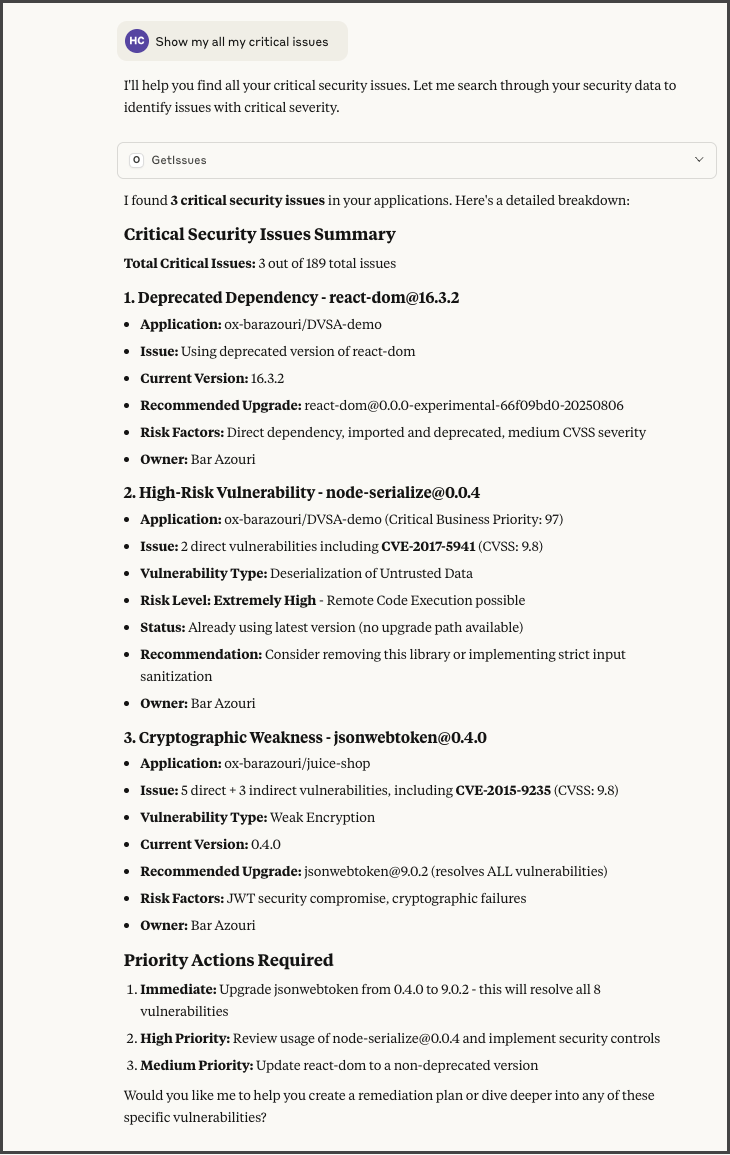
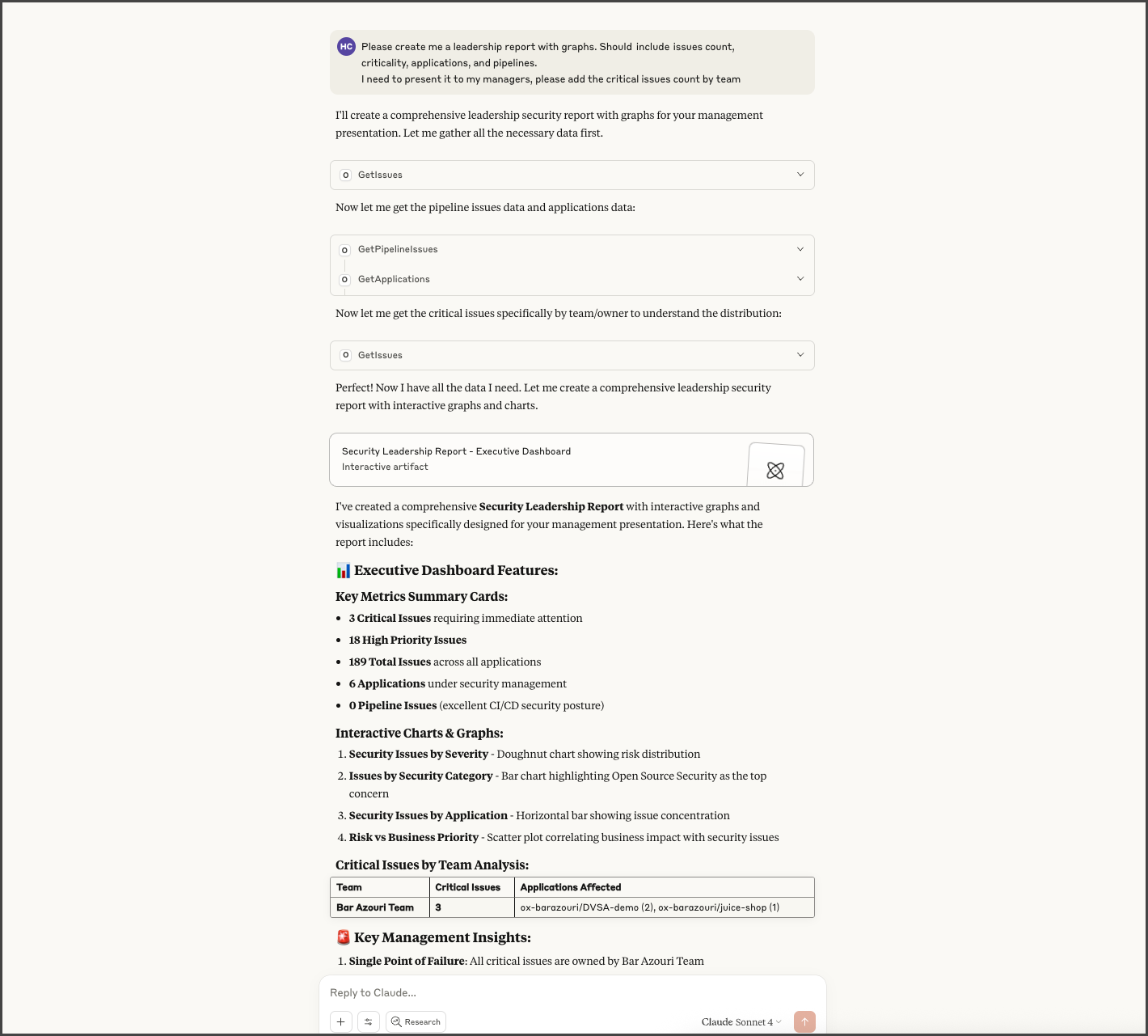
When MCP is connected to OX, AI agents can assist with a wide range of queries and operations:
### Show all my critical issues
### Generate a leadership report
### More examples
| Use Case | Example Prompt | Agent Action (via MCP) |
| ------------------------------------- | ------------------------------------------------------------ | ------------------------------------------------------------------------------------- |
| **Query Top Issues** | "What are the top 10 critical issues in my OX organization?" | Runs `GetIssues` and returns a severity-sorted list of the top issues. |
| **Summarize Vulnerabilities by Team** | "How many issues are assigned to each team lead?" | Queries ownership metadata and returns a breakdown by team lead. |
| **Contextual Recommendations** | "Should I fix this issue or mark it as excluded?" | Retrieves issue details (e.g., via `GetIssueDetails`) and recommends the next action. |
---
# Agent Instructions
This documentation is published with GitBook. GitBook is the documentation platform designed so that both humans and AI agents can read, navigate, and reason over technical content effectively. Learn more at gitbook.com.
## Querying This Documentation
If you need additional information that is not directly available in this page, you can query the documentation by asking a question.
Perform an HTTP GET request on the following URL with the `ask` and `goal` query parameters:
```
GET https://docs.ox.security/api-documentation/api-reference/model-context-protocol.md?ask=&goal=
```
`ask` is the immediate question: it should be specific, self-contained, and written in natural language.
`goal` is what the user is ultimately trying to achieve, the reason they need the answer. Sharing it helps GitBook give you a better, more relevant answer. A goal is most helpful when it describes the outcome the user wants rather than restating the question. For example, with `ask=how do I create an API token`, a goal like `automate deployments from our CI pipeline` lets GitBook tailor the answer to that use case.
The response will contain a direct answer to the question and relevant excerpts and sources from the documentation.
Use this mechanism when the answer is not explicitly present in the current page, you need clarification or additional context, or you want to retrieve related documentation sections.