Code Security Policies

Code Security policies identify security vulnerabilities or flaws in your source code early in the CI:CD and before runtime. Addressing these issues can prevent security breaches, data leaks, and system compromises. OX evaluates source code using static analysis and pattern detection (SAST).

The article describes the policies in this category, configuration options, and the impact of policy violations. For an overview of policies and policy management, see the Policies article.

View and manage Code Security policies

Open each policy to view the business impact and optional settings.

SAST issue

Purpose: Analyzes application source code using static analysis to identify security vulnerabilities and insecure coding patterns.

Business impact: SAST findings indicate security vulnerabilities in your source code that attackers may exploit. Addressing these issues early prevents data exposure, unauthorized access, and costly remediation later in the development cycle.

Setting
Description
Default

ON/OFF (toggle)

Enable/disable the policy.

ON

Show issues of severity (dropdown)

Limits which severities appear as issues.

All (including Info)

Ignore Application Business Priority for severity calculation (checkbox)

When enabled, severity is not adjusted based on application priority.

OFF

Unapproved SaaS in code

Purpose: Detects references in application code to SaaS services or APIs that are not approved for use by the organization.

Business impact: SAST findings indicate security vulnerabilities in your source code that attackers may exploit. Addressing these issues early prevents data exposure, unauthorized access, and costly remediation later in the development cycle.

Setting
Description
Default

ON/OFF (toggle)

Enable/disable the policy.

OFF

Show issues of severity (dropdown)

Limits which severities appear as issues.

All (including Info)

Category (checkboxes)

This policy enables organizations to:

  • Define which SaaS categories are unapproved

  • Establish a list of approved services

  • Configure the severity level for violations

Select SaaS categories to monitor:

Database, Ticketing, Messaging, Logging, Development Tool, Marketing, AI, CRM, Monitoring, Cloud, Email Service, Fintech, IaC, Data Service, Auth, Social Media, Ecommerce, File Hosting, Data Analytics

OFF

Ignore Application Business Priority for severity calculation (checkbox)

When enabled, severity is not adjusted based on application priority.

OFF

Worked example

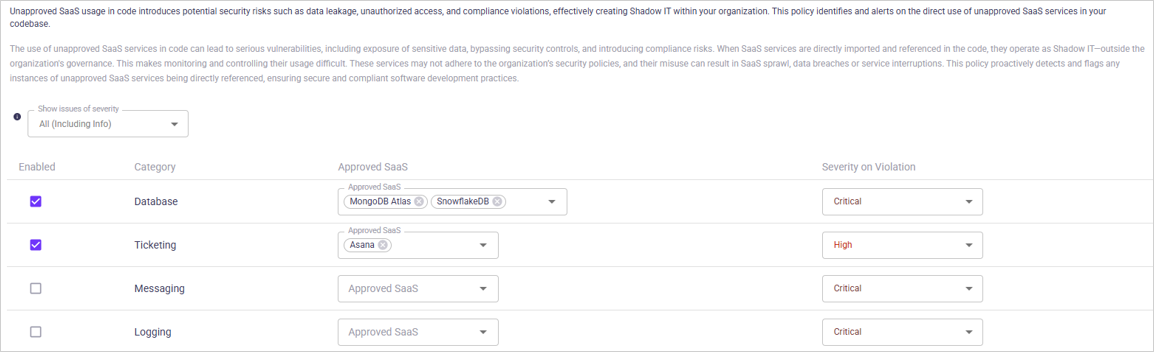
The image below shows a policy configuration where the Database and Ticketing SaaS categories are set as unapproved. Within these categories, MongoDB Atlas, SnowflakeDB, and Asana are marked as approved services.

Use of other database services triggers a critical severity issue, while use of other ticketing services triggers a high severity issue.

Code Smell issue

Purpose: Identifies poor or inefficient coding patterns that may affect code quality, maintainability, or long-term reliability.

Business impact: Code smells indicate poor coding practices that increase technical debt, reduce maintainability, and slow development. They can lead to performance issues, hidden bugs, and costly refactoring as the system grows. Over time, unmanaged code smells reduce productivity and create instability in applications.

Setting
Description
Default

ON/OFF (toggle)

Enable/disable the policy.

ON

Show issues of severity (dropdown)

Limits which severities appear as issues.

All (including Info)

Always set to Info severity (checkbox)

Forces all code smell findings to be created as Info severity only.

OFF

Ignore Application Business Priority for severity calculation (checkbox)

When enabled, severity is not adjusted based on application priority.

OFF

  1. Open the Active Issues page.

  2. Use the Category filter and select the policy category to view related active issues.

  3. Use the Policy filter to narrow the list to a specific policy.

  4. Apply the Category and Policy filters separately or together, depending on how specific you want the results to be.

  5. Use the search box to refine results, such as filtering by file name, keyword, or rule identifier.

You can also view code-related issues on the Application page, where the Issues tab shows findings linked to that application.

When you change a policy’s severity, ON/OFF toggle or any other setting, you must save the current profile or create a new one.

  • To save the current profile, click SAVE in the page header.

  • To create a new profile, click SAVE AS in the page header. For instructions, see the section Create or edit policy profiles in the Policies article.

Last updated