| Category | Policy | Description |
|---|---|---|
| License | Unapproved license detected by 3rd party security app | Detects components identified by an integrated third-party security tool as using licenses that are not approved by your organization. |
| License | Unapproved license used by direct dependency in code | Checks direct dependencies in the codebase for licenses that are not approved by your organization. |
| License | Unapproved license used by indirect dependency in code | Checks indirect (transitive) dependencies for licenses that are not approved by your organization. |
| License | Unapproved license used in forked open source | Checks forked open-source projects for licenses that are not approved by your organization. |
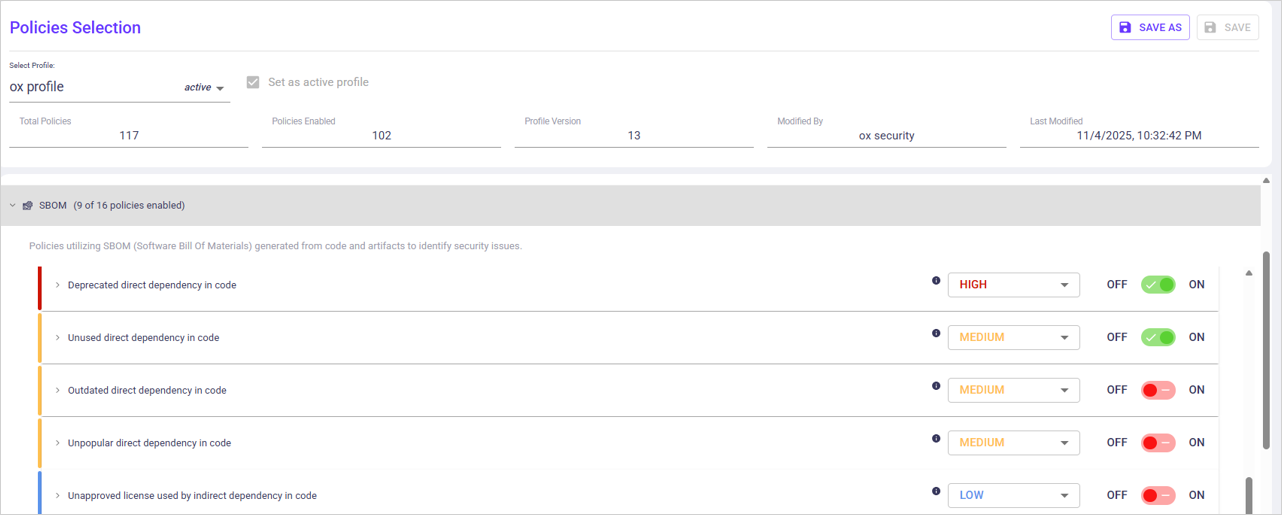
| Maintenance | Deprecated direct dependency in code | Identifies direct dependencies in the codebase that are marked as deprecated by their maintainers. |
| Maintenance | Deprecated indirect dependency in code | Identifies indirect dependencies that are marked as deprecated by their maintainers. |
| Maintenance | Outdated direct dependency in code | Detects direct dependencies that do not use the latest available versions. |
| Maintenance | Outdated indirect dependency in code | Detects indirect dependencies that do not use the latest available versions. |
| Maintenance | Unpopular direct dependency in code | Identifies direct dependencies with low adoption or usage signals in the ecosystem. |
| Maintenance | Unpopular indirect dependency in code | Identifies indirect dependencies with low adoption or usage signals in the ecosystem. |
| Maintenance | Unused direct dependency in code | Detects direct dependencies that are declared but not referenced in the codebase. |
| Maintenance | Missing lock file in code | Identifies repositories that declare dependencies without a corresponding lock file. Without a lock file, OX cannot determine exact dependency versions, reducing the accuracy of vulnerability detection. |
| Malware | Dependency confusion: organization scope in code | Detects dependency confusion risks where public packages may override organization-scoped packages. |
| Malware | Dependency confusion: private package in code | Detects dependency confusion risks involving private packages that may be shadowed by public packages. |
| Malware | Malicious dependency in code | Identifies dependencies that are known or suspected to contain malicious code. |
| Malware | Typosquatting dependency in code | Detects dependencies with names that closely resemble popular packages and may indicate typosquatting. |
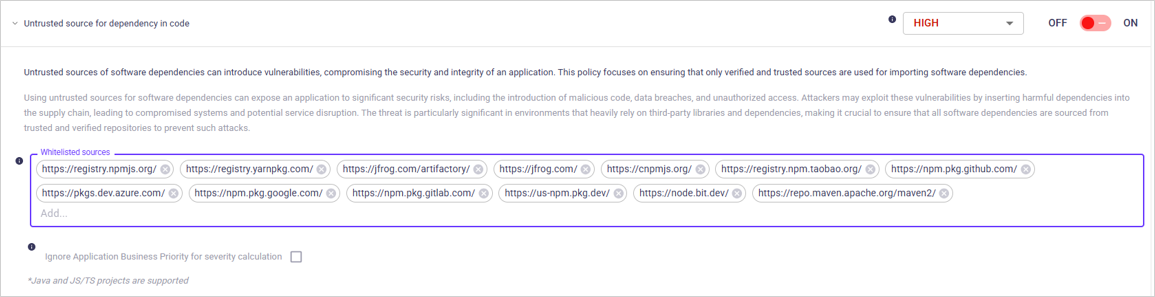
| Malware | Untrusted source for dependency in code | Identifies dependencies that are downloaded from sources not approved or trusted by your organization. |

| Setting | Description | Default |
|---|---|---|
| ON/OFF (toggle) | Enable/disable the policy. | ON |
| Show issues of severity (dropdown) | Limits which severities appear as issues. | OX severity setting |
| Ignore Application Business Priority for severity calculation (checkbox) | When enabled, severity is not adjusted based on application priority. | OFF |

| Setting | Description | Default |
|---|---|---|
| ON/OFF (toggle) | Enable/disable the policy. | OFF |
| Show issues of severity (dropdown) | Limits which severities appear as issues. | OX severity setting |
| Ignore Application Business Priority for severity calculation (checkbox) | When enabled, severity is not adjusted based on application priority. | OFF |

| Setting | Description | Default |
|---|---|---|
| ON/OFF (toggle) | Enable/disable the policy. | OFF |
| Show issues of severity (dropdown) | Limits which severities appear as issues. | OX severity setting |
| Compare (dropdown) | Major version: When selected there is no violation if the latest version of a library is just a minor version change. | Current setting |
| Major version draft | A violation occurs only if the difference between the latest major version and the deployed major version is greater than or equal to the drift. | Current setting |
| Days since update | Days that a library that has a newer version can remain without being updated. | Calculation |
| Ignore Application Business Priority for severity calculation (checkbox) | When enabled, severity is not adjusted based on application priority. | OFF |

| Setting | Description | Default |
|---|---|---|
| ON/OFF (toggle) | Enable/disable the policy. | OFF |
| Show issues of severity (dropdown) | Limits which severities appear as issues. | OX severity setting |
| Compare (dropdown) | Major version: When selected there is no violation if the latest version of a library is just a minor version change. | Current setting |
| Major version draft | A violation occurs only if the difference between the latest major version and the deployed major version is greater than or equal to the drift. | Current setting |
| Days since update | Days that a library that has a newer version can remain without being updated. | Calculation |
| Ignore Application Business Priority for severity calculation (checkbox) | When enabled, severity is not adjusted based on application priority. | OFF |

| Setting | Description | Default |
|---|---|---|
| ON/OFF (toggle) | Enable/disable the policy. | OFF |
| Show issues of severity (dropdown) | Limits which severities appear as issues. | OX severity setting |
| Stars count | Minimum number of stars. A violation occurs only when all arguments (forks, stars, downloads if available) are violated. | Current setting |
| Downloads count | Minimum number of downloads. A violation occurs only when all arguments (forks, stars, downloads if available) are violated. | Current setting |
| Forks count | The minimum number of forks. A violation occurs only when all arguments (forks, stars, downloads if available) are violated. | Current setting |
| Ignore Application Business Priority for severity calculation (checkbox) | When enabled, severity is not adjusted based on application priority. | OFF |

| Setting | Description | Default |
|---|---|---|
| ON/OFF (toggle) | Enable/disable the policy. | OFF |
| Show issues of severity (dropdown) | Limits which severities appear as issues. | OX severity setting |
| Stars count | Minimum number of stars. A violation occurs only when all arguments (forks, stars, downloads if available) are violated. | Current setting |
| Downloads count | Minimum number of downloads. A violation occurs only when all arguments (forks, stars, downloads if available) are violated. | Current setting |
| Forks count | The minimum number of forks. A violation occurs only when all arguments (forks, stars, downloads if available) are violated. | Current setting |
| Ignore Application Business Priority for severity calculation (checkbox) | When enabled, severity is not adjusted based on application priority. | OFF |

| Setting | Description | Default |
|---|---|---|
| ON/OFF (toggle) | Enable/disable the policy. | ON |
| Show issues of severity (dropdown) | Limits which severities appear as issues. | OX severity setting |
| Ignore Application Business Priority for severity calculation (checkbox) | When enabled, severity is not adjusted based on application priority. | OFF |



| Setting | Description | Default |
|---|---|---|
| ON/OFF (toggle) | Enable/disable the policy. | ON |
| Show issues of severity (dropdown) | Limits which severities appear as issues. | OX severity setting |
| Ignore internal package scopes | Add package names | Current setting |
| Ignore Application Business Priority for severity calculation (checkbox) | When enabled, severity is not adjusted based on application priority. | OFF |

| Setting | Description | Default |
|---|---|---|
| ON/OFF (toggle) | Enable/disable the policy. | ON |
| Show issues of severity (dropdown) | Limits which severities appear as issues. | OX severity setting |
| Ignore Application Business Priority for severity calculation (checkbox) | When enabled, severity is not adjusted based on application priority. | ON |