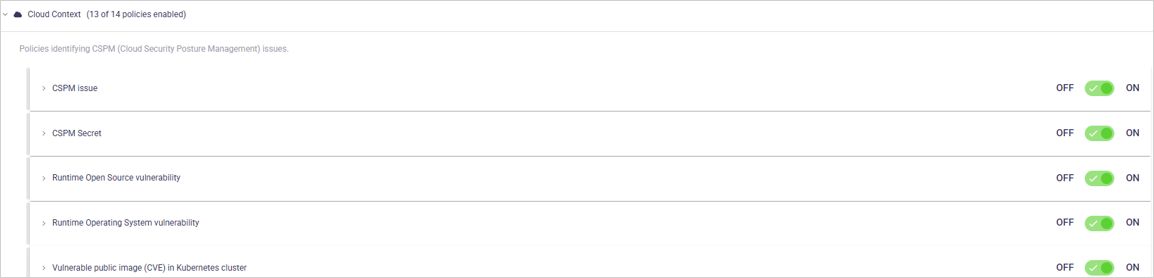
| Policy (A-Z) | GitHub | GitLab | Azure Repos | Bitbucket Cloud |
|---|---|---|---|---|
| Bot user is a repo admin | ✓ | ✓ | ✓ | ✓ |
| Bot user is an org owner | ✓ | ✓ | ✓ | ✓ |
| Branch protection not enforced | ✓ | ✓ | ✓ | ✓ |
| Branch protection code review can be ignored by developer | ✓ | ✓ | ✓ | ✓ |
| Branch protection code review can be ignored by outside collaborator | ✓ | ✓ | ✓ | ✓ |
| Branch protection push restriction can be ignored by developer | ✓ | ✓ | ✓ | ✓ |
| Branch protection push restriction can be ignored by outside collaborator | ✓ | ✓ | ✓ | ✓ |
| Branch protection allows unsigned commits | ✓ | ✓ | ✓ | ✓ |
| CODEOWNERS file missing in repo | ✓ | ✓ | — | ✓ |
| External user has access to repo | ✓ | ✓ | ✓ | ✓ |
| Missing 2FA in organization | ✓ | ✓ | ✓ | ✓ |
| Outside collaborator not using 2FA | ✓ | ✓ | ✓ | ✓ |
| Protected branch can be deleted by a non-admin | ✓ | ✓ | ✓ | ✓ |
| Repo admin with no admin activity | ✓ | ✓ | ✓ | ✓ |
| Org owner with no admin activity | ✓ | ✓ | ✓ | ✓ |
| Single owner in org | ✓ | ✓ | ✓ | ✓ |
| Too many org owners | ✓ | ✓ | ✓ | ✓ |
| Too many repo admins | ✓ | ✓ | ✓ | ✓ |
| Developer did not write code in repo | ✓ | ✓ | ✓ | ✓ |
| Outside collaborator is a repo admin | ✓ | ✓ | ✓ | ✓ |
| Outside collaborator is repo maintainer | ✓ | ✓ | ✓ | ✓ |
| Outside collaborator with no activity | ✓ | ✓ | ✓ | ✓ |
| Unreviewed code change | ✓ | ✓ | ✓ | ✓ |
| Veteran developer review required | ✓ | ✓ | ✓ | ✓ |
| Security Policy file missing in repo | ✓ | ✓ | — | ✓ |
| Repo wiki publicly available | ✓ | ✓ | — | ✓ |
| Personal public repo detected | ✓ | ✓ | — | ✓ |
| Public repo detected | ✓ | ✓ | — | ✓ |
| Private personal repo fork detected | ✓ | ✓ | — | ✓ |
| Private repo forking is enabled | ✓ | ✓ | — | ✓ |
| Unarchived stale repo | ✓ | ✓ | ✓ | ✓ |

| Setting | Description | Default |
|---|---|---|
| ON/OFF (toggle) | Enable/disable the policy. | ON |
| Ignore Application Business Priority for severity calculation (checkbox) | When enabled, severity is not adjusted based on application priority. | OFF |
| Bot Identification Settings | Strings used to identify bots in your organization. Click to add strings. | Current setting |
| Ignore if admin activity seen (toggle) | Ignores all bots that have known admin activity. The setting is ignored if Audit Log permissions are not available. | ON |
| Ignore if a user is admin in multiple repos | This will ignore all bots that are admins of more than the selected number of repos | Current setting |
| Audit log access | Grant Ox access to your source control platform's audit logs. This enables the detection of admin activity across all repositories. The access is required for Ox to accurately evaluate policies related to administrative functions. | Required |

| Setting | Description | Default |
|---|---|---|
| ON/OFF (toggle) | Enable/disable the policy. | ON |
| Ignore Application Business Priority for severity calculation (checkbox) | When enabled, severity is not adjusted based on application priority. | OFF |
| Bot Identification Settings | Strings used to identify bots in your organization. Click to add strings. | Current setting |

| Setting | Description | Default |
|---|---|---|
| ON/OFF (toggle) | Enable/disable the policy. | ON |
| Repo Visibility (dropdown) | Determines if this policy applies to public repos, private repos or both. | Current setting |
| Ignore Business Priority Less Than | Ignore repos with Business Priority less than the number entered. | Current setting |
| Ignore Application Business Priority for severity calculation (checkbox) | When enabled, severity is not adjusted based on application priority. | OFF |

| Setting | Description | Default |
|---|---|---|
| ON/OFF (toggle) | Enable/disable the policy. | ON |
| Repo Visibility (dropdown) | Choose if the policy applies to private, public or all repo types. | Current setting |
| Ignore Business Priority Less Than | Ignore repos with Business Priority less than the number entered. | Current setting |
| Choose an Available Fix for a Violation | Pick between the options of available fixes for violation. | Current setting |
| Ignore Application Business Priority for severity calculation (checkbox) | When enabled, severity is not adjusted based on application priority. | OFF |

| Setting | Description | Default |
|---|---|---|
| ON/OFF (toggle) | Enable/disable the policy. | ON |
| Repo Visibility (dropdown) | Choose if the policy applies to private, public or all repo types. | Current setting |
| Ignore Business Priority Less Than | Ignore repos with Business Priority less than the number entered. | Current setting |
| Choose an Available Fix for a Violation | Pick between the options of available fixes for violation. | Current setting |
| Ignore Application Business Priority for severity calculation (checkbox) | When enabled, severity is not adjusted based on application priority. | OFF |

| Setting | Description | Default |
|---|---|---|
| ON/OFF (toggle) | Enable/disable the policy. | ON |
| Repo Visibility (dropdown) | Choose if the policy applies to private, public or all repo types. | Current setting |
| Ignore Business Priority Less Than | Ignore repos with Business Priority less than the number entered. | Current setting |
| Ignore Application Business Priority for severity calculation (checkbox) | When enabled, severity is not adjusted based on application priority. | OFF |
| Choose developers that can bypass branch code | Type in usernames of restricted developers that can bypass branch code reviews. Click to add. | Current setting |
| Setting | Description | Default |
|---|---|---|
| ON/OFF (toggle) | Enable/disable the policy. | ON |
| Repo Visibility | Determines if this policy applies to public repos, private repos or both. | Current setting |
| Ignore Business Priority Less Than | Ignore repos with Business Priority less than the number entered. | Current setting |
| Ignore Application Business Priority for severity calculation (checkbox) | When enabled, severity is not adjusted based on application priority. | OFF |
| Setting | Description | Default |
|---|---|---|
| ON/OFF (toggle) | Enable/disable the policy. | ON |
| Repo Visibility | Determines if this policy applies to public repos, private repos or both. | Current setting |
| Ignore Business Priority Less Than | Ignore repos with Business Priority less than the number entered. | Current setting |
| Ignore Application Business Priority for severity calculation (checkbox) | When enabled, severity is not adjusted based on application priority. | OFF |
| Setting | Description | Default |
|---|---|---|
| ON/OFF (toggle) | Enable/disable the policy. | ON |
| Months Since Change | Choose a minimum number of months before a violation could occur | Current setting |
| Repo Type (dropdown) | Choose if the policy applies to private, public or all repo types. | Current setting |
| Ignore Application Business Priority for severity calculation (checkbox) | When enabled, severity is not adjusted based on application priority. | OFF |

| Setting | Description | Default |
|---|---|---|
| ON/OFF (toggle) | Enable/disable the policy. | ON |
| Repo types applied by the policy (dropdown) | Choose if the policy applies to private, public, or all repo types | Current setting |
| Ignore Application Business Priority for severity calculation (checkbox) | When enabled, severity is not adjusted based on application priority. | OFF |
| Branch Protection (Required Reviews) (checkbox) | Determine if the policy applies only to repos with branch protection turned on | ON |

| Setting | Description | Default |
|---|---|---|
| ON/OFF (toggle) | Enable/disable the policy. | ON |
| Ignore Application Business Priority for severity calculation (checkbox) | When enabled, severity is not adjusted based on application priority. | OFF |

| Setting | Description | Default |
|---|---|---|
| ON/OFF (toggle) | Enable/disable the policy. | OFF |
| Email Domains (Suffix) | Choose the email domains that should have access to the build systems. Click to add. | Current setting |
| Repo Type (dropdown) | Choose if the policy applies to private, public or all repo types. | Current setting |
| Ignore Application Business Priority for severity calculation (checkbox) | When enabled, severity is not adjusted based on application priority. | OFF |

| Setting | Description | Default |
|---|---|---|
| ON/OFF (toggle) | Enable/disable the policy. | ON |
| Ignore Application Business Priority for severity calculation (checkbox) | When enabled, severity is not adjusted based on application priority. | OFF |

| Setting | Description | Default |
|---|---|---|
| ON/OFF (toggle) | Enable/disable the policy. | ON |
| Repo Visibility (dropdown) | Determines if this policy applies to public repos, private repos or both. | Current setting |
| License File Name | License File names to search for.
| Current setting |
| Ignore Application Business Priority for severity calculation (checkbox) | When enabled, severity is not adjusted based on application priority. | OFF |

| Setting | Description | Default |
|---|---|---|
| ON/OFF (toggle) | Enable/disable the policy. | ON |
| Enforce for (dropdown) | Choose what type of users the policy will apply to: Admin, Member, Admin or Member. | Current setting |
| Ignore Application Business Priority for severity calculation (checkbox) | When enabled, severity is not adjusted based on application priority. | OFF |

| Setting | Description | Default |
|---|---|---|
| ON/OFF (toggle) | Enable/disable the policy. | ON |
| Months Since Activity | Choose how many months since the last activity will trigger a violation. | Current setting |
| Ignore Application Business Priority for severity calculation (checkbox) | When enabled, severity is not adjusted based on application priority. | OFF |
| Audit log access | Grant Ox access to your source control platform's audit logs. This enables the detection of admin activity across all repositories. The access is required for Ox to accurately evaluate policies related to administrative functions. | Required |

| Setting | Description | Default |
|---|---|---|
| ON/OFF (toggle) | Enable/disable the policy. | ON |
| Ignore Application Business Priority for severity calculation (checkbox) | When enabled, severity is not adjusted based on application priority. | ON |

| Setting | Description | Default |
|---|---|---|
| ON/OFF (toggle) | Enable/disable the policy. | ON |
| Ignore Application Business Priority for severity calculation (checkbox) | When enabled, severity is not adjusted based on application priority. | OFF |

| Setting | Description | Default |
|---|---|---|
| ON/OFF (toggle) | Enable/disable the policy. | ON |
| Ignore Application Business Priority for severity calculation (checkbox) | When enabled, severity is not adjusted based on application priority. | OFF |

| Setting | Description | Default |
|---|---|---|
| ON/OFF (toggle) | Enable/disable the policy. | ON |
| Months Since Activity | Choose how many months since the last activity will trigger a violation. | Current setting |
| Ignore Application Business Priority for severity calculation (checkbox) | When enabled, severity is not adjusted based on application priority. | OFF |

| Setting | Description | Default |
|---|---|---|
| ON/OFF (toggle) | Enable/disable the policy. | ON |
| Ignore User Repos Older Than (Months) | Ignores mentioning repos older than X Months. | Current setting |
| Users to report on | Determines the organization users to report on. Click to add. | Current setting |
| Monitor Time for Former Members (Months) | Stops evaluating former members who left the company after the selected months ago. | Current setting |
| Include Forked Public Repos (checkbox) | If the repo is forked (from another public repo by definition), then it is unlikely to contain proprietary data. | ON |
| Ignore Application Business Priority for severity calculation (checkbox) | When enabled, severity is not adjusted based on application priority. | OFF |

| Setting | Description | Default |
|---|---|---|
| ON/OFF (toggle) | Enable/disable the policy. | ON |
| Ignore User Repos Older Than (Months) | Ignores mentioning repos older than X Months. | Current setting |
| Users to report on | Determines the organization users to report on. Click to add. | Current setting |
| Monitor Time for Former Members (Months) | Stops evaluating former members who left the company after the selected months ago | Current setting |
| Ignore Application Business Priority for severity calculation (checkbox) | When enabled, severity is not adjusted based on application priority. | OFF |

| Setting | Description | Default |
|---|---|---|
| ON/OFF (toggle) | Enable/disable the policy. | ON |
| Ignore Application Business Priority for severity calculation (checkbox) | When enabled, severity is not adjusted based on application priority. | OFF |
| Ignore Business Priority Less Than | Ignore repos with Business Priority less than the number entered. | Current setting |

| Setting | Description | Default |
|---|---|---|
| ON/OFF (toggle) | Enable/disable the policy. | ON |
| Repo Visibility (dropdown) | Determines if this policy applies to public repos, private repos or both. | Current setting |
| Ignore Business Priority Less Than | Ignore repos with Business Priority less than the number entered. | Current setting |
| Ignore Application Business Priority for severity calculation (checkbox) | When enabled, severity is not adjusted based on application priority. | OFF |
| Setting | Description | Default |
|---|---|---|
| ON/OFF (toggle) | Enable/disable the policy. | ON |
| Ignore User Repos Older Than (Months) | Ignores mentioning repos older than X Months. | Current setting |
| Users to report on | Determines the organization users to report on. Click to add. | Current setting |
| Monitor Time for Former Members (Months) | Stops evaluating former members who left the company after the selected months ago | Current setting |
| Include Forked Public Repos | If the repo is forked (from another public repo by definition), then it is unlikely to contain proprietary data. | ON |
| Ignore Application Business Priority for severity calculation (checkbox) | When enabled, severity is not adjusted based on application priority. | OFF |

| Setting | Description | Default |
|---|---|---|
| ON/OFF (toggle) | Enable/disable the policy. | ON |
| Months Since Activity | Choose how many months since the last activity will trigger a violation. | Current setting |
| Ignore Application Business Priority for severity calculation (checkbox) | When enabled, severity is not adjusted based on application priority. | OFF |

| Setting | Description | Default |
|---|---|---|
| ON/OFF (toggle) | Enable/disable the policy. | ON |
| Repo Visibility (dropdown) | Determines if this policy applies to public repos, private repos or both. | Current setting |
| Ignore Application Business Priority for severity calculation (checkbox) | When enabled, severity is not adjusted based on application priority. | OFF |

| Setting | Description | Default |
|---|---|---|
| ON/OFF (toggle) | Enable/disable the policy. | ON |
| Min Users | No issue will be created if the number of users in the org or group is less than or equal to the entered value. | Current setting |
| Ignore Application Business Priority for severity calculation (checkbox) | When enabled, severity is not adjusted based on application priority. | OFF |

| Setting | Description | Default |
|---|---|---|
| ON/OFF (toggle) | Enable/disable the policy. | ON |
| Max Admins | Issue will be created if the number of admins is bigger than the entered value. | Current setting |
| Max Admin Percent | Issue will be created if the percentage of admins is bigger than the entered value. | Current setting |
| Ignore Application Business Priority for severity calculation (checkbox) | When enabled, severity is not adjusted based on application priority. | OFF |

| Setting | Description | Default |
|---|---|---|
| ON/OFF (toggle) | Enable/disable the policy. | ON |
| Max Admins | Issue will be created if the number of admins is bigger than the entered value. | Current setting |
| Max Admin Percent | Issue will be created if the percentage of admins is bigger than the entered value. | Current setting |
| Ignore Owners | Choose if Org/Group owners who by default are repo admins will be ignored. | ON |
| Ignore Application Business Priority for severity calculation (checkbox) | When enabled, severity is not adjusted based on application priority. | OFF |
| Audit log access | Grant Ox access to your source control platform's audit logs. This enables the detection of admin activity across all repositories. The access is required for Ox to accurately evaluate policies related to administrative functions. | Required |

| Setting | Description | Default |
|---|---|---|
| ON/OFF (toggle) | Enable/disable the policy. | ON |
| Months Since Change | Choose a minimum number of months before a violation could occur | Current setting |
| Repo Type (dropdown) | Choose if the policy applies to private, public or all repo types. | Current setting |
| Ignore Application Business Priority for severity calculation (checkbox) | When enabled, severity is not adjusted based on application priority. | OFF |

| Setting | Description | Default |
|---|---|---|
| ON/OFF (toggle) | Enable/disable the policy. | ON |
| Reviews Required | Please specify the minimum number of reviewers per code push for the policy. | Current setting |
| Files Changed | Specify the minimum number of files changed for the policy. | Current setting |
| Ignore Older Code Changes (Months) | Specify the max number of months to find changes to evaluate | Current setting |
| Ignore File Types | Choose the file types that will not trigger a violation. | Current setting |
| Ignore Business Priority Less Than | Ignore repos with Business Priority less than the number entered. | Current setting |
| Ignore Admins & Owners | An admin will not trigger a violation. | Current setting |
| Dominant Language Percentage Min | A violation will not occur if dominant language percentage is lower than the value entered. | Current setting |
| Ignore Application Business Priority for severity calculation (checkbox) | When enabled, severity is not adjusted based on application priority. | OFF |
| Setting | Description | Default |
|---|---|---|
| ON/OFF (toggle) | Enable/disable the policy. | ON |
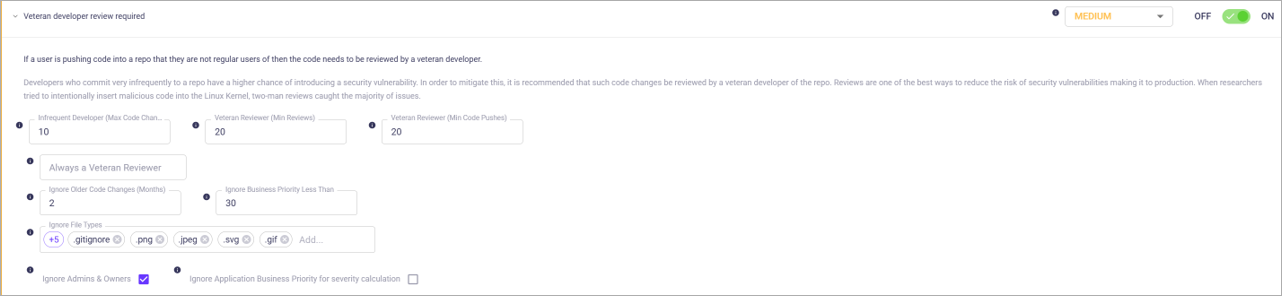
| Infrequent Developer (Max Code Changes) | Please specify the number of pushes or pull requests that define an infrequent developer (less than). | Current setting |
| Veteran Reviewer (Min Reviews) | Specify the number of reviews that define a veteran reviewer (greater than or equal to). | Current setting |
| Veteran Reviewer (Min Code Pushes) | Specify the number of pushes that define a veteran reviewer (greater than or equal to). | Current setting |
| Always a Veteran Reviewr | Users by name who will always be considered as veteran reviewers in the system. Click to add. | Current setting |
| Ignore Older Code Changes (Months) | Specify the max number of months to find changes to evaluate | Current setting |
| Ignore Business Priority Less Than | Ignore repos with Business Priority less than the number entered. | Current setting |
| Ignore File Types | Click to add. | Current setting |
| Ignore Admins & Owners | An admin will not trigger a violation. | Current setting |
| Ignore Application Business Priority for severity calculation (checkbox) | When enabled, severity is not adjusted based on application priority. | OFF |