> For the complete documentation index, see [llms.txt](https://docs.ox.security/llms.txt). Markdown versions of documentation pages are available by appending `.md` to page URLs; this page is available as [Markdown](https://docs.ox.security/automate-with-ox-workflows/creating-a-workflow/workflow-use-cases.md).
# Workflow Examples
The following examples illustrate how workflows can be applied to real-world scenarios.\
Each use case shows the trigger, conditions, and resulting actions.
## Use Case 1: Critical secret exposure in public repo
Secrets in code, such as tokens, passwords, or API keys, can expose your organization to immediate risk.
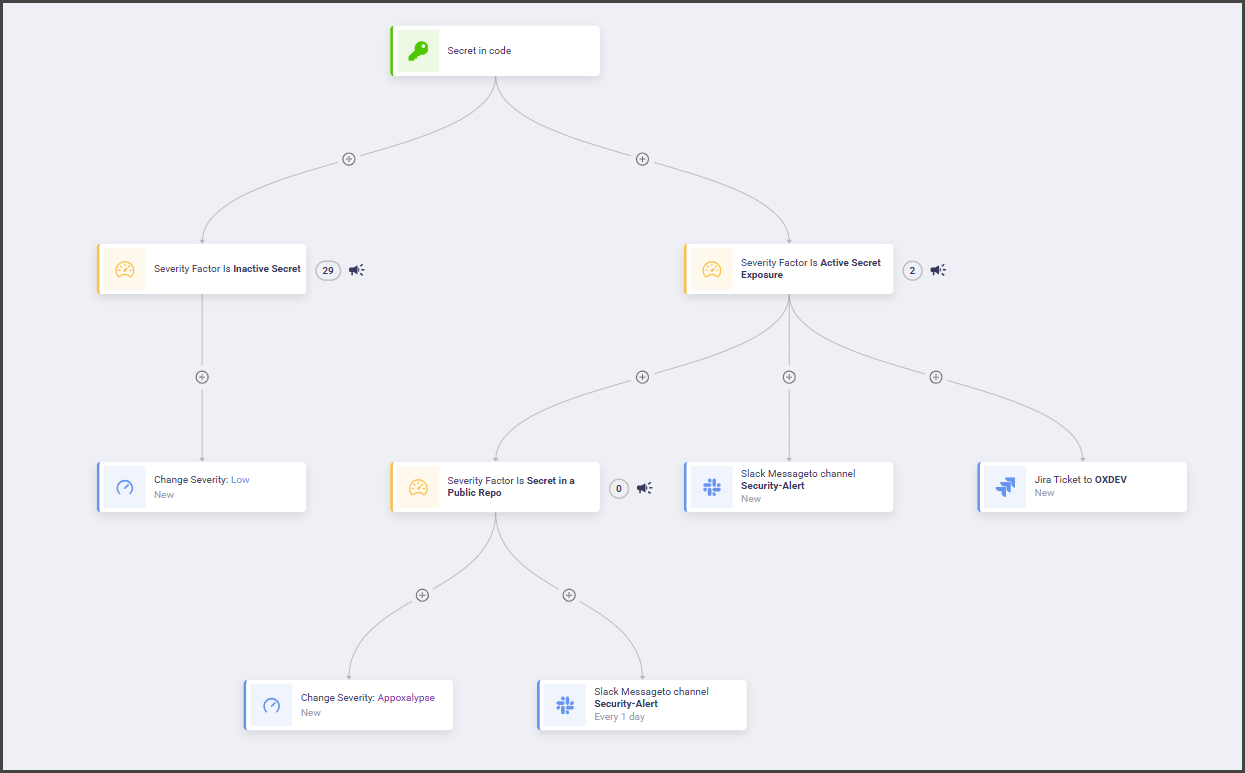
This workflow shows how OX can separate harmless detections from business-critical exposures. Inactive secrets are downgraded and tracked with low severity, while active secrets create alerts and tickets.\
This structure minimizes false alarms while ensuring urgent threats are prioritized immediately.
The workflow in this scenario contains several branching paths. Each node in the workflow builder represents a condition or an action.
* Secret in Code (Trigger)
* Inactive Secret (Condition)
* Active Secret Exposure (Condition)
* Secret in a Public Repo (Condition)
* Change Severity: Low (Action)
* Change Severity: Apocalypse (Action)
* Slack Message: Security-Alert (Action)
* Jira Ticket: OXDEV (Action)
## Use case 2: SLA violation reminder
The SLA Violation Reminder workflow helps teams stay on top of unresolved issues that exceed their defined Service Level Agreement (SLA).\
Instead of leaving overdue issues unnoticed, the workflow automatically escalates them and ensures visibility across communication and ticketing systems.
SLA management is critical in application security because it ties remediation timelines to business risk. This workflow ensures that high-severity issues do not linger without attention. By sending reminders, alerts, and escalations, it keeps security and development teams accountable.
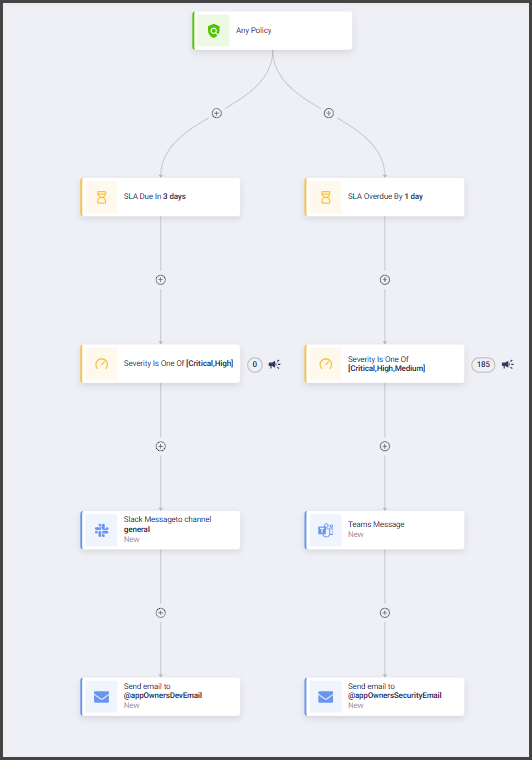
The workflow in this scenario monitors SLA deadlines and automatically takes action when issues are overdue.
* SLA Breach Detected (Trigger)
* High or Critical Severity (Condition)
* Reminder Email to Issue Owner (Action)
* Slack Alert to Issue-Tracking Channel (Action)
* Escalation for Business-Critical Apps (Action)
## Use case 3: Minor pull request change in critical application
This workflow ensures that even small pull requests in critical applications receive appropriate review.\
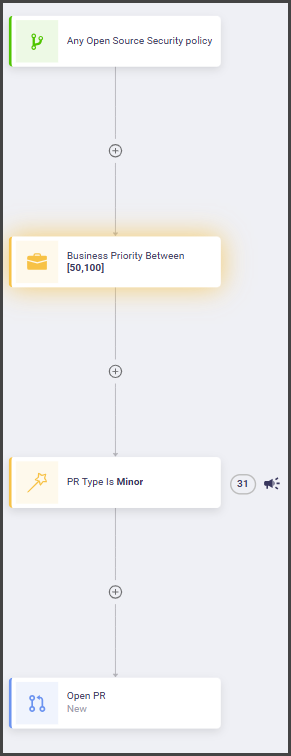
By combining PR metadata with business priority, the workflow routes changes for tracking and validation before they reach production.
* Pull Request Created (Trigger)
* Minor PR Type (Condition)
* Application is Business-Critical (Condition)
* Public Repository (Condition)
* Open PR (Action)
---
# Agent Instructions
This documentation is published with GitBook. GitBook is the documentation platform designed so that both humans and AI agents can read, navigate, and reason over technical content effectively. Learn more at gitbook.com.
## Querying This Documentation
If you need additional information that is not directly available in this page, you can query the documentation by asking a question.
Perform an HTTP GET request on the following URL with the `ask` and `goal` query parameters:
```
GET https://docs.ox.security/automate-with-ox-workflows/creating-a-workflow/workflow-use-cases.md?ask=&goal=
```
`ask` is the immediate question: it should be specific, self-contained, and written in natural language.
`goal` is what the user is ultimately trying to achieve, the reason they need the answer. Sharing it helps GitBook give you a better, more relevant answer. A goal is most helpful when it describes the outcome the user wants rather than restating the question. For example, with `ask=how do I create an API token`, a goal like `automate deployments from our CI pipeline` lets GitBook tailor the answer to that use case.
The response will contain a direct answer to the question and relevant excerpts and sources from the documentation.
Use this mechanism when the answer is not explicitly present in the current page, you need clarification or additional context, or you want to retrieve related documentation sections.