> For the complete documentation index, see [llms.txt](https://docs.ox.security/llms.txt). Markdown versions of documentation pages are available by appending `.md` to page URLs; this page is available as [Markdown](https://docs.ox.security/ox-integrations/3rd-party-integrations/dynamic-app-security.md).
# Dynamic App Security
Dynamic application security testing (DAST) scanners probe running web apps and APIs to find runtime risks, such as SQL injection or cross-site scripting.
OX connects to third-party DAST tools to import their findings, enrich them with OX context, and present everything in one place alongside SAST, SCA, cloud, and infrastructure data.
OX does not run scans in your DAST tool. Each connector reads findings through the vendor’s API, then maps them to your applications and workflows in OX so you can triage, prioritize, and report consistently.
Where you will see DAST data in OX:
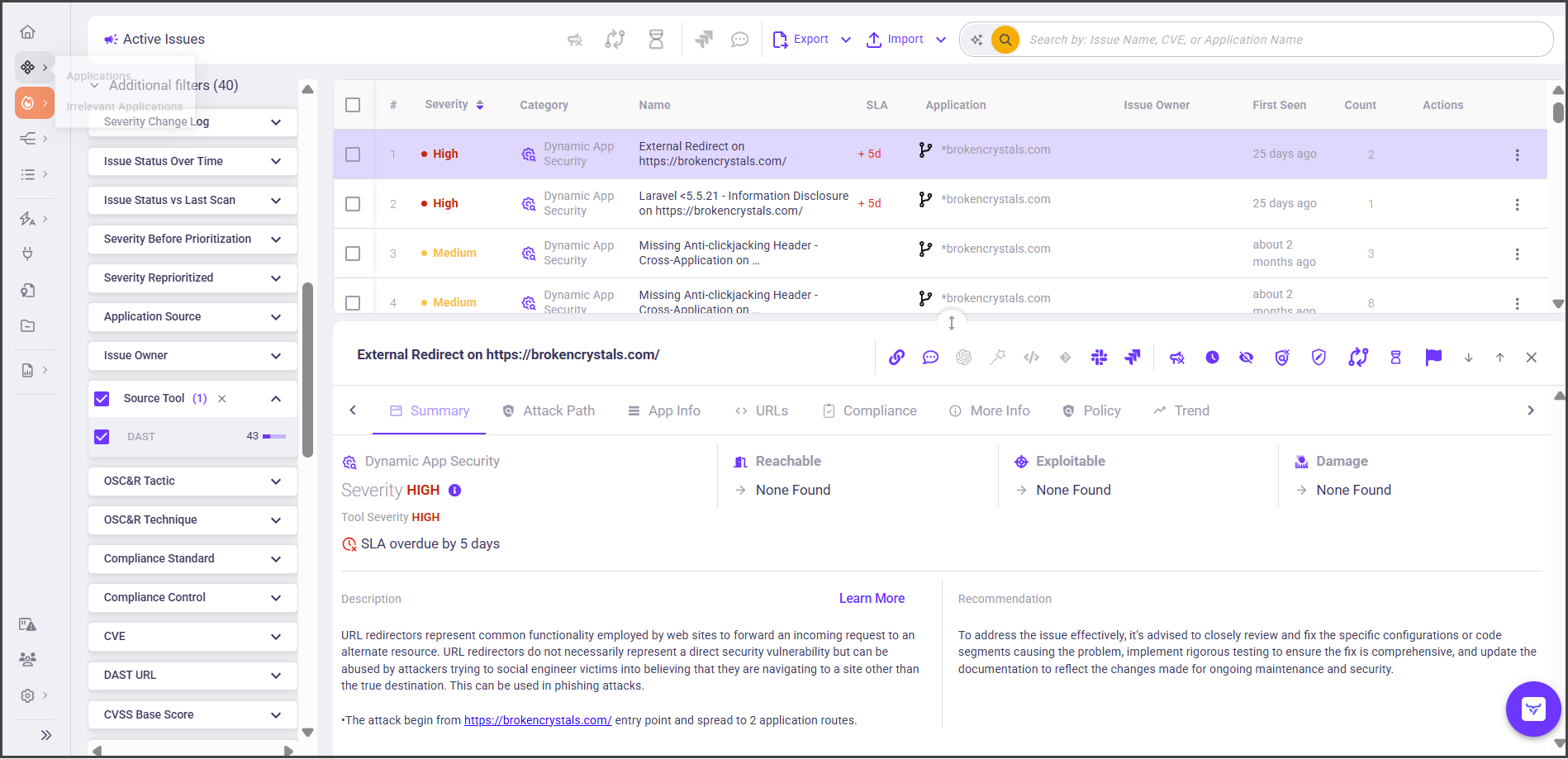
* **Active issues:** Filter by **Source tool** to focus on a specific vendor.
* **Issue details:** Tabs include Summary, URL, Request, Response, Compliance, and CWE, and OX context, such as attack path.
* **Applications:** Imported applications appear in the Applications list and dashboards.
The following DAST connectors are supported:
* [Invicti](/ox-integrations/3rd-party-integrations/dynamic-app-security/invicti.md)
* [Bright Security](/ox-integrations/3rd-party-integrations/dynamic-app-security/bright.md)
* [CyCognito](/ox-integrations/3rd-party-integrations/dynamic-app-security/cycognito.md)
* [Bitsight](/ox-integrations/3rd-party-integrations/dynamic-app-security/bitsight.md)
* [Applause](/ox-integrations/3rd-party-integrations/dynamic-app-security/applause.md)
* [Qualys WAS](/ox-integrations/3rd-party-integrations/dynamic-app-security/qualys-was.md)
## How data from DAST connectors is used by OX
When a DAST connector is active, issues from connectors appear in the Active Issues page, under the DAST Source Tool.
Severity factors in these issues are displayed only for issues that include CVEs. This means that if an issue pulled from the connector has an associated CVE, OX will show its severity level. However, not all DAST issues include CVEs, so severity scoring will only be available for those that do.
This distinction helps users quickly assess which issues are tied to known vulnerabilities and prioritize accordingly, but it also means that some issues may appear without severity factors if they lack a CVE reference.
Each issue includes the following info received from a DAST connector:
* The attacked URL, or a group of URLs; all URLs that triggered this issue appear under the same issue.
* The HTTP request that triggered the issue.
* The HTTP response returned by the application.
* Issue severity as reported by the connector.
* CWE identifiers, if provided.
* Compliance-related tags, if provided.
* Other metadata specific to the connector.
---
# Agent Instructions
This documentation is published with GitBook. GitBook is the documentation platform designed so that both humans and AI agents can read, navigate, and reason over technical content effectively. Learn more at gitbook.com.
## Querying This Documentation
If you need additional information that is not directly available in this page, you can query the documentation dynamically by asking a question.
Perform an HTTP GET request on the current page URL with the `ask` query parameter, and the optional `goal` query parameter:
```
GET https://docs.ox.security/ox-integrations/3rd-party-integrations/dynamic-app-security.md?ask=&goal=
```
`ask` is the immediate question: it should be specific, self-contained, and written in natural language.
`goal` is optional and describes the broader end goal you are ultimately trying to accomplish on behalf of the user. GitBook uses it to tailor the answer towards what is most useful for that goal.
The response will contain a direct answer to the question and relevant excerpts and sources from the documentation.
Use this mechanism when the answer is not explicitly present in the current page, you need clarification or additional context, or you want to retrieve related documentation sections.